240
*
[AS30075(ALL)08/95] 2. Press one of the memory preset buttons and hold the button
until the sound returns. That station is now held in memory
on that button.
*
[AS30080(ALL)08/95] 3. Follow the two steps above for each station memory preset
button you want to set.
*
[AS30085(ALL)08/95]
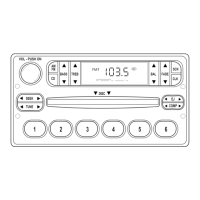
Adjusting the tone balance and speaker output of your
radio
*
[AS30090(ALL)08/95]
■ Increasing or decreasing bass response
*
[AS30095(ALL)03/95]
Press the top (
c
) of the ”BASS“ button to increase bass;
press the bottom (
d
) of the ”BASS“ button to decrease bass.
*
[AS30100(ALL)08/95]
■ Increasing or decreasing treble response
*
[AS30105(ALL)03/95]
Press the top (
c
) of the ”TREBLE“ button to increase treble;
press the bottom (
d
) of the treble button to decrease treble.
*
[AS30110(ALL)08/95]
■ Adjusting speaker balance
*
[AS30115(ALL)03/95]
Balance control allows you to adjust the sound distribution
between the right and left speakers. Press the top (
c
) of the
”BAL“ button to shift the sound to the right speakers, and
press the bottom (
d
) of the ”BAL“ button to shift the sound
to the left speakers.
*
[AS30120(ALL)08/95]
■ Adjusting speaker fader
*
[AS30125(ALL)03/95]
Fade control allows you to adjust the sound distribution
between the front and rear speakers. Press the top (
c
)of
the ”FADE“ button to shift the sound to the front speakers,
and press the bottom (
d
) of the ”FADE“ button to shift the
sound to the back speakers.
*
[AS30130(ALL)06/95]
NOTE: Illuminated bars in the display show relative levels of
bass and treble, and positions of speaker balance and
fader functions (left to right, front to rear).
File:09unasx.ex
Update:Thu Feb 29 09:08:53 1996











 To Next Page