the website, select “Support > Download Center > Software Tools”, then you can find the “Equipment
Search Tool”,the icon shows as below:
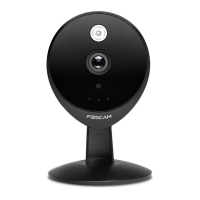
Download the “Equipment Search Tool” to your computer, double click the icon to run, and it should find
the camera’s IP address automatically.
Notes:
If you have multiple cameras and you cannot determine which camera you are going to log in. Please
match the "Device MAC address" on the search tool with the MAC address on the label pasted of each
camera.
10. Double-click the camera list here, and your default browser will open up to the login page. Input the
username and password you has changed. Then, you will see the live video on the interface.


 To Next Page