w
w
www
www
.foscam.
.foscam.
us
us
Foscam Digital Technologies LLC
Telephone: 1-800-930-0949
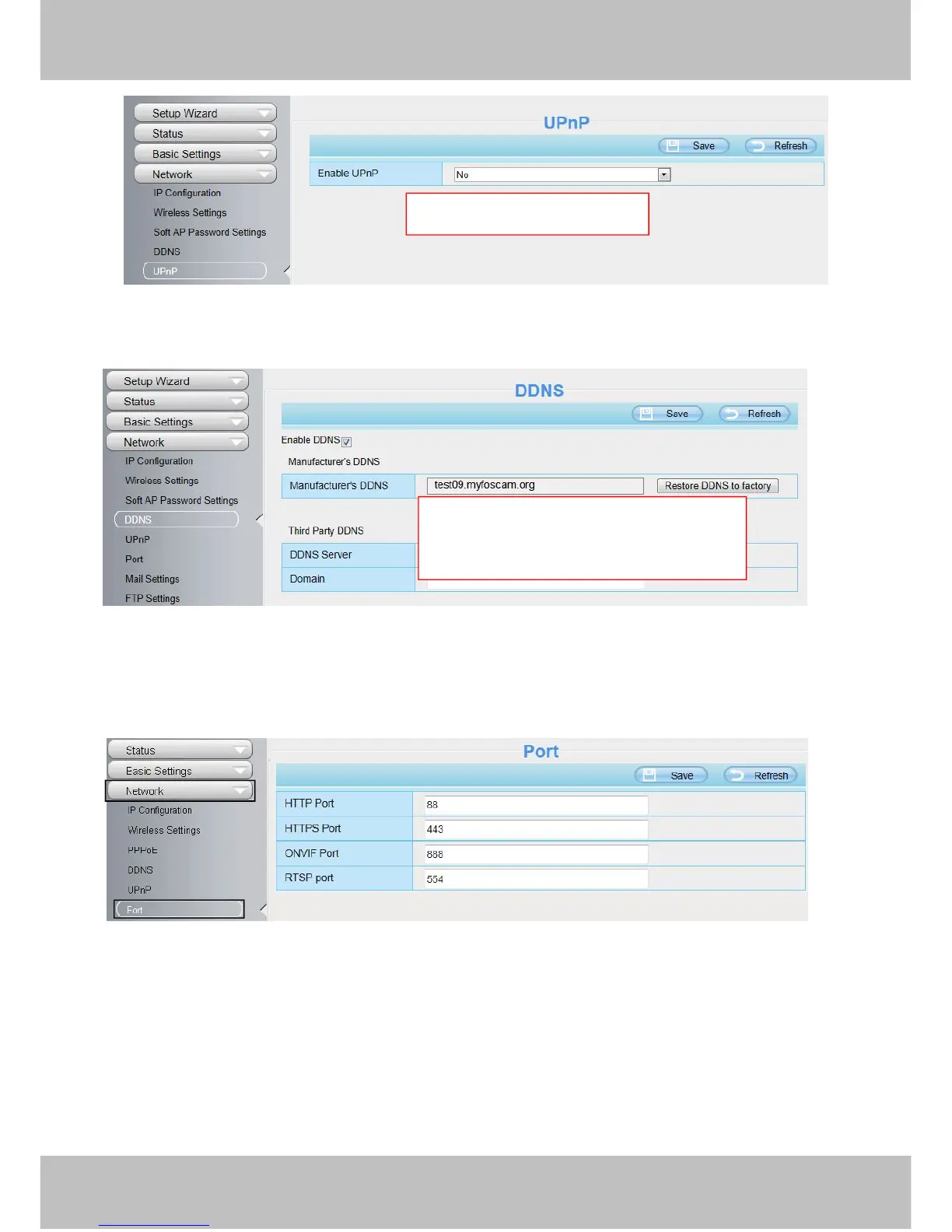
Figure 2.7
Figure 2.8
3. You can see the port of your camera here. If you want to set Remote Access for several cameras on the
same network, you will need to change the HTTPS port for each camera.
Figure 2.9
4. If the UPnP of the router has been enable, you do not need to perform following steps. Otherwise, you
need to select one of the following methods to configure port forwarding on your router. For these steps, we will
be using the TP-LINK brand wireless router as an example.
If there is a UPnP function in your router:
Choose “Forwarding > UPnP”, make sure that the Current UPnP Status is Enabled.
Select Yes and click Save.
Click Enable DDNS and click Save.
The content in the Manufacture’s DDNS
column is the domain name of your camera.



 To Next Page