10/100M adaptive Ethernet interface. Through this interface, IPCAM can be connected with various network
devices, such as hub, router, etc.
2 Power Interface
Connect the external power adapter, request for 12V/1A power.
3 Reset button
Press and hold on the reset button for 5 seconds. Releasing the reset button, the password will back to the
factory default administrator password. The default administrator user is admin with no password.
4 Audio output interface:
The jack is used to plug external output device such as loud speaker directly. Here microphone cannot directly
insert to the interface, it must connect to adapter first.
5 Audio input interface:
The jack is used to plug external input device such as sound pick up device directly. Here microphone cannot
directly insert to the interface, it must connect to adapter first.
Bottom View
There are up to two labels located at the bottom of the camera; this is an important feature of original Foscam
cameras. If your camera does not have labels , it may be a clone. Cloned Foscam cameras can not use
original firmware and are not eligible for warranty or technical services.
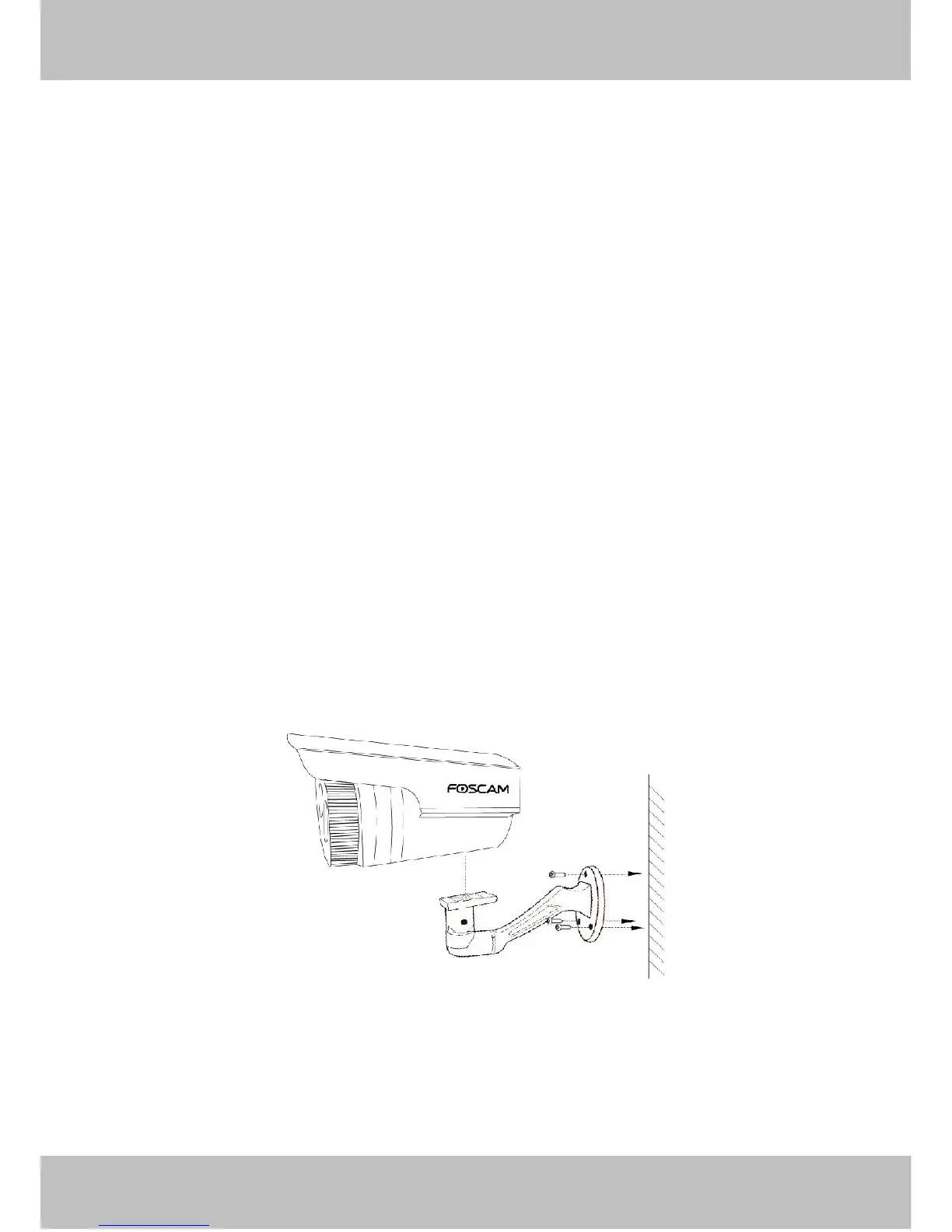
1.5 Hardware Installation
Step 1: Screw the mount on the wall with the 3 screws provided.
Step2: Install the camera on the mounting bracket with 1 screw to complete installation.
Please Note: The tail line’s wall hole must be lower than socket, ensure that the rain will not wet out device
through tail line.



 To Next Page