EasyManua.ls Logo

Foscam FI9803P - 2 Accessing the Network Camera; 2.1 Hardware Connection & Software Installation

Foscam FI9803P
70 pages
Print Icon
To Next Page IconTo Next Page
To Previous Page IconTo Previous Page
Loading...
w
w
www
www
.foscam.
.foscam.
us
us
Foscam Digital Technologies LLC
Telephone: 1-800-930-0949
7
2 Accessing the Network Camera
2.1 Hardware Connection & Software Installation
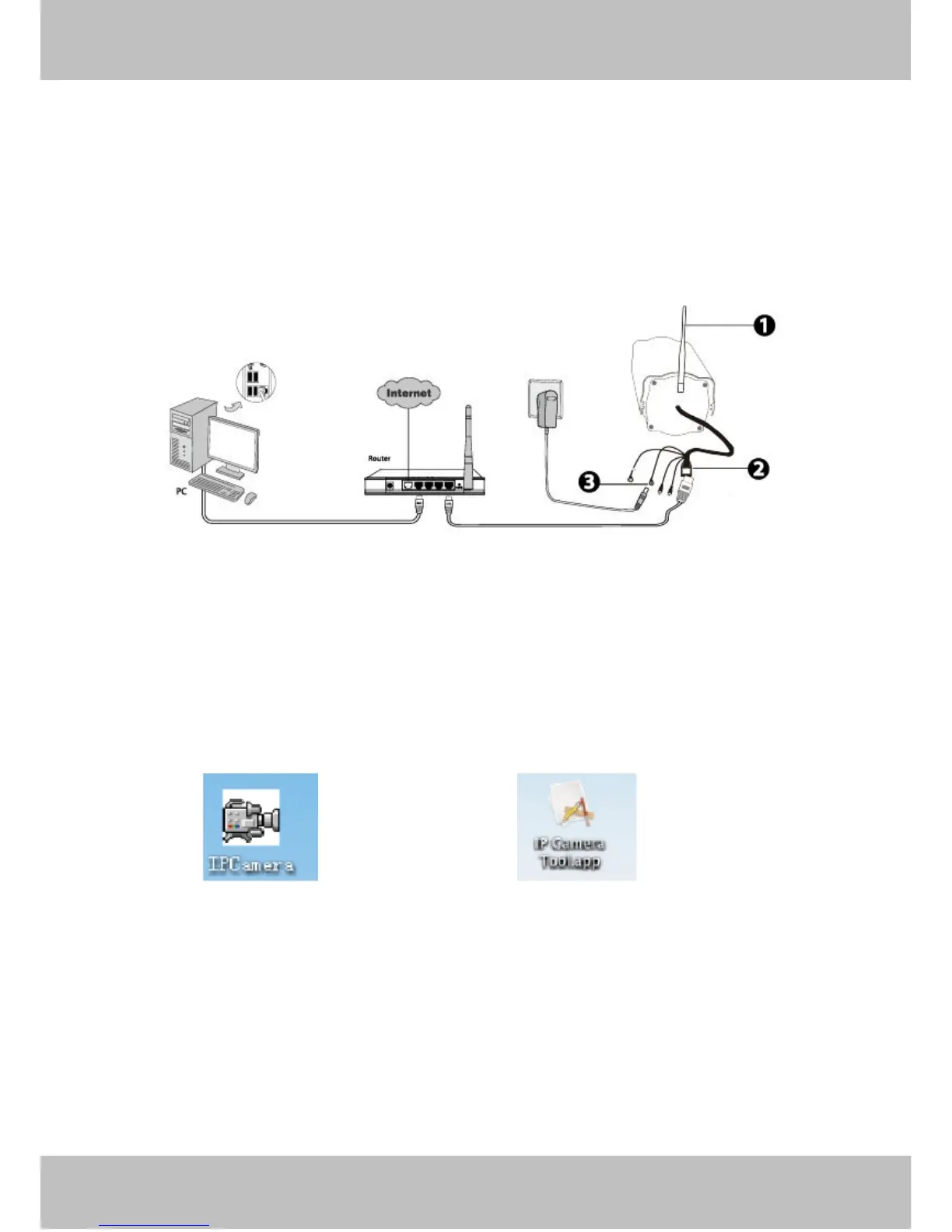
Figure 2.1
1. Mount the antenna and make it stand vertically(Only for the device with external antenna).
2. Connect the camera to the LAN network (Router or Switch) via network cable.
3. Connect the power adapter to the camera.
4. Insert the CD into the CD drive of your computer.
5. Go to the folder “IP Camera Search Tool” and find the folder “For Windows OS”or “For Mac OS”. Copy
and paste the IP camera tool file to your computer, or drag it onto your Desktop.
Shortcut icon for Windows OS Shortcut icon for Mac OS
Notes:

If your computer ( Windows OS ) supports autorun function, you can find the corresponding file in the
opened control panel.
If your computer doesn’t have CD drive, you can download the IP camera tool from our website for free.

Table of Contents

Other manuals for Foscam FI9803P

Related product manuals