w
w
www
www
.foscam.
.foscam.
us
us
Foscam Digital Technologies LLC
Telephone: 1-800-930-0949
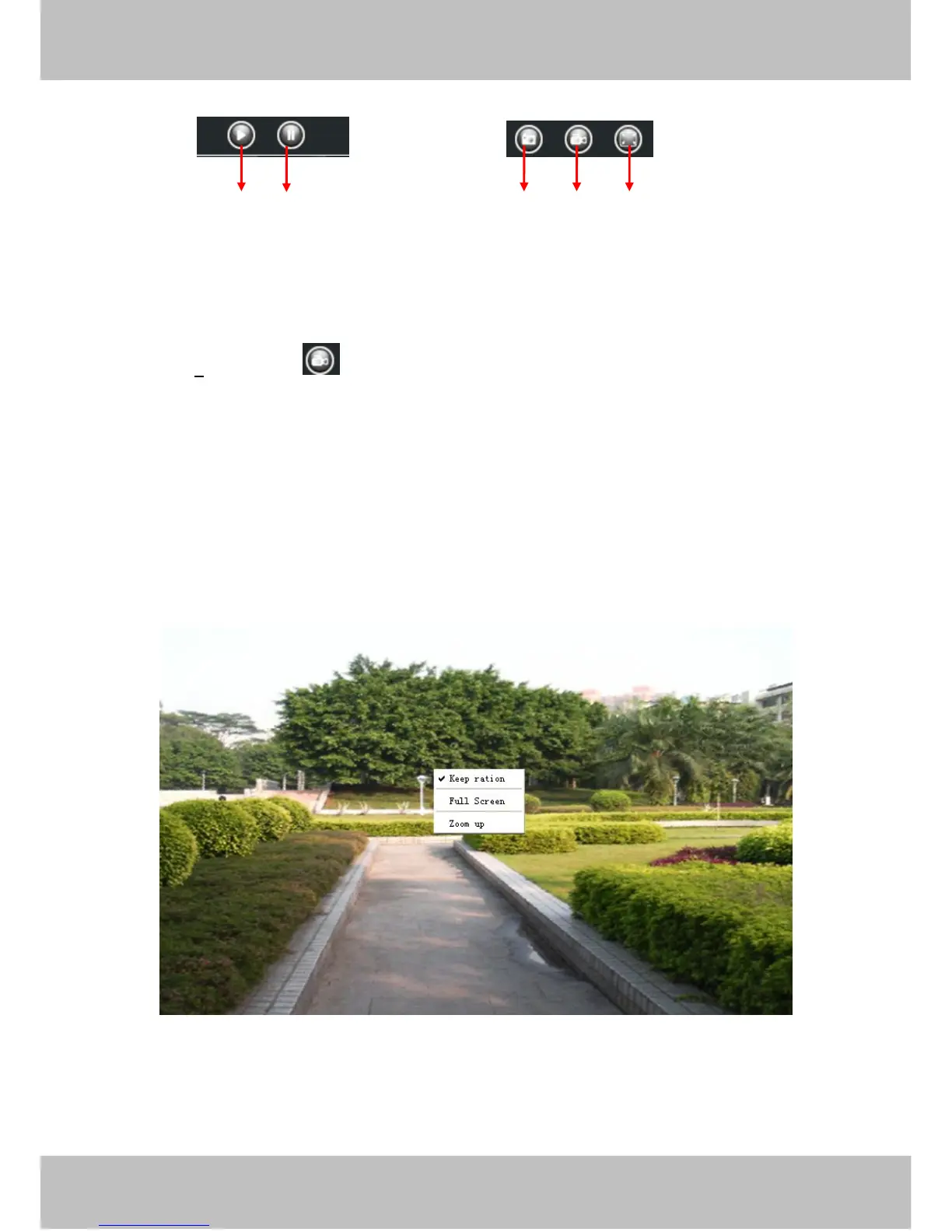
1------Play Click it to play the video of the camera
2------Stop Click it to stop the video of the camera
3----- Snap: Click it to make snapshot and it pop up a window which picture you snapshot, right click in the
window and save the picture to anywhere you want.
4----- Record: Click the icon and the camera start recording, you can see a green dot in the live window.
Click again and stop recording. The default storage path is C:\IPCamRecord. You can change the storage path:
Go to Settings- >Record-> Storage Location panel.
5------Full Screen Click it to make full-screen, or you can double click the surveillance screen to make
full-screen. Double click again and exit full-screen.
Onscreen Mouse Control
Right click the mouse and you can adjust the screen ration, full screen and Zoom up.
Figure 3.10
Keep ration: Select it and the camera will adjust the size of live window based on the computer monitor
automatically.
Sometimes there is a black border around the video , please select Keep ration to get a better visual quality .



 To Next Page