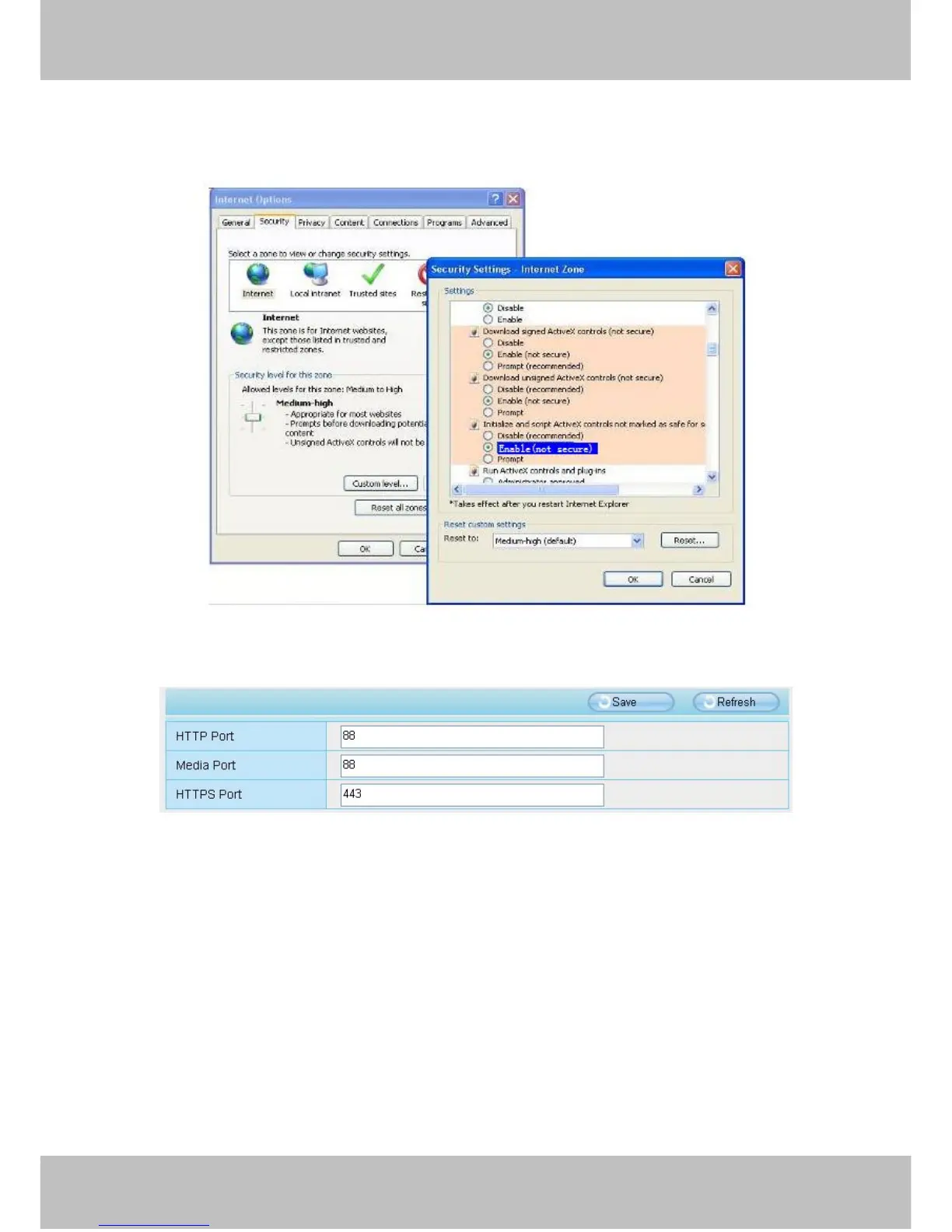
front should be set to be “Enable”, The ActiveX programs read by the computer will be stored. As follows:
Enable: Download unsigned ActiveX controls
Enable: Initialize and script ActiveX controls not marked as safe
Enable: Run ActiveX controls and plug-ins
Figure 5.10
If you allow the ActiveX running, but still could not see living video. Please change another port number to try.
Don’t use port 8000.
Figure 5.11
NOTE: Make sure that your firewall or anti-virus software does not block the camera or ActiveX. If you could
not see video, please shut down firewall or anti-virus software to try again.
5.1.7 Can’t access IP camera in internet
There are some reasons:
1 ActiveX controller is not installed correctly
2 The port which camera used is blocked by Firewall or Anti-virus software. Please change another port
number and try again.
3 Port forwarding is not successful.
Check these settings and make sure they are correct.



 To Next Page