EasyManua.ls Logo

Foscam FI9803P - 4.9.2 System Upgrade

Foscam FI9803P
70 pages
Print Icon
To Next Page IconTo Next Page
To Previous Page IconTo Previous Page
Loading...
w
w
www
www
.foscam.
.foscam.
us
us
Foscam Digital Technologies LLC
Telephone: 1-800-930-0949
58
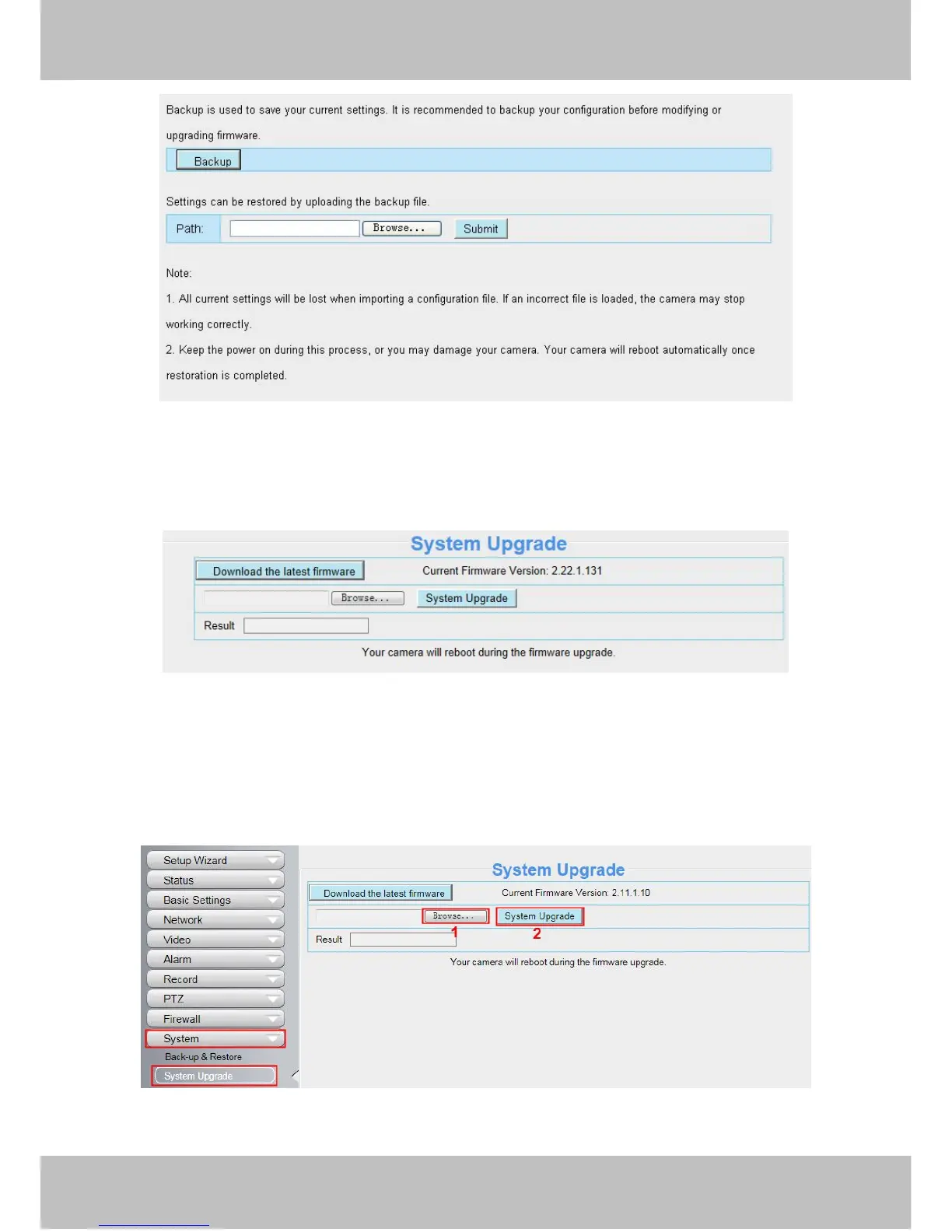
Figure 4.58
4.9.2 System Upgrade
Click “Download the latest firmware”, you will see the following screen. And click “save” to save the firmware on
your computer locally.
Figure 4.59
Your current firmware version will be displayed on your screen. You may go to the Status Device
Information page to check for the latest firmware versions available.
Click Browse, choose the correct bin file and then click System upgrade.
Don’t shut down the power during upgrading. After upgrading, you can see the upgrade result.
Figure 4.60
Upgrade Firmware by IP Camera Tool

Table of Contents

Other manuals for Foscam FI9803P

Related product manuals