w
w
w
w
w
w
.
.
f
f
o
o
s
s
c
c
a
a
m
m
.
.
c
c
o
o
m
m
28
S
S
h
h
e
e
n
n
z
z
h
h
e
e
n
n
F
F
o
o
s
s
c
c
a
a
m
m
I
I
n
n
t
t
e
e
l
l
l
l
i
i
g
g
e
e
n
n
t
t
T
T
e
e
c
c
h
h
n
n
o
o
l
l
o
o
g
g
y
y
C
C
o
o
.
.
,
,
L
L
i
i
m
m
i
i
t
t
e
e
d
d
T
T
e
e
l
l
:
:
8
8
6
6
7
7
5
5
5
5
2
2
6
6
7
7
4
4
5
5
6
6
6
6
8
8
F
F
a
a
x
x
:
:
8
8
6
6
7
7
5
5
5
5
2
2
6
6
7
7
4
4
5
5
1
1
6
6
8
8
28
3
3.
.7
7
E
E
m
m
a
a
i
i
l
l
S
S
e
e
t
t
t
t
i
i
n
n
g
g
s
s
3
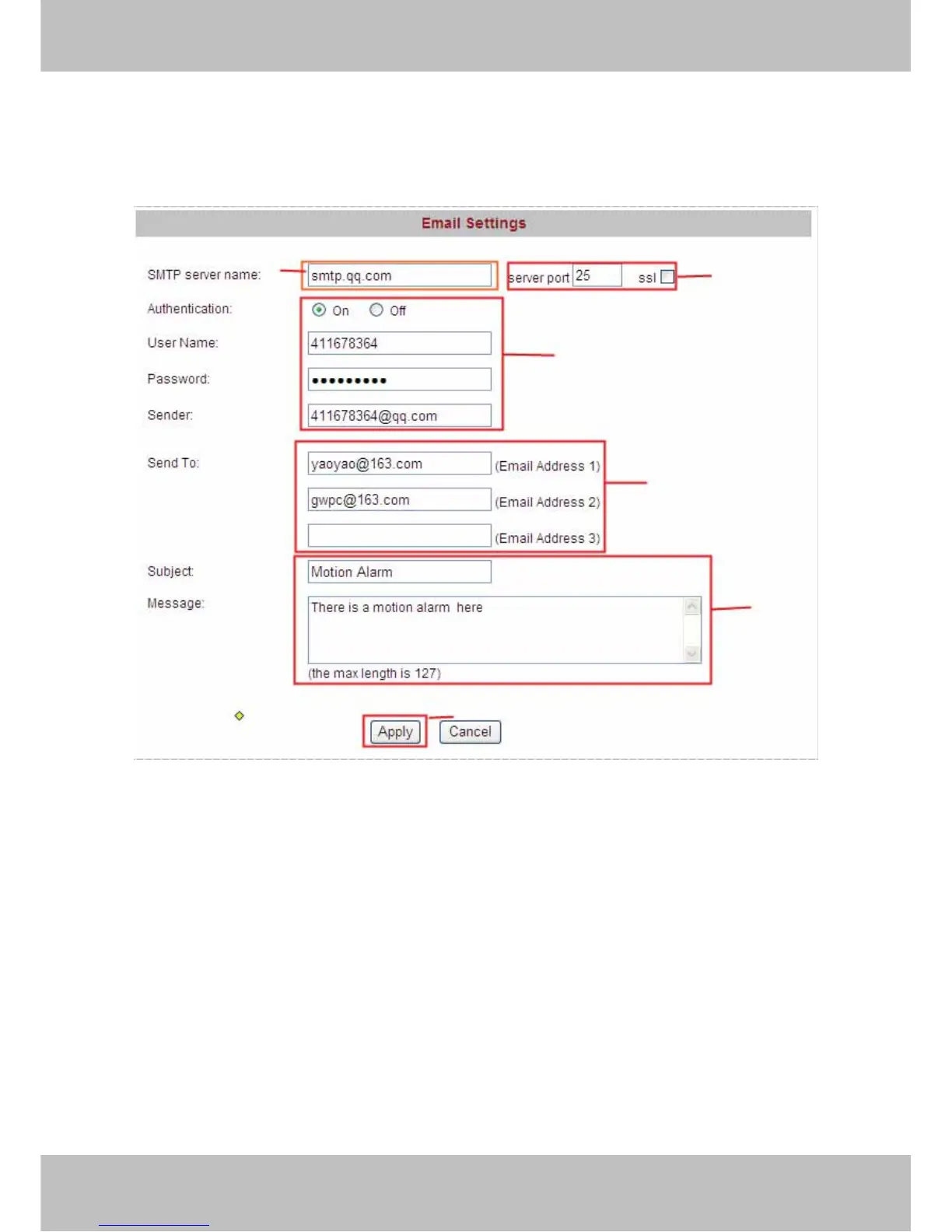
If you want the camera to send emails when motion has been activated, Email Settings will
need to be configured.
If you want the camera to send emails when motion has been activated, Email Settings will
need to be configured.
3
.
.
7
7
E
E
m
m
a
a
i
i
l
l
S
S
e
e
t
t
t
t
i
i
n
n
g
g
s
s
Figure 3.18
. 1------- Enter the SMTP Server for Sender,
2------ SMTP port is usually set as 25. If SMTP server supports SSL, you should choose it.
3------ If you select ON, fill in the authentication for sender, mail box for sender must support
SMTP
4------ Three recipients can be added to receive images.
5------ Set the subject and text for the email. The subject and message can not be Chinese
characters.
6------ Click Apply and all settings take effect.
Trouble Shooting----The email failed to send emails or snapshots
1. Check the mail service settings, and make sure all of them are correct and try it again.
2. Check if the sender email is enabled with SMTP server.
3. Check the mailbox whether should be enabled SSL encryption.
1
2
3
4
5
6



 To Next Page