19
CD-R/RW MASTER RECORDER CR500 (Preparation before using the CR500)
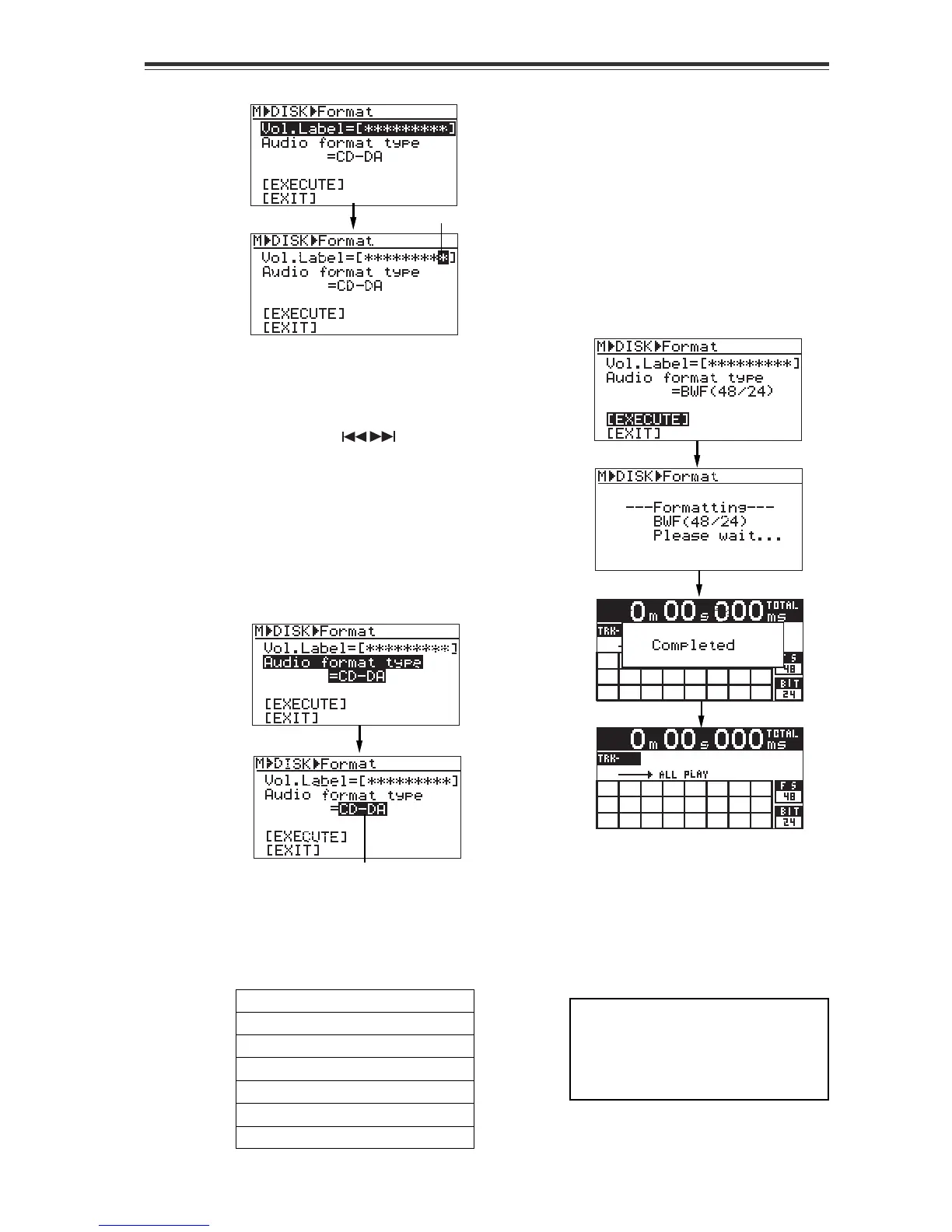
4) Use the numeric keys or [MENU] dial to edit
the volume label.
You can enter a desired alphanumeric
character at the flashing point.
You can move the flashing point by using
the [SKIP/CURSOR
] keys. You can
clear the character at the flashing point by
pressing the [CLEAR/+10] key.
5) After completing editing, press the [ENTER/
YES] key to set the volume label.
6) Use the [MENU] dial to highlight "Audio
format type" and press the [ENTER/YES] key.
The current format type flashes ("CD-DA"
flashes by default) and you can now
select the format type.
7) Use the [MENU] dial to select a desired
format type and press the [ENTER/YES] key.
8) Use the [MENU] dial to highlight
"[EXECUTE]" and press the [ENTER/YES]
key. (To cancel formatting, select "[EXIT]".)
Formatting starts and the display shows
the formatting status.
The screen below shows an example when
the disc is formatted by "BWF (48/24)".
When formatting completes, "Completed"
is shown and the unit exits the MENU
mode. The display shows the Home screen.
You can select a desired format type from
among "CD-DA" and various "BWF" types
(see the table below). To make an audio
CD, select "CD-DA". To record WAV files,
select any one of "BWF" types shown be-
low.
CD-DA: 44.1kHz/16Bit (Default)
BWF (44.1/16): 44.1kHz/16Bit
BWF (44.1/24): 44.1kHz/24Bit
BWF (48/16): 48kHz/16Bit
BWF (48/24): 48kHz/24Bit
BWF (88.2/24): 88.2kHz/24Bit
BWF (96/24): 96kHz/24Bit
On the Home screen immediately after the
disc has been formatted, track display is
blank while the Fs and Bit information of
the disc is shown.
After the CD-R/RW disc has been format-
ted, you can now make a recording with
the CR500. See "Chapter 5: Recording"
(from page 39) for details.
<Note>:
You can re-format a format-
ted disc by the "Format" menu item
of the "DISK UTILITY" menu in the
MENU mode (see "Formatting a disk
[Format]" on page 86).
flashing
flashing


 To Next Page