77
CD-R/RW MASTER RECORDER CR500 (MENU mode: SYSTEM SETUP menu)
Digital output signal format selection [Digital Out]
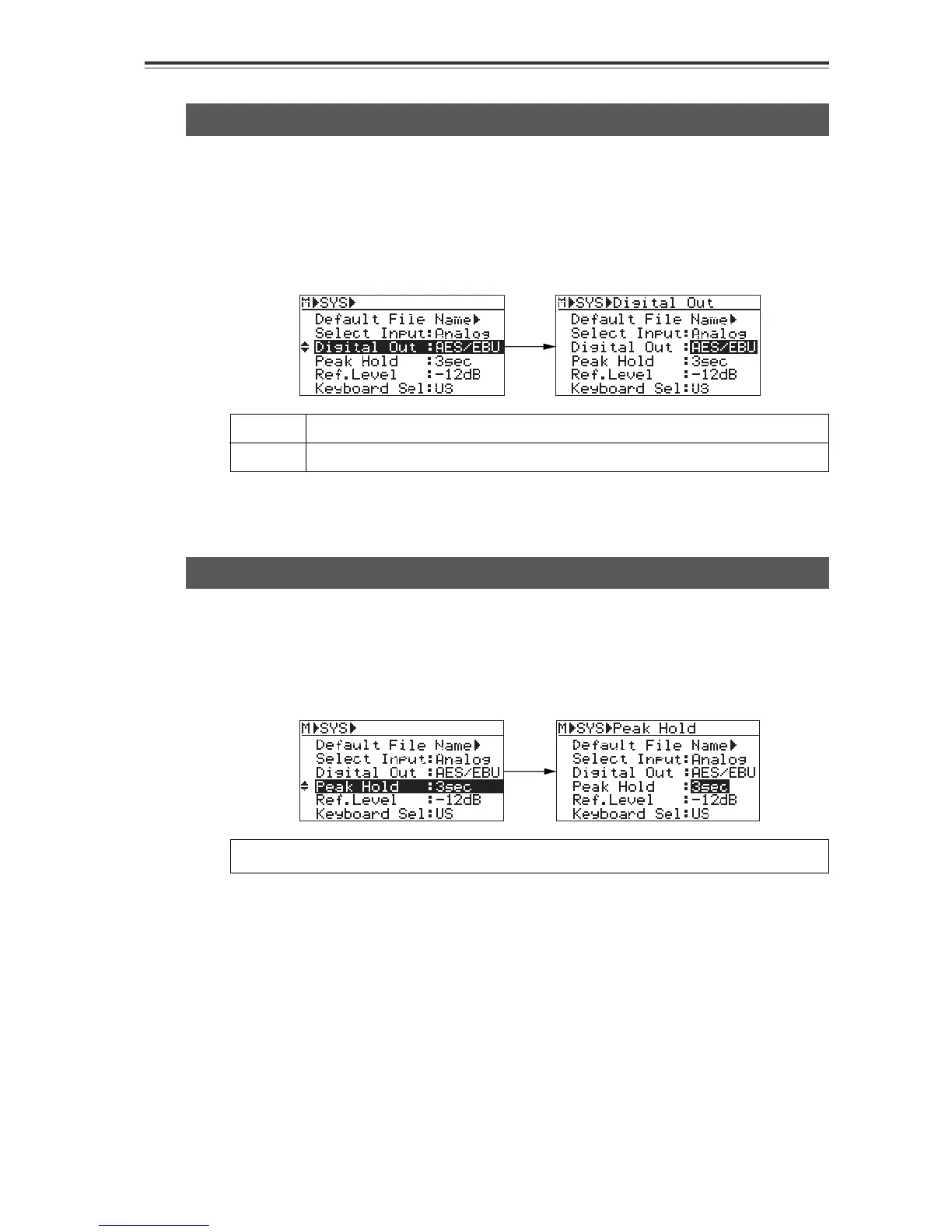
Select the "Digital Out" menu item on the SYS SETUP menu screen and press the [ENTER/
YES] key. The current setting (the default is "AES/EBU") starts flashing and you can now
select the desired option. Use the [MENU] dial to select between "AES/EBU" and "S/P DIF",
and press the [ENTER/YES] key to confirm your setting.
AES/EBU
S/P DIF
IEC 60958 (AES/EBU) format digital signal is output.
IEC 60958 (S/P DIF) format digital signal is output.
* To exit the MENU mode, press the [STOP/HOME] key.
The "Digital Out" menu item selects the format (AES/EBU or S/P DIF) of the digital signal
which is output from the [DIGITAL OUTPUT] connector.
Peak hold time setting [Peak Hold]
Select the "Peak Hold" menu item on the SYS SETUP menu screen and press the [ENTER/
YES] key. The current setting (the default is "3sec") starts flashing and you can now set the
peak hold time. Use the [MENU] dial to select the desired time and press the [ENTER/YES]
key to confirm your setting.
You can set the time between "0sec" and "9sec" in one second step.
* To exit the MENU mode, press the [STOP/HOME] key.
The "Peak Hold" menu item sets the peak hold time of the peak level meters.


 To Next Page