58
CD-R/RW MASTER RECORDER CR500 (Playback/Locate)
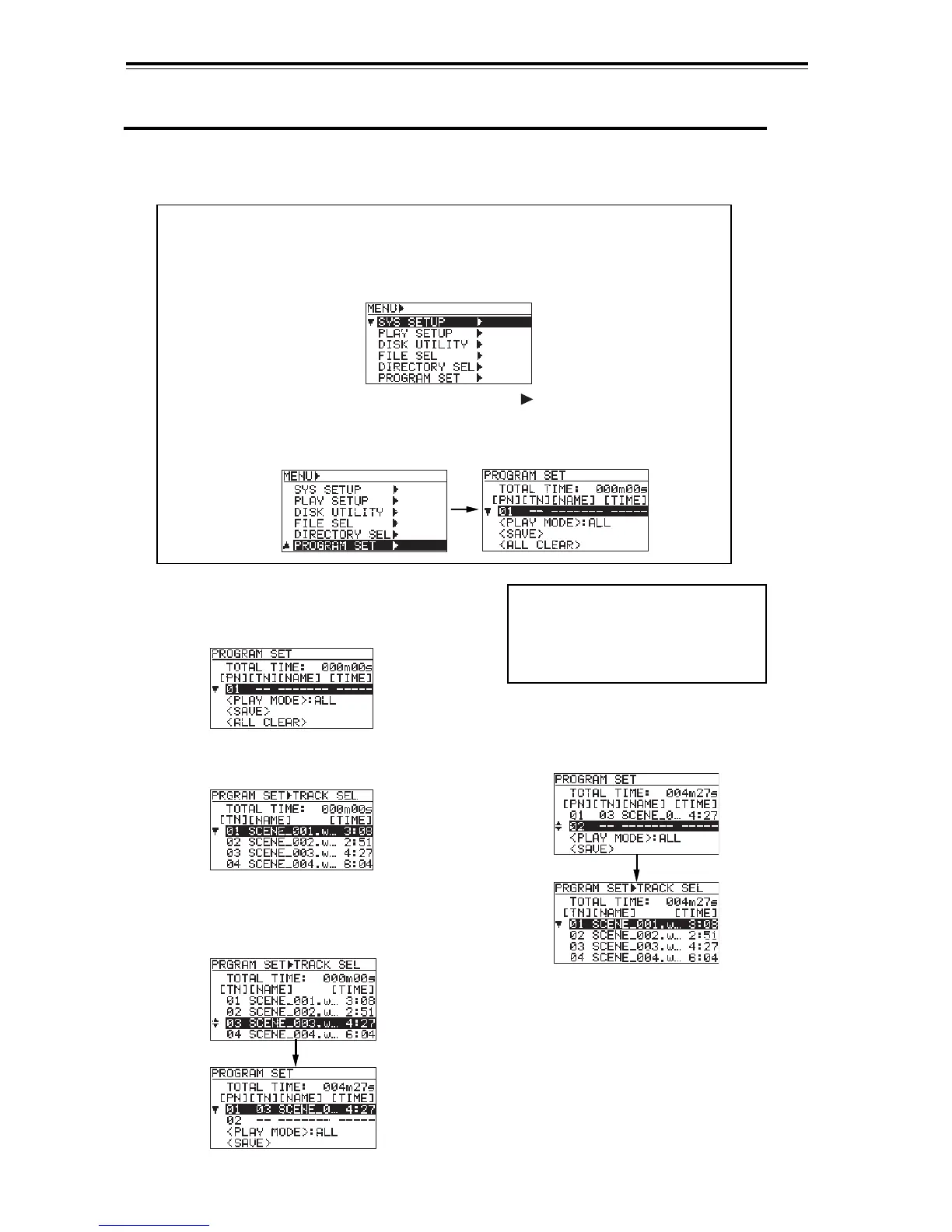
5) Use the [MENU] dial to select a desired song
and press the [ENTER/YES] key, as with step
3) above.
The selected song is set to program
number 02. Repeat steps 4) and 5) until
all desired songs are set to the play list.
4) Use the [MENU] dial to move the cursor to
"02" and press the [ENTER/YES] key.
The display changes to show the song list
screen, as step 2) above.
<Note>:
To cancel setting, press the
[CLEAR/+10] key while the program
number of which you want to cancel
the setting is highlighted (see page
60).
1) Press the [SHIFT] key to turn on the Shift
mode, and press the [PLAY MODE] key.
The display shows the screen for setting the
play list.
2) Press the [ENTER/YES] key.
The display changes to show the song list
screen.
3) Use the [MENU] dial to select a desired song
and press the [ENTER/YES] key.
The selected song is set to program number
01. (In the screen example below, file 03 is
set.)
Creating the play list
The description below assumes that a BWF formatted disc on which more than one WAV file
is recorded is loaded. However, it is also applicable to a CD-DA formatted disc on which more
than one audio track is recorded.
<Note>:
You can also access to the screen for setting the play list using the "PRO-
GRAM SET" menu in the MENU mode. To do this, follow the procedure below.
2) Use the [MENU] dial to highlight "PROGRAM SET " and press the [ENTER/YES]
key.
The display shows the screen for setting the play list for program playback.
For the procedure afterwards, see the next page.
1) While stopped, press the [ENTER/YES] key.
The unit enters the menu mode. The display shows the MENU list screen.


 To Next Page