66
CD-R/RW MASTER RECORDER CR500 (Playback/Locate)
Deleting memory play data
You can delete data in a memory bank. The following description assumes that one or more
memory banks have audio data and the display shows the Home screen of the MEMORY PLAY
mode. <Note>: You cannot delete whole memory play data of a disc at once.
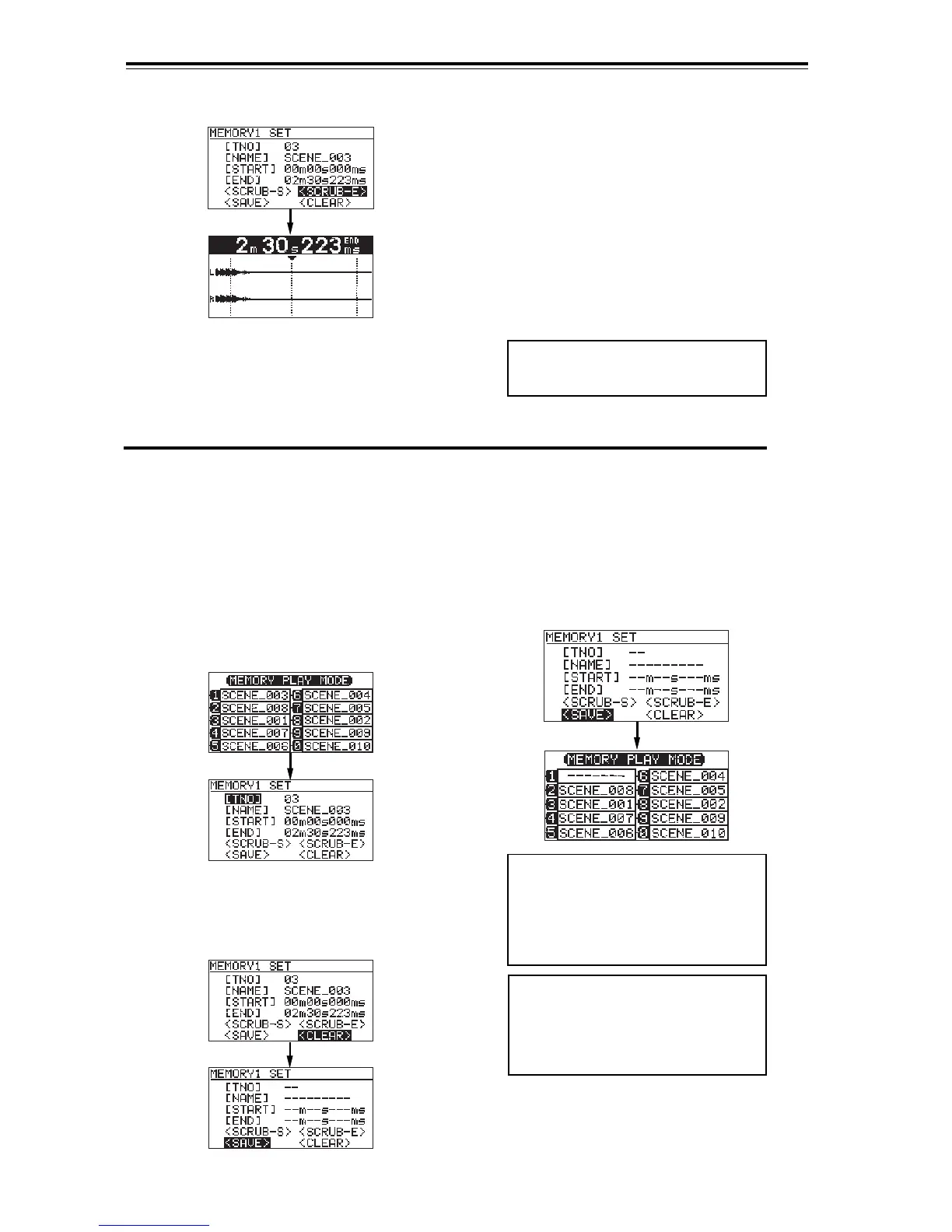
2) Use the [MENU] dial to move the cursor to
"<CLEAR>" and press the [ENTER/YES] key.
Data in MEMORY 1 is cleared.
The screen shows MEMORY 1 is now blank and
the cursor automatically moves to <SAVE>.
3) After editing, move the cursor to "<SAVE>" and
press the [ENTER/YES] key.
The display returns to the Home screen of the
MEMORY PLAY mode. The memory bank whose data
has been deleted shows "-------".
1) Press the [SHIFT] key to turn on the Shift
mode, and specify the memory bank whose
data you want to edit by pressing the
corresponding numeric key in the [MEMORY]
key group.
For example, if you press the [1/space] key,
the display changes to show the setting
screen for memory bank 1 (MEMORY 1).
<Note>:
If you attempt to execute
MEMORY PLAY (Instant start) of an
empty memory bank, "Memory 1 No
Entry" appears and the operation is
cancelled.
<Note>:
Do not forget to execute the
save operation above.
To assign new audio data to the
memory bank whose data has been de-
leted, follow the procedure described
above.
<Example when you select "<SCRUB-E>">
<Note>:
Do not forget to execute the
save operation above. Otherwise, the
editing is cancelled.
3) Use the [MENU] dial to scrub forward or
backward for adjusting the start (or end) point.
At a point where audio is recorded, You can
hear the scrubbing sound.
3) Use the [MENU] dial to scrub forward or
backward for adjusting the start (or end) point.
At a point where audio is recorded, You can
hear the scrubbing sound.
4) After adjusting the start (or end) point, press
the [ENTER/YES] key.
The time of the point replaces the start (or
end) time and is shown in the "[START]" (or
"[END]") field.
5) After editing, move the cursor to "<SAVE>"
and press the [ENTER/YES] key.
The display returns to the Home screen of
the MEMORY PLAY mode.


 To Next Page