36
CD-R/RW MASTER RECORDER CR500 (Connection)
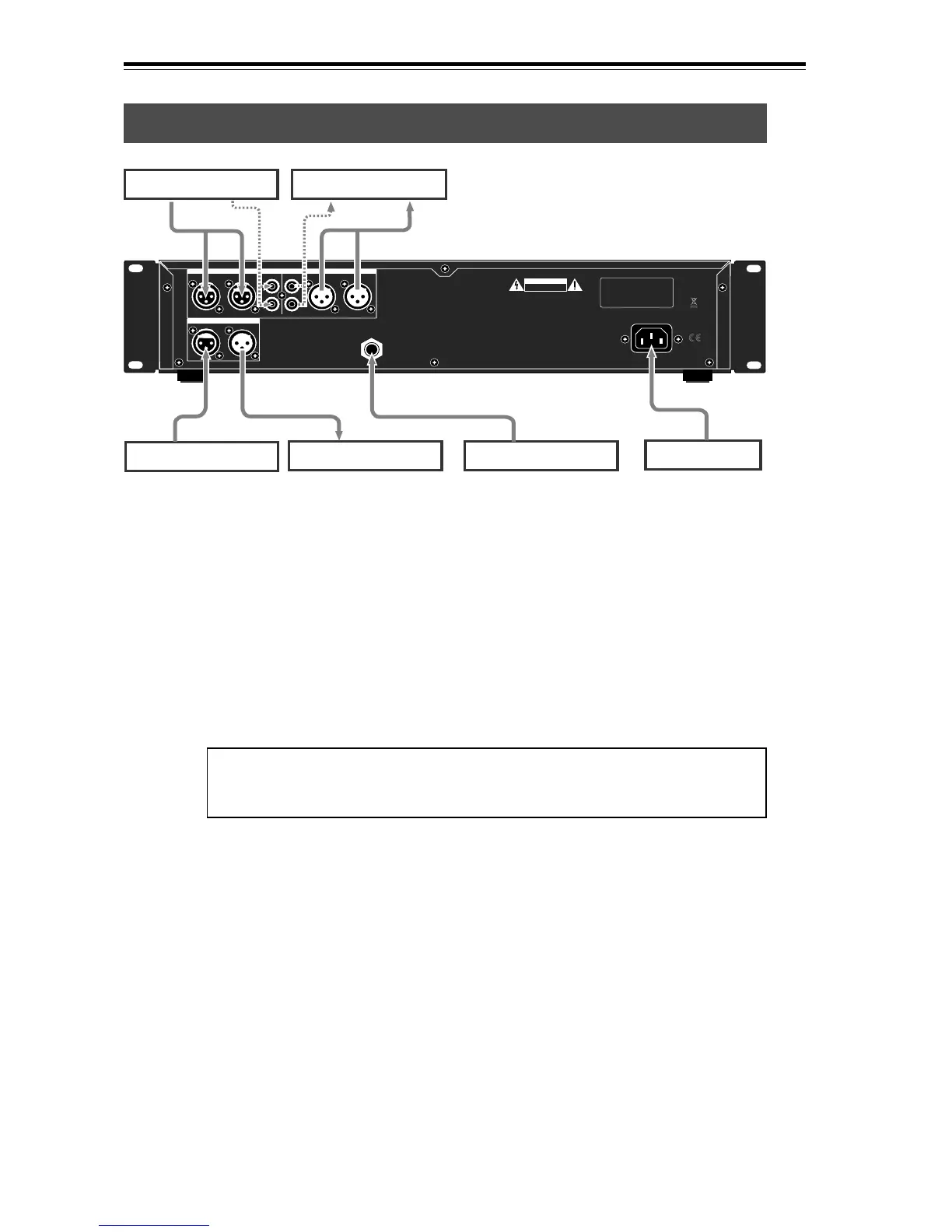
Analog audio connection (balanced/unbalanced)
Connecting to other devices
AC IN
CAUTION
AVIS:
RISQUE DE CHOC ELECTRIQUE
NE PAS OUVRIR
WARNING:
TO REDUCE THE RISK OF FIRE OR ELECTRIC
SHOCK, DO NOT EXPOSE THIS EQUIPMENT
TO RAIN OR MOISTURE.
UNBALANCED [-10dBV] BALANCED [+4dBu]
1:GND 2:HOT 3:COLD
RL RL
BALANCED [+4dBu]
DIGITAL
OUTPUTINPUT
L
R
R
L
ANALOG INPUT ANALOG OUTPUT
AC IN
GPI
Analog audio device
Analog audio device
Digital audio device
Digital audio device Fader start
<Note>:
When both the balanced (XLR) and unbalanced (RCA) input connectors
of [ANALOG INPUT] are plugged, the unbalanced input signal takes priority (the
balanced XLR connector is disabled).
Digital audio connection (AES/EBU, S/P DIF)
Power cable
The CR500 is equipped with both the balanced (XLR-3-31) and unbalanced (RCA)
[ANALOG INPUT] connectors, ensuring broad compatibility. You can connect
"+4dBu" signals to the balanced input connectors, while "-10dBV" signals to the
unbalanced input connectors.
To record analog signals fed to the balanced or unbalanced [ANALOG INPUT]
connectors, set the "Input Sel" menu item of the "SYS SETUP" in the MENU mode
to "Analog" (see page 76). By default, the "Input Sel" menu item is set to "Ana-
log". If it is set to "Digital", however, you need to change the setting.
The CR500 is also equipped with both the balanced (XLR-3-32) and unbalanced
(RCA) [ANALOG OUTPUT] connectors, which feed +4dBu and -10dBV analog audio
signals respectively.
The CR500 is equipped with the [DIGITAL INPUT] (XLR-3-31) connector which
accepts digital audio signals of both IEC 60958 (AES/EBU) and IEC 60958 (S/P
DIF) format. It automatically detects the format (AES/EBU or S/P DIF) of the
digital input signal. Regardless of the Fs/bit information of the input signal, the
CR500 records the input signal at the Fs/bit which is set when a disc is format-
ted.
To record a digital signal fed to the [DIGITAL INPUT] connectors set the "Input
Sel" menu item of the "SYS SETUP" in the MENU mode to "Digital" (see page 76).
The CR500 is also equipped with the [DIGITAL OUTPUT] (XLR-3-32) connector
which accepts digital audio signals of both IEC 60958 (AES/EBU) and IEC 60958
(S/P DIF) format, like the [DIGITAL INPUT] connector.
You can set the digital output signal format (AES/EBU or S/P DIF) using the
"Digital Out" menu item of the "SYS SETUP" in the MENU mode (see page 77).
The default setting of the "Digital Out" menu item is "AES/EBU".


 To Next Page