43
CD-R/RW MASTER RECORDER CR500 (Recording)
• Feed an analog audio source and adjust the input levels appropriately using the
[INPUT LEVEL] control (when feeding a digital audio source, you can only view
the levels but cannot control it).
When the analog audio signals are fed, turning the [INPUT LEVEL] control
clockwise raises the input level. Adjust the levels appropriately by checking the
meter indication and monitoring via headphones.
* When the "Select Input" menu item is set to "Digital", you do not need to adjust the
input levels.
<Note>:
You should set the input levels appropriately so that the indicators
near to "0"dB sometimes light but the "OL" indicators do not light.
The reference level is set to "-12dBFS" by default. On the level meter scale, "12"
(the -12dB point from the 24-bit full-scale level) is shown in red as the refer-
ence marker. You can change to set this level to "-20dB" via the "Ref.level" item
in the "SYS SETUP" menu of the MENU mode (see page 78 for details).
<Note>:
By default, the file name shown on the input monitor screen for a BWF
formatted disc is "<Scene Name> + <Take Number>" (with ".wav", the file ex-
tension). Using the "Default File Name" menu item of the "SYS SETUP" menu in
the MENU mode, you can select the file name mode from among "<Scene Name>
+ <Take Number>" (default), "<Reel Number> + <Take Number>" and "<Date>"
(see page 75). You can also edit the file name using the "Edit File Name" menu
item of the "SYS SETUP" menu in the MENU mode (see page 89).
<Note>:
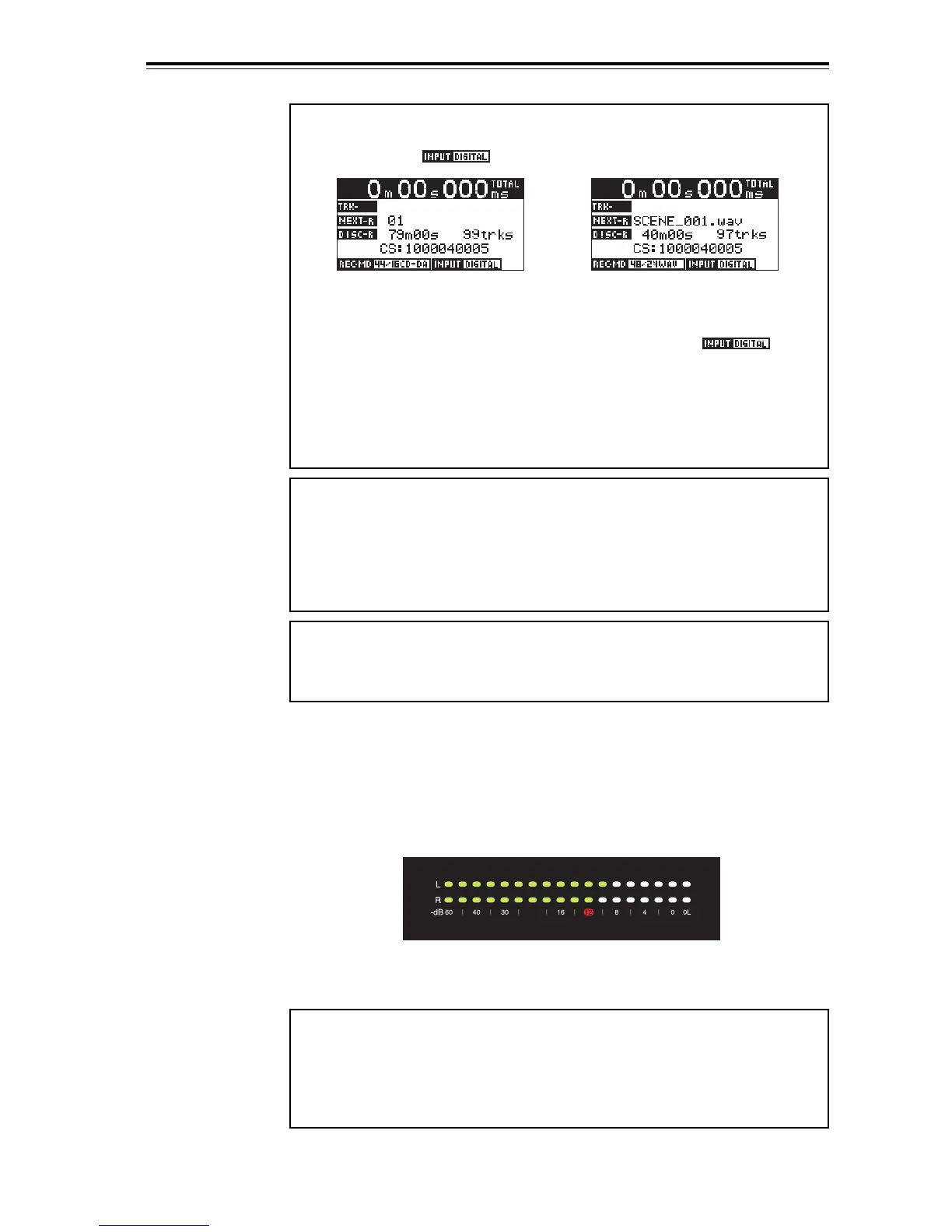
When the "Select Input" menu item is set to "Digital", the input moni-
tor screens for a BWF formatted disc and a CD-DA formatted disc look like the
examples below (" " is shown).
While the "Select Input" menu item is set to "Digital", if the unit receives a
correct digital input signal and locks to it, "DIGITAL" of " " is lit.
Just below the "DISC-R" field, the channel status information of the digital
signal currently received is shown. If the unit does not receive a correct digital
input signal or does not lock to the digital input signal, "DIGITAL" flashes and
the input audio signal is muted. In such a case, check the digital output setting
of the source device and connection between the source device and the [DIGI-
TAL INPUT] connector of the CR500.
<Note>:
Normally, no file name is indicated on the input monitor screen for a
CD-DA formatted disc. However, if any file name is written by CD-TEXT, it is
indicated. Note that you cannot edit the file name of an audio track on the CD-
DA formatted disc.
Input monitor screen for
a CD-DA formatted disc
Input monitor screen for
a BWF formatted disc


 To Next Page