DMT-8 Ver 2.0 Supplement to the Owner’s Manual
3-1. Saving recorded data ("SAvE")
The Setup menu has been divided into the two categories; "Setup menu
effective for each Program", and "Setup menu applied to all Programs".
15
◯
●
: Setup for each program
: Effective against ALL
"BAR"
"TEMPO"
"CLIck"
"LOAD"
"SAvE"
"FORMAT"
"PREROLL TIME"
"MIDI SYNC OUT"
"FRAME RATE"
"MTC OFFSET"
"EnAbLE rEc"
"dG in"
"dG out"
"rE SoLu"
"SLAVE"
"dEvicE"
"undo"
Sets the time signature on the Tempo Map (selected from 11 signatures: 1/4 ~ 8/8).
Sets the tempo on the Tempo Map.
Tums the Metronome function on/off.
Loads a data file saved an a DAT to the DMT-8.
Saves recording/setup data from the hard disk to the DAT machine.
Initializes the hard disk.
Sets the preroll value for the locate point.
Selects the signal output form the MIDI OUT connector.
Selects the frame rate for MTC output.
Sets the offset value between MTC and ABS time.
Selects recording enable/disable.
Selecting a signal input channel.
Selecting a signal output channel/.
Setting Display Resolution mode ON/OFF.
Setting Slave mode ON/OFF.
Setting a device ID.
Setting an effective range of the Undo function.
(*1)
(*2)
(*2)
001 BAR 04 04 (Signature 4/4)
001 BAR 1, 120 (Tempo 120)
OFF
Current Program
00S (00 second)
CLOCK (MIDI clock)
25 Frame
0H: 59M: 57S: 00F: 00SF
ENABLE (Can record)
L • (No assign) R • (No assign)
cH St (Mixer output L/R)
OFF
OFF
00 (Device No. = 00)
EDIT (Edit and Auto Punch)
* 1: Only the currently-selected Program, or Programs 1 ~ 5 will be saved.
* 2: The parameters will be set default when the power is turned off (as well as the locate memory).
* 3: You can set the Time Base for each Program individually.
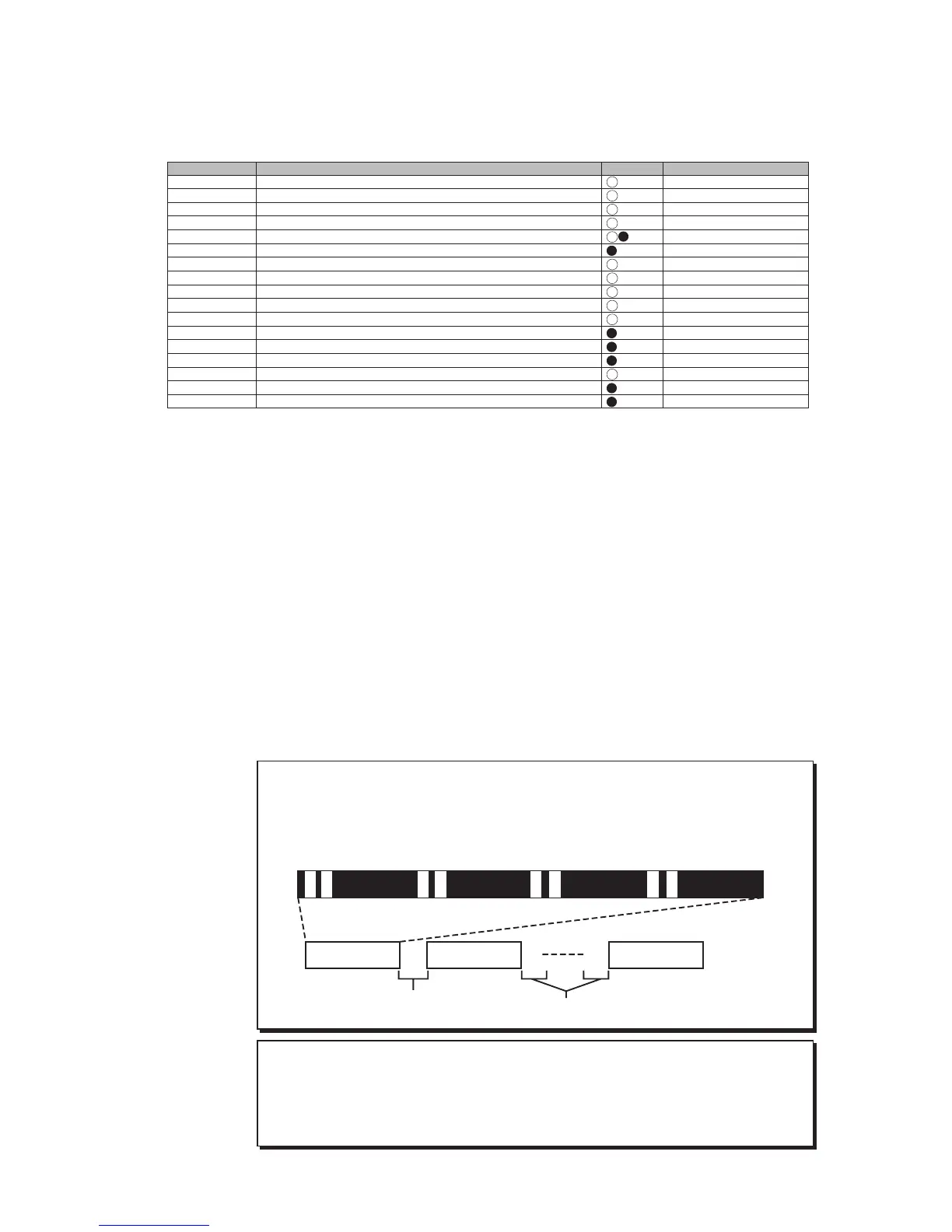
In Version 2.0, you can select whether you wish to save the currently-
selected Program, or all Programs 1-5 at once. If you save all Programs,
the process duration will be four times the total length of all Program data
to save them.
The following diagram shows the sequence of the Programs saved to the
DAT machine.
P1 -> (10 seconds between the songs) -> P2 -> (10 seconds between the
songs) -> P3 -> (10 seconds between the songs) -> P4 -> (10 seconds between
the songs) -> P5
You can save all Programs 1-5 at once, but you cannot load them back to
the DMT-8 at once. (You can load Programs one by one.) For details, refer
to the "Loading from the DAT Machine (LOAD) "for details.
< CAUTION >
Gray: Setup data (You will hear the deep.)
Black: Audio data (You will hear the audio data.)
White: Non data (Non recorded area.)
Data outpoint pattem when "SAvE ALL (saving all Programs 1-5)" is selected:
Indication Function Commonness Default setting
Tr 1&2 Tr 3&4 Tr 5&6 Tr 7&8
Program 1 (P1) Program 2 (P2) Program 5 (P5)
10 seconds
10 seconds



 To Next Page