EasyManua.ls Logo

Fostex FD-8 - Page 19

Fostex FD-8
28 pages
Print Icon
To Next Page IconTo Next Page
To Previous Page IconTo Previous Page
Loading...
FQStQX
Overdubbmg
“Overdubbing”
refers
to
the
practice
of
recording
a
new
sound
to
a
one
track
while
listening
to
other
previ¬
ously
recorded
tracks.
You
can
overdub
multiple
performances
of
musical
instruments
and
vocals.
This
technique
is
central
to
multi-track
music
production.
In
this
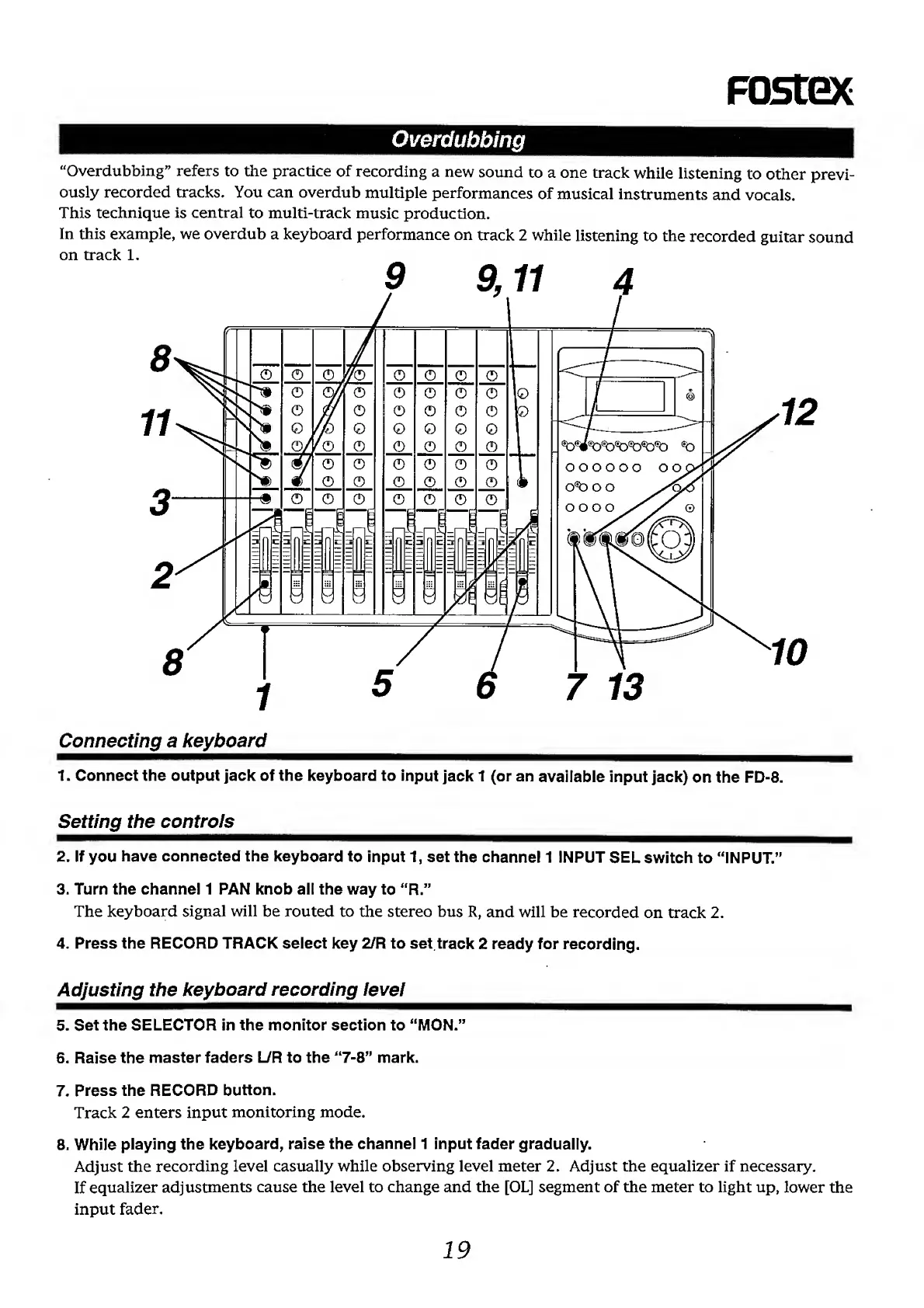
example,
we
overdub
a
keyboard
performance
on
track
2
while
listening
to
the
recorded
guitar
sound
on
track
1.
Connecting
a
keyboard
1.
Connect
the
output
jack
of
the
keyboard
to
input
Jack
1
(or
an
available
Input
jack)
on
the
FD-8.
Setting
the
controls
2.
If
you
have
connected
the
keyboard
to
input
1,
set
the
channel
1
INPUT
SEL
switch
to
“INPUT.”
3.
Turn
the
channel
1
PAN
knob
ail
the
way
to
“R.”
The
keyboard
signal
will
be
routed
to
the
stereo
bus
R,
and
will
be
recorded
on
track
2.
4.
Press
the
RECORD
TRACK
select
key
2/R
to
set
track
2
ready
for
recording.
Adjusting
the
keyboard
recording
level
5.
Set
the
SELECTOR
in
the
monitor
section
to
“MON.”
6.
Raise
the
master
faders
L/R
to
the
“7-8”
mark.
7.
Press
the
RECORD
button.
Track
2
enters
input
monitoring
mode.
8.
While
playing
the
keyboard,
raise
the
channel
1
input
fader
gradually.
Adjust
the
recording
level
casually
while
observing
level
meter
2.
Adjust
the
equalizer
if
necessary.
If
equalizer
adjustments
cause
the
level
to
change
and
the
[OL]
segment
of
the
meter
to
light
up,
lower
the
input
fader.
19

Other manuals for Fostex FD-8

Related product manuals