6
Basic operations
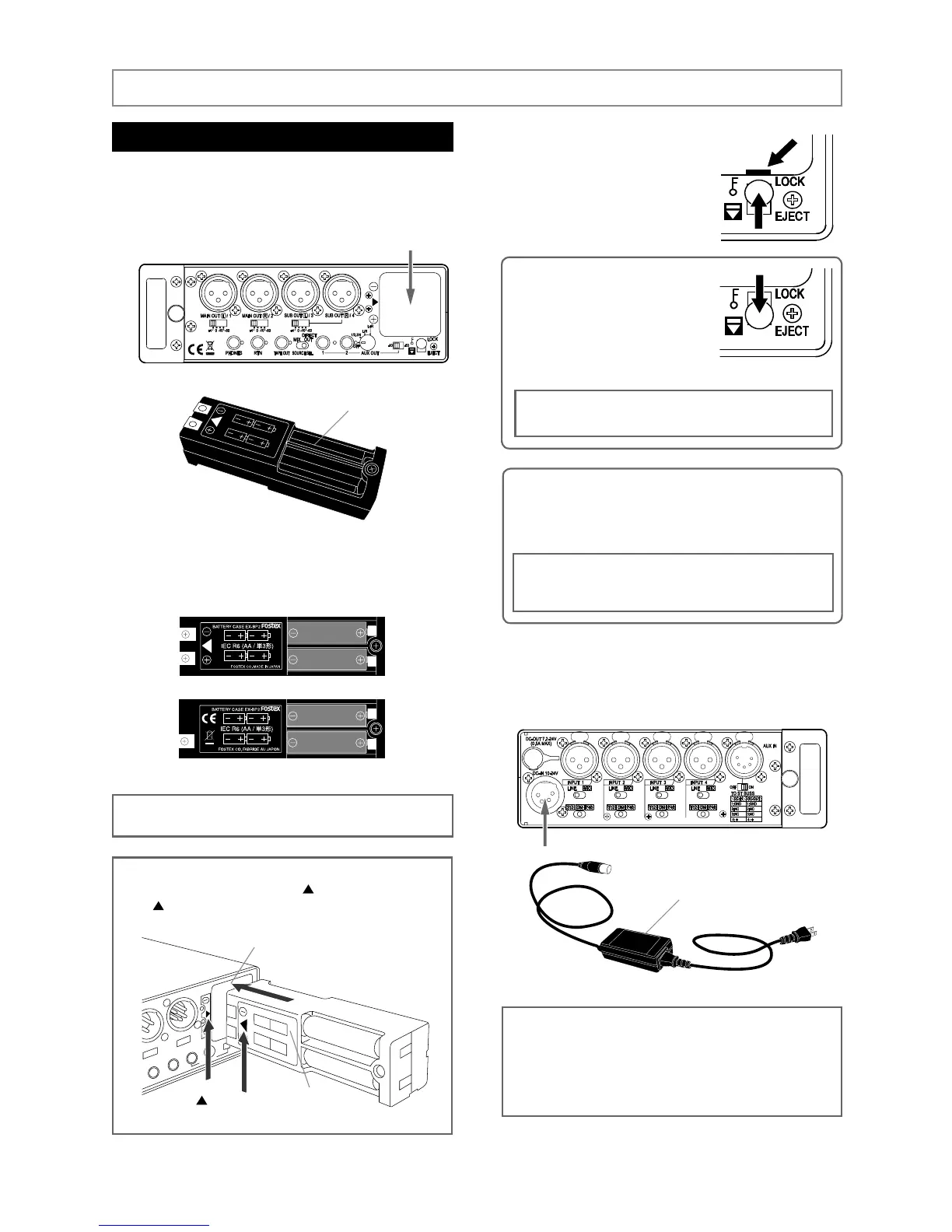
To operate the unit on internal battery power, set AA
alkaline or nickel hydride batteries to the supplied
battery box and fit the box to the battery compart
-
ment on the right side panel.
Optional AC adaptor or
external battery
<Note>: The rated voltage of the [DC IN] connector is DC 10
V to 24 V. When you connect an external power source to
the [DC IN] connector, use the appropriate power source that
matches the rated voltage of the [DC IN] connector.
For the detail information on the pin assignment of the [DC IN]
connector, see page 14 of “Features and controls”.
To operate the unit on external power, connect the
optional dedicated AC adaptor or an external battery
to the [DC-IN] connector on the left side panel.
Make sure to set alkaline or nickel hydride batteries
to the battery box in correct direction as marked on
the box. Set four batteries on each side of the bat
-
tery box.
<Note>: Always use eight new alkaline or fully charged nickel
hydride batteries of the same model and same capacity.
<Note>: Insert the battery box to the battery box compartment in
the correct direction by matching the
symbol on the battery box
to the
symbol on the panel of the unit.
Symbol
Battery box
<Memo>: You can set the battery type (alkaline or nickel
hydride) to be used from the meter display. By default, it is
set for alkaline batteries. If you use nickel hydride batteries,
change the battery type setting (see page 23).
Battery box compartment
<Note>: If the battery type setting do not match the bat-
teries currently used, the EMPTY indicator, battery indica
-
tor and alert display do not work correctly.
Battery box compartment
<Memo>: To remove the battery
box, slide down the [EJECT/LOCK]
lever to unlock the battery box.
The battery box is slid to the front a
few millimeters and you can pull it
out by hand.
<Note>: Before you remove the battery box, turn off the
power or set the [POWER] switch to the “EXT position.
After fully inserting the battery
box, slide up the [EJECT/LOCK]
lever to the LOCK position.
A tab appears as shown on the
right figure and the battery box
is locked.
Battery box
Tab
Preparation of power supply



 To Next Page