NAGA PRO User Manual
30
dialog box pop up.
Software download URL::http://firmware.ardupilot.org/Tools/MissionPlanner/
2. Connect Mission Planner to The Cube
Connecting The Cube usually has two connection methods: wireless data transmission and
USB. Mission Planner also supports Bluetooth and IP address connections. No matter what
kind of connection you use, your data transmission driver or serial port driver must be
installed correctly to ensure the normal operation of the data link, then the Cube can be
connected to the ground station.
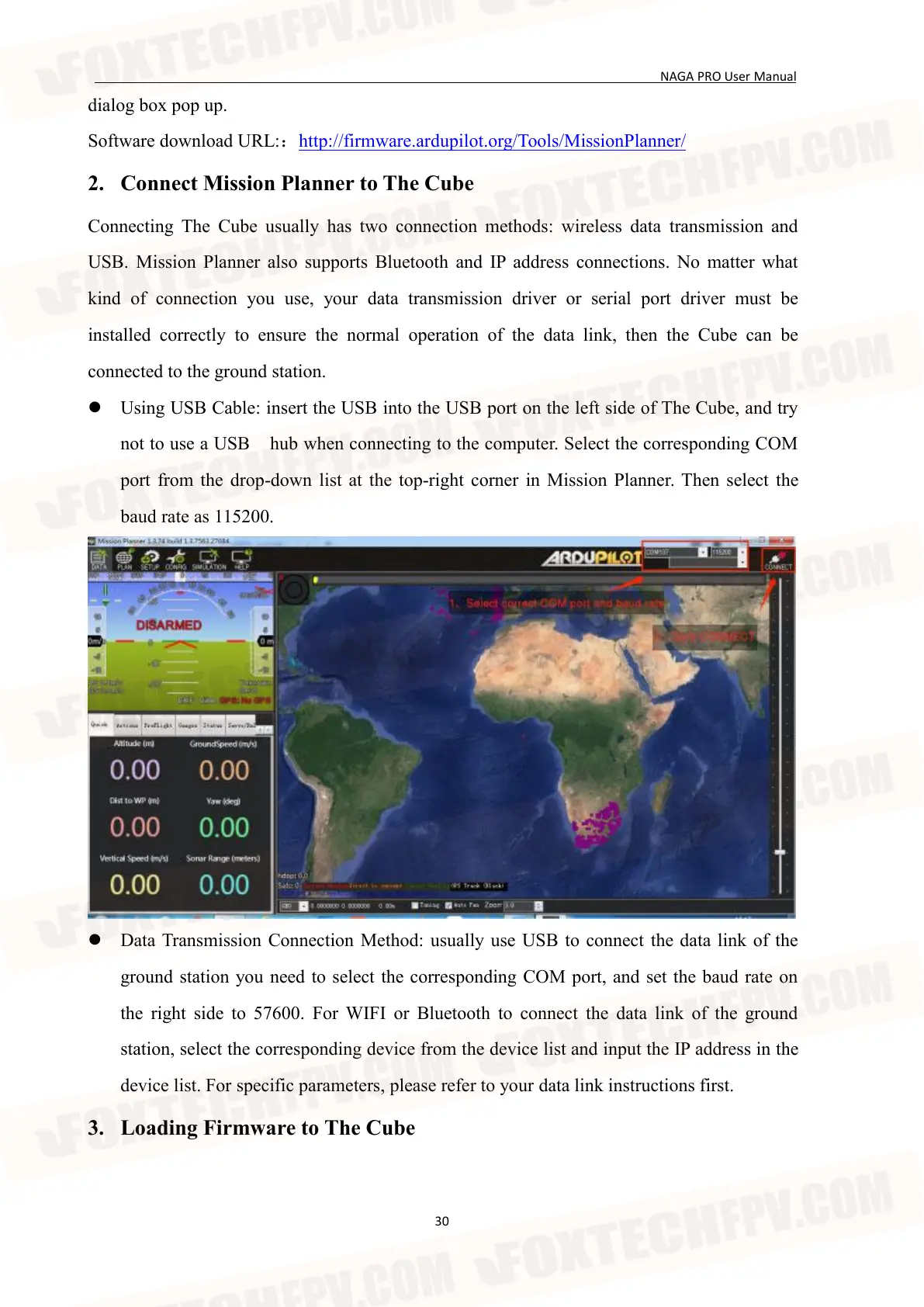
Using USB Cable: insert the USB into the USB port on the left side of The Cube, and try
not to use a USB hub when connecting to the computer. Select the corresponding COM
port from the drop-down list at the top-right corner in Mission Planner. Then select the
baud rate as 115200.
Data Transmission Connection Method: usually use USB to connect the data link of the
ground station you need to select the corresponding COM port, and set the baud rate on
the right side to 57600. For WIFI or Bluetooth to connect the data link of the ground
station, select the corresponding device from the device list and input the IP address in the
device list. For specific parameters, please refer to your data link instructions first.
3. Loading Firmware to The Cube


 To Next Page