NAGA PRO User Manual
48
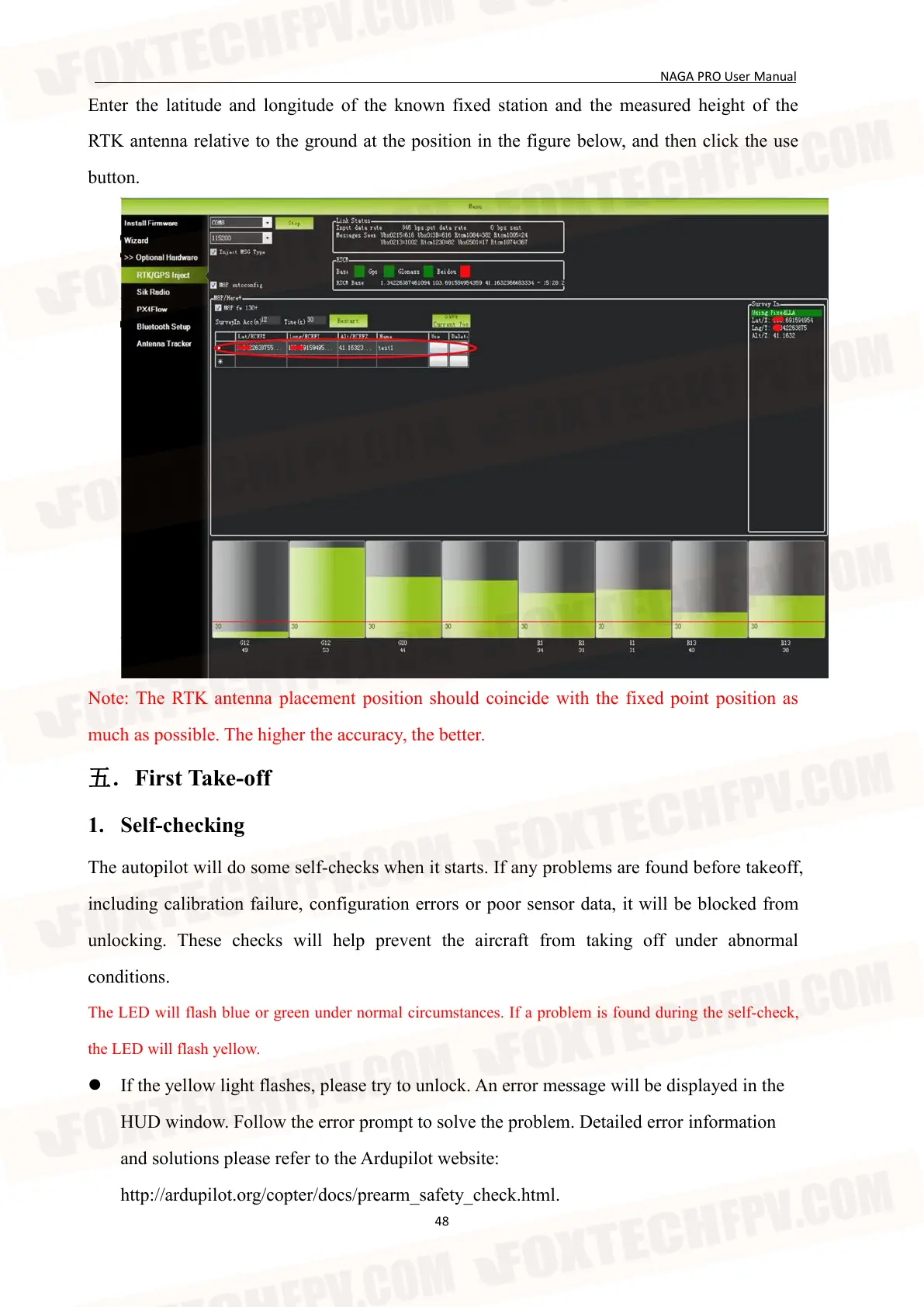
Enter the latitude and longitude of the known fixed station and the measured height of the
RTK antenna relative to the ground at the position in the figure below, and then click the use
button.
Note: The RTK antenna placement position should coincide with the fixed point position as
much as possible. The higher the accuracy, the better.
五.First Take-off
1. Self-checking
The autopilot will do some self-checks when it starts. If any problems are found before takeoff,
including calibration failure, configuration errors or poor sensor data, it will be blocked from
unlocking. These checks will help prevent the aircraft from taking off under abnormal
conditions.
The LED will flash blue or green under normal circumstances. If a problem is found during the self-check,
the LED will flash yellow.
If the yellow light flashes, please try to unlock. An error message will be displayed in the
HUD window. Follow the error prompt to solve the problem. Detailed error information
and solutions please refer to the Ardupilot website:
http://ardupilot.org/copter/docs/prearm_safety_check.html.


 To Next Page