Franking
63
6.4 Frank a label (optional)
With the optional label dispenser, PostBase can frank self-adhesive labels, which you
can order from Francotyp-Postalia.
Caution! We recommend to use only labels that have been approved by
Francotyp-Postalia. The manufacturer FP has established reliability, safety
and applicability. The manufacturer cannot assess the reliability, safety and
applicability for products not approved by FP, and therefore not vouch for
such products
We can ensure correct label processing only when you comply with this.
Frank a label
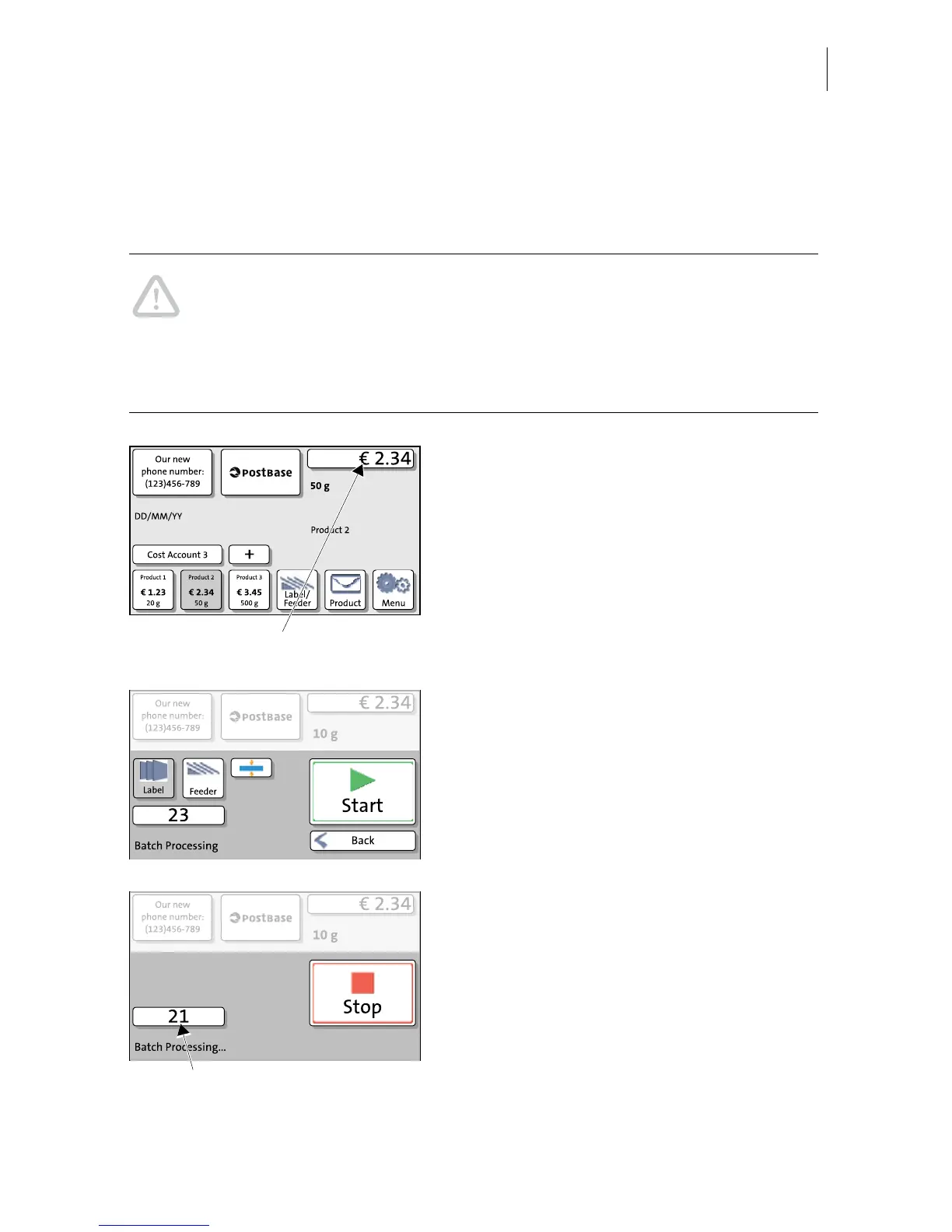
• In the Home screen, press the L
ABEL/
F
EEDER button.
PostBase opens a pop-up.
• Press the L
ABEL button.
• Press the S
TART button.
PostBase prints a label.
Franking several identical labels
• Press the L
ABEL button.
• Set the batch counter (see page 61).
• Press the START button.
PostBase prints the number of labels you
have set. The counter displays the number of
labels still to be franked.


 To Next Page