Franka Emika GmbH © October 2018
98
Wiring diagram
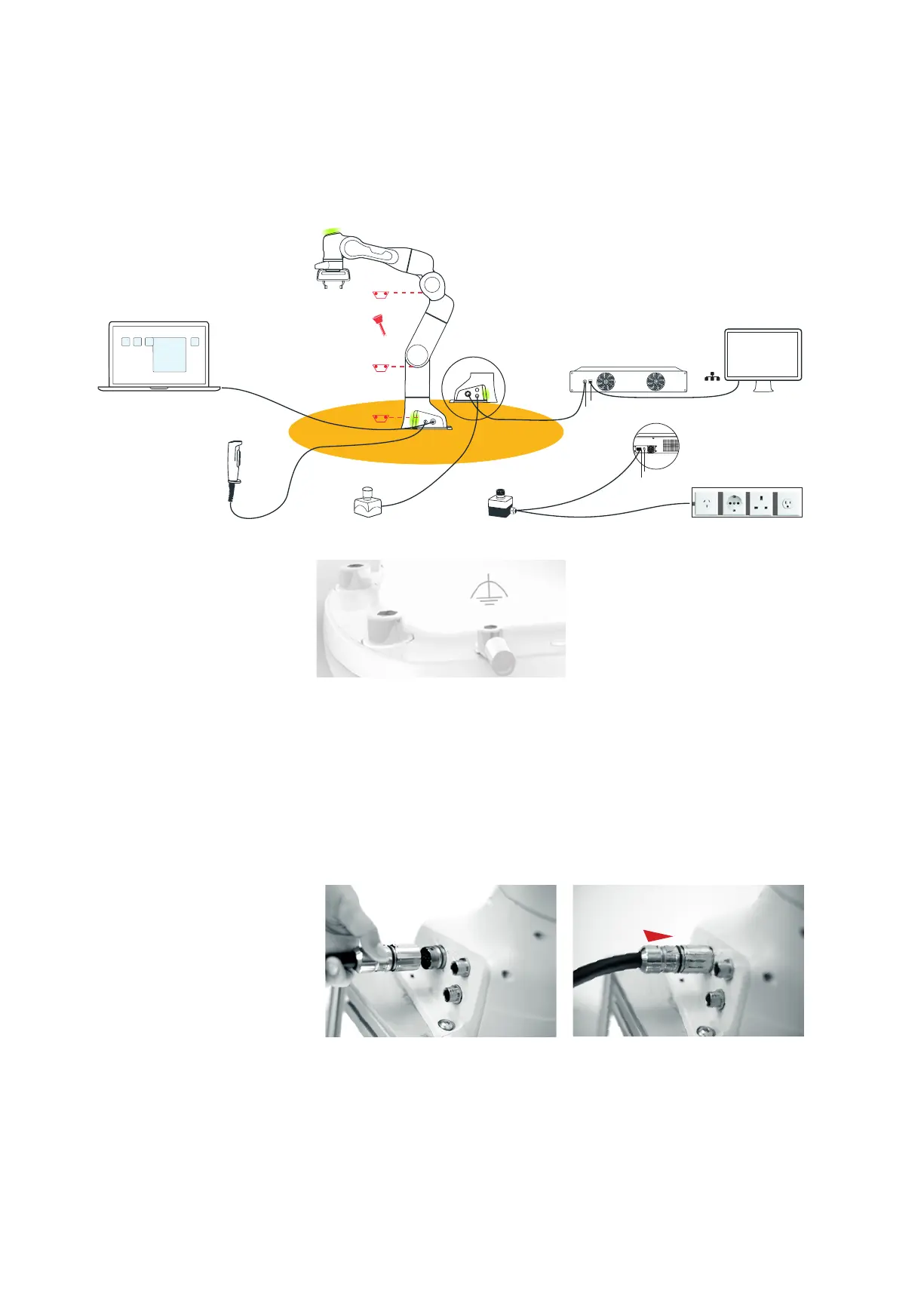
• Connect the funconal earth to the base of the Arm at the indicated posion.
• For this purpose, an M5 screw thread is available – the corresponding
grounding cable with end sleeve and an M5x8 screw with lock washer are not
included.
Connecng the funconal earth
• Insert the connector port of the Hand into the designated connector on
the grip of the Arm. It has to be simply pushed and not screwed!
Connecng the Hand to the
power supply
Connecng Arm and Control
• Carefully place the connector port onto the connector X1, the triangular
marking poinng upward.
• By turning the movable front part of the connector port, the plug itself is
pulled into the connector. Turn hand-ght.
External enabling device
Interface device with desk
External acvaon device Emergency stop device power supply
Australia/
China
Germany USAUK
X4 X5
Hand
Control
Power Cable
Power switch
Connecon cable
Ethernet (network)
X1
X2
X3
Arm
Safety Area
EMERGENCY
UNLOCK
EMERGENCY
UNLOCK
EMERGENCY
UNLOCK
Unlocking tool
Network/PC
MOUNTING & INSTALLATION



 To Next Page