15
Wall Controller Wiring Installation
FreshAire
®
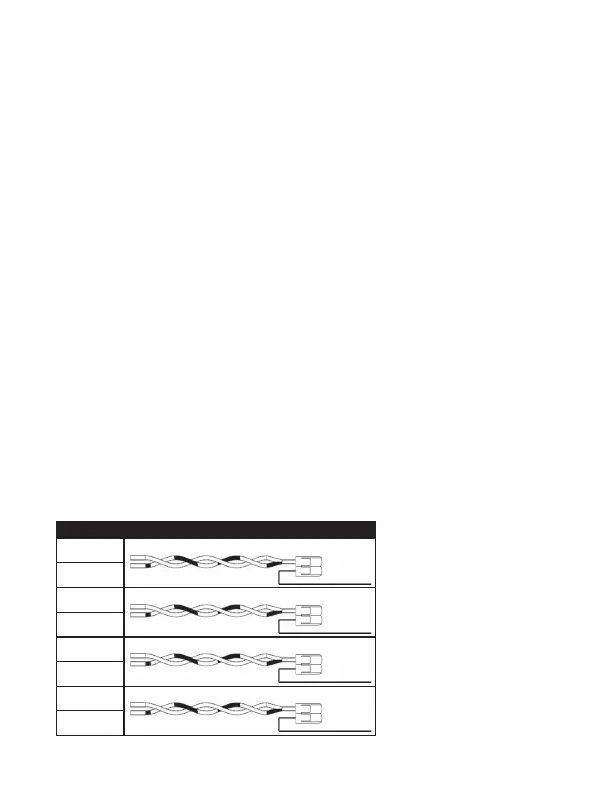
PTAC Installation (Wall Controller to Lever Connector)
Connection 1: Insert the Red (V+) wire from the Wall Controller into a lever
connector slot and close the orange lever on the connector.
Insert the twisted Blue and Brown/White Cat 6 wires into the remaining lever
connector slot and close the orange lever on the connector.
Connection 2: Insert the Blue (D-) wire from the Wall Controller into a lever
connector slot and close the orange lever on the connector.
Insert the twisted Green and Orange Cat 6 wires into the remaining lever
connector slot and close the orange lever on the connector.
Connection 3: Insert the Brown (D+) wire from the Wall Controller into a lever
connector slot and close the orange lever on the connector.
Insert the twisted White/Green and White/Orange Cat 6 wire into the remaining
lever connector slot and close the orange lever on the connector.
Connection 4: Insert the Green (V-) wire from the Wall Controller into a lever
connector slot and close the orange lever on the connector.
Insert the twisted White/Blue and Brown Cat 6 wire into the remaining lever
connector slot and close the orange lever on the connector.
Figure 6
WIRE COLOR LABEL
Blue
Connection 1
V+
Red
Brown/White
Green
Connection 2
D-
Blue
Orange
White/Green
Connection 3
D+
Brown
White/Orange
White/Blue
Connection 4
V-
Green
Brown


 To Next Page