SeaSTAR 3610 USER MANUAL
MODES OF OPERATION SETUP
Set the receiver to the required mode; DGNSS, HP/XP/G2 or VBS.
Note!
When the unit is first supplied, hasr not been used for a long period of time
or moved a large distance between use, it may take up to 40 minutes
before it starts to outputcorrections.
DGNSS mode setup
• In DGNSS mode, the RTCM data will be available from the output ports A and/or B.
The ports will need to be set up to match the requirements of your GPS receiver
RTCM IN port, use the Port cfg menu item to set these parameters (see page 16).
• In DGNSS mode, the GPS L1 output must be enabled. In addition, the GLO L1
output and Iono output could be enabled if GLONASS corrections and/or
ionospheric corrections shall be used.
HP/XP/G2 mode setup
• In HP/XP/G2 mode, the HP/XP/G2 data will be available from output ports A
and/or B. The ports will need to be set up to match the requirements of your GPS
receiver HP/XP/G2 IN port, use the Port cfg menu item to set these (see page 16).
• In HP/XP/G2 mode the HP/XP/G2 output must be enabled.
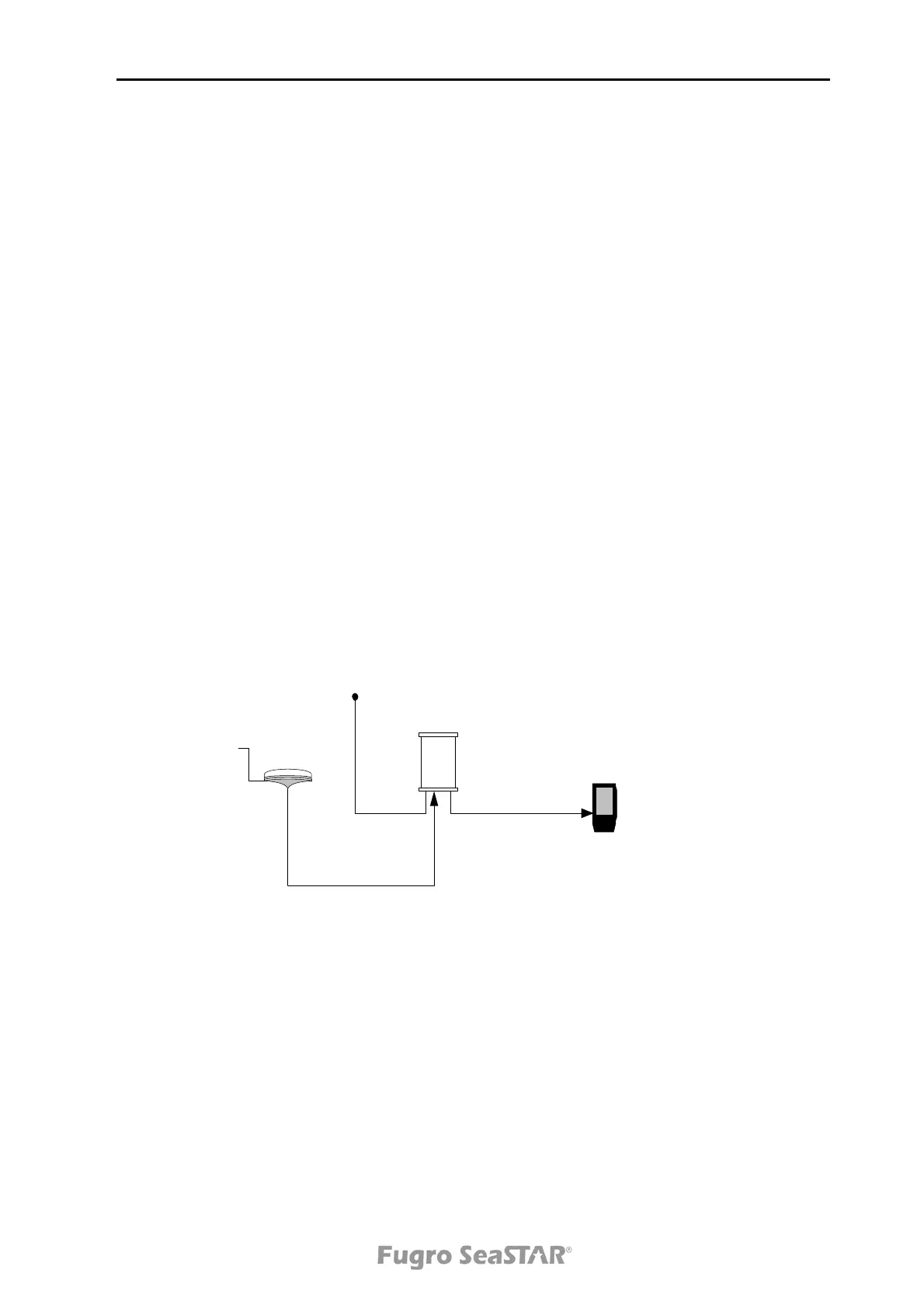
3610
receiver
GPS receiver
DGNSS antenna
DC power supply
A and/or B
PWR
ANT
Figure 2. Operating in DGNSS or HP/XP mode
VBS mode setup
In VBS mode a composite set of RTCM corrections is computed from the GPS
network data sent over the link. The following information is required to compute
these corrections; time (supplied via the link), GPS almanac data (supplied via the
link), and receiver location entered via the display config menu or through the GGA
message via a GPS receiver.
Issue 2.0 02/10
7


 To Next Page