SeaSTAR 3610 USER MANUAL
3610 DGNSS RECEIVER AND DPS SETUP EXAMPLE
The 3610 DGNSS receiver may be used together with a variety of DPS systems:
DPS 116, DPS 122, DPS 132, DPS 200, DPS 232 and DPS 700. The different DPS
systems use different SeaSTAR services:
DPS
system
SeaSTAR
DGNSS
SeaSTAR
Plus
SeaSTAR
HP
SeaSTAR
XP
SeaSTAR
G2
DPS 116
X
DPS 122
X
DPS 132
X X X X
DPS 200
X
DPS 232
X X X X X
DPS 700
X X X X X
To set up a DPS 122 and DPS 232 to use Fugro SeaSTAR services do the following:
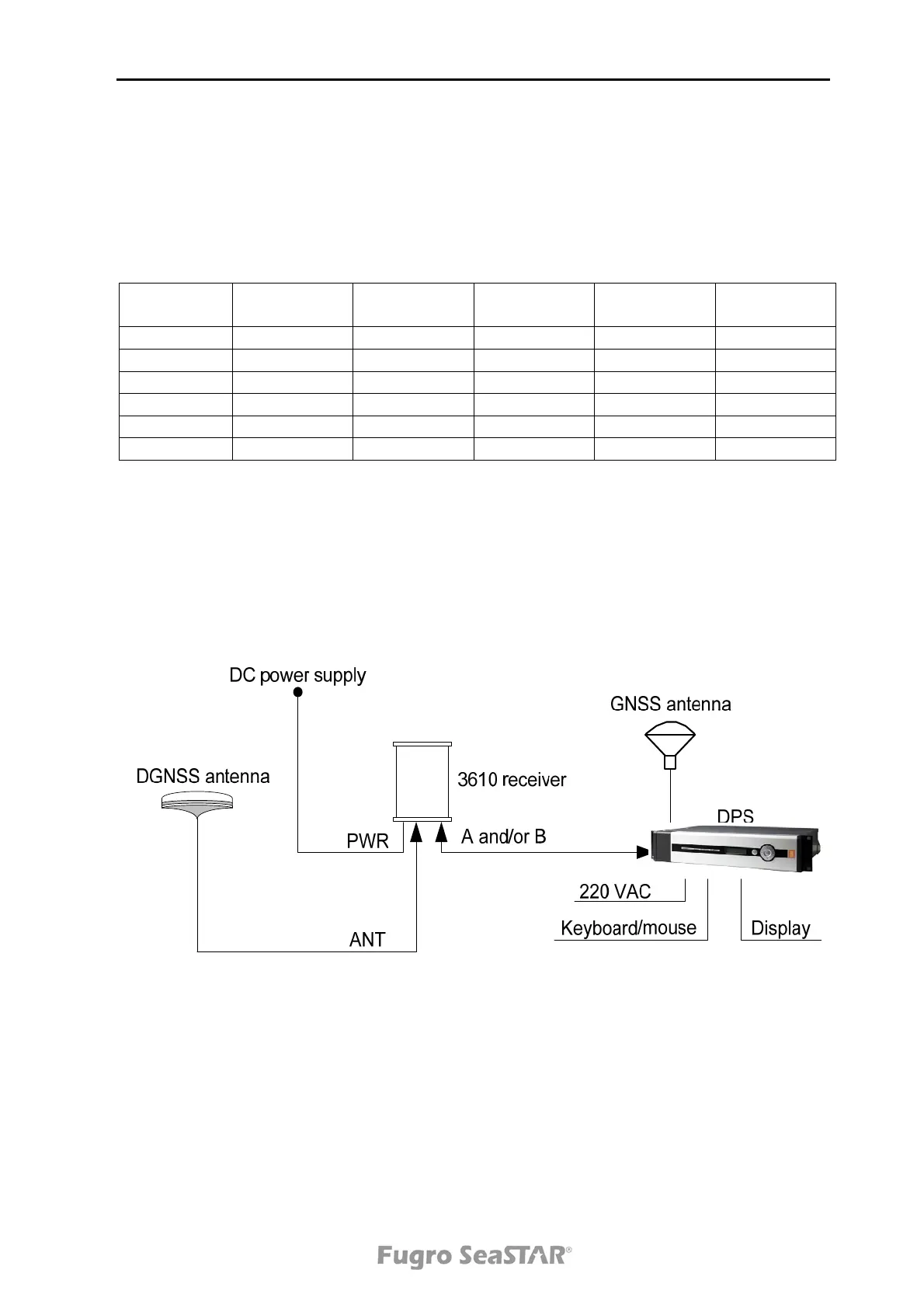
1. Connect the receiver and DPS as described in Figure 6. below.
Figure 6. DGNSS receiver and DPS connection
2. Power on the units. The DPS will start automatically.
3. In the DPS, select System|Change system mode. Select Configuration. A
dialog which requires a password will open. The password is "stx".
4. Select System|NavEngine config. This will open a text based configuration
file.
Issue 2.0 02/10
19


 To Next Page