10
4
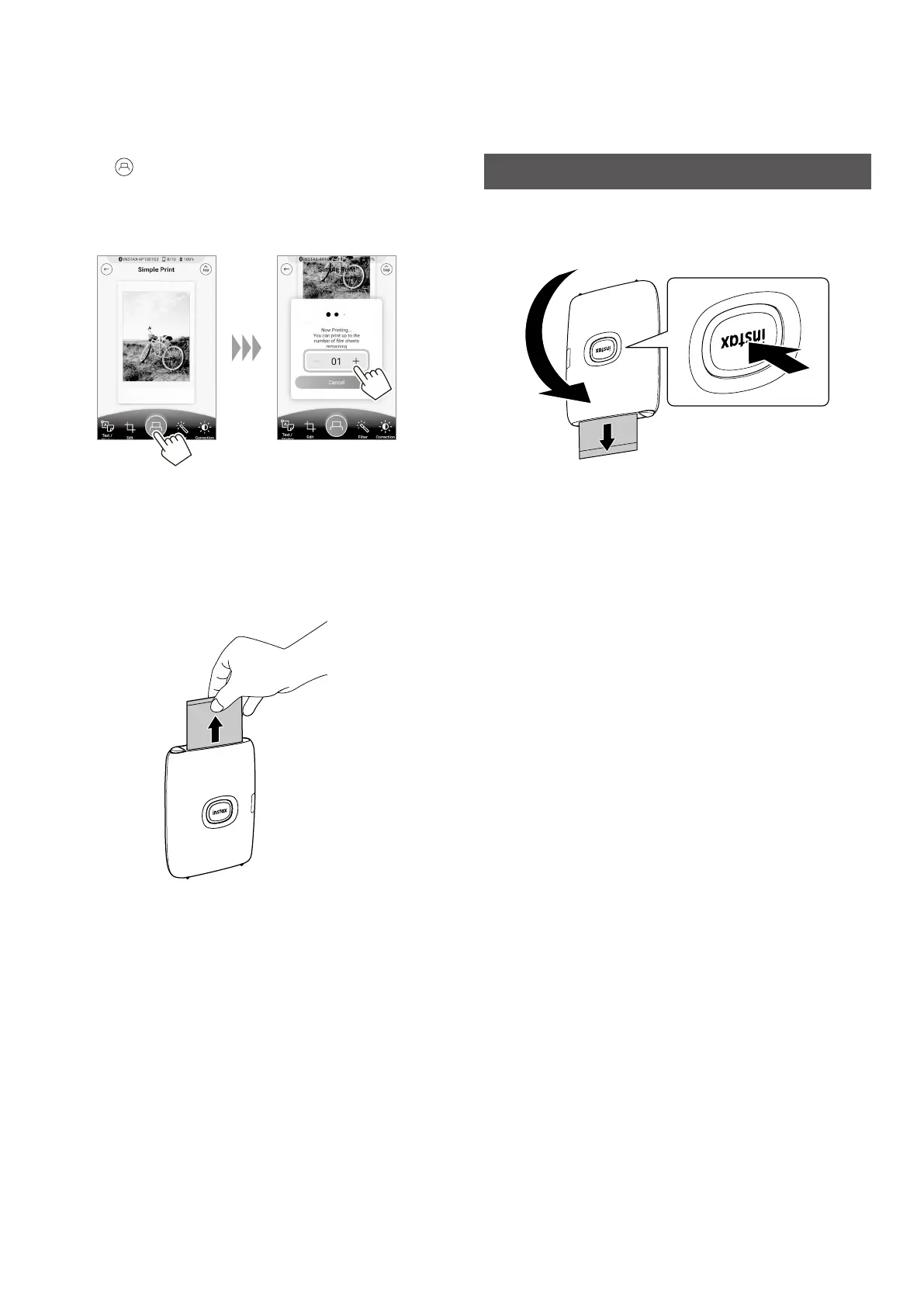
Tap or swipe the image up on the screen to print
your image�
After a slight transmission delay, the printer starts printing.
You can also select the number of images to print during
image transfer.
5
When the film has been ejected (the printer stops
making a sound), grasp the edge of the film, then
take it out�
Confirm the number of images remaining in your
INSTAX MINI instant film pack on the Smartphone App
screen.
Reprinting an Image
You can reprint the image you last printed by using the Reprint
motion sensor function.
Turn the printer over with the film ejection slot facing down and
press the Power button.
Notes
• When the printer is connected to the App and the App is in
INSTAX Camera mode, you cannot use the reprint function.
• When you turn the printer off, the image you last printed before
turning off the printer is deleted and the image cannot be
re-printed. In such a case, print the image from the App.
• When using the Reprint motion sensor feature and the printer is
turned upside down, please be sure to keep the printer at least
10 cm/4 in. away from any objects.













 To Next Page