12
Specifications
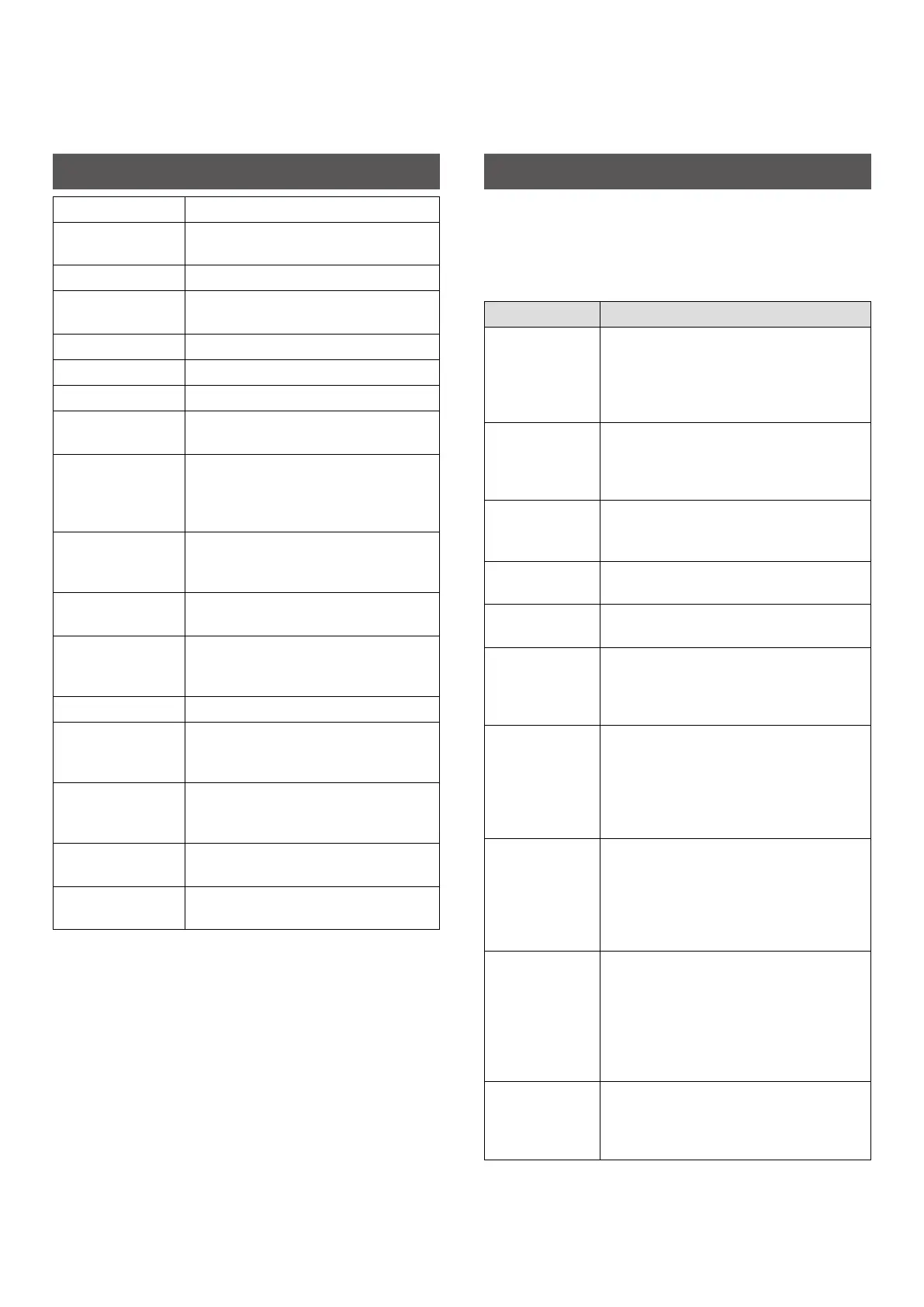
Recording method 3-color exposure with OLED
Film used FUJIFILM INSTAX MINI Instant Film (sold
separately)
Image size 2.4 in x 1.8 in/62 mm × 46 mm
Exposure pixel
count
800 × 600 dots
Exposure resolution 12.5 dots/mm (318 dpi, 80 μm dot pitch)
Exposure gradation RGB gradation of 256 colors
Interface Bluetooth Ver. 4.2 (BLE)
Printable image
format
JPEG, PNG, HEIF, DNG
Print transmission
time
Approximately 15 seconds for
transmission and to start printing
* Print development time approximately
90 seconds
Possible number of
printed images
Approximately 100 (from full charge;
number of prints depends on the usage
conditions.)
Power supply Lithium ion battery (internal type: not
removable)
Charging time Approximately 80 to 120 minutes
(depending upon environment
temperature at time of charging)
Power consumption Approximately 3 W
Operating
environment
Temperature: +41°F to +104°F (+5 °C to
+40°C)
Humidity: 20% to 80% (no condensation)
Main unit
dimensions
3.6 in × 1.4 in × 4.9 in (91.9 mm × 36.4
mm × 124.8 mm) excluding projecting
parts
Main unit weight Approximately 0.46 lbs (210 g) excluding
film pack
Supplied accessory Micro USB cable (BOD700)
Length: 11.8 in (30 cm)
*The above specifications are subject to change.
Troubleshooting
Please check the following items before considering a problem to
be a malfunction. If the problem persists even after taking action,
please contact the Fujifilm service center for repair in your country
or visit the website below.
https://instax.com/mini_link_2/en/support/faq/
If the following problem occurs���
Problem Possible causes and solutions
I cannot turn on
the printer.
• The battery may not be charged. Please
charge the printer.
• You did not press the Power button long
enough. Press and hold the Power button
for approximately 1 second.
The battery loses
its charge
quickly.
If you use the printer in a very cold
environment, the battery will drain quickly.
Please keep the printer warm before
printing.
The printer
turned off during
use.
The battery level may be low. Please charge
the printer.
Charging does
not start.
Make sure that the USB power adapter plug
is properly connected to the power outlet.
It takes too long
to charge.
At low temperatures, charging may take
some time.
Charging does
not start or
prematurely
stops.
Charge the battery in a temperature range
of 41°F to 104°F (5°C to 40°C). If you cannot
charge the printer in this range, contact
your FUJIFILM dealer or support center.
The printer does
not work
properly.
• There may be a temporary malfunction.
Please press the reset button. If it still
does not work properly, please contact
our repair service center for repair.
• The battery may not be charged. Please
charge the printer.
The film pack
does not load or
does not load
smoothly.
• Please use FUJIFILM INSTAX MINI instant
print film only (INSTAX SQUARE or INSTAX
WIDE instant print film cannot be used).
• Align the yellow mark on the film pack
with the printer alignment mark (yellow)
and load it.
The film does not
unload.
• The film may be misaligned due to shock
such as vibration or dropping. Please load
a new film pack.
• If the film is jammed, turn the printer off
and turn it on again. If the problem
persists, remove the jammed film and
then load a new film pack.
Some or all of the
finished prints
are white.
Do not open the film door until the film is
used up. If the film door is opened with film
remaining, the film is exposed and the
exposed area becomes white.














 To Next Page