4.3 Confirming system status [Status Display]
4–7
4. Accessing each display
4.3 Confirming system status [Status Display]
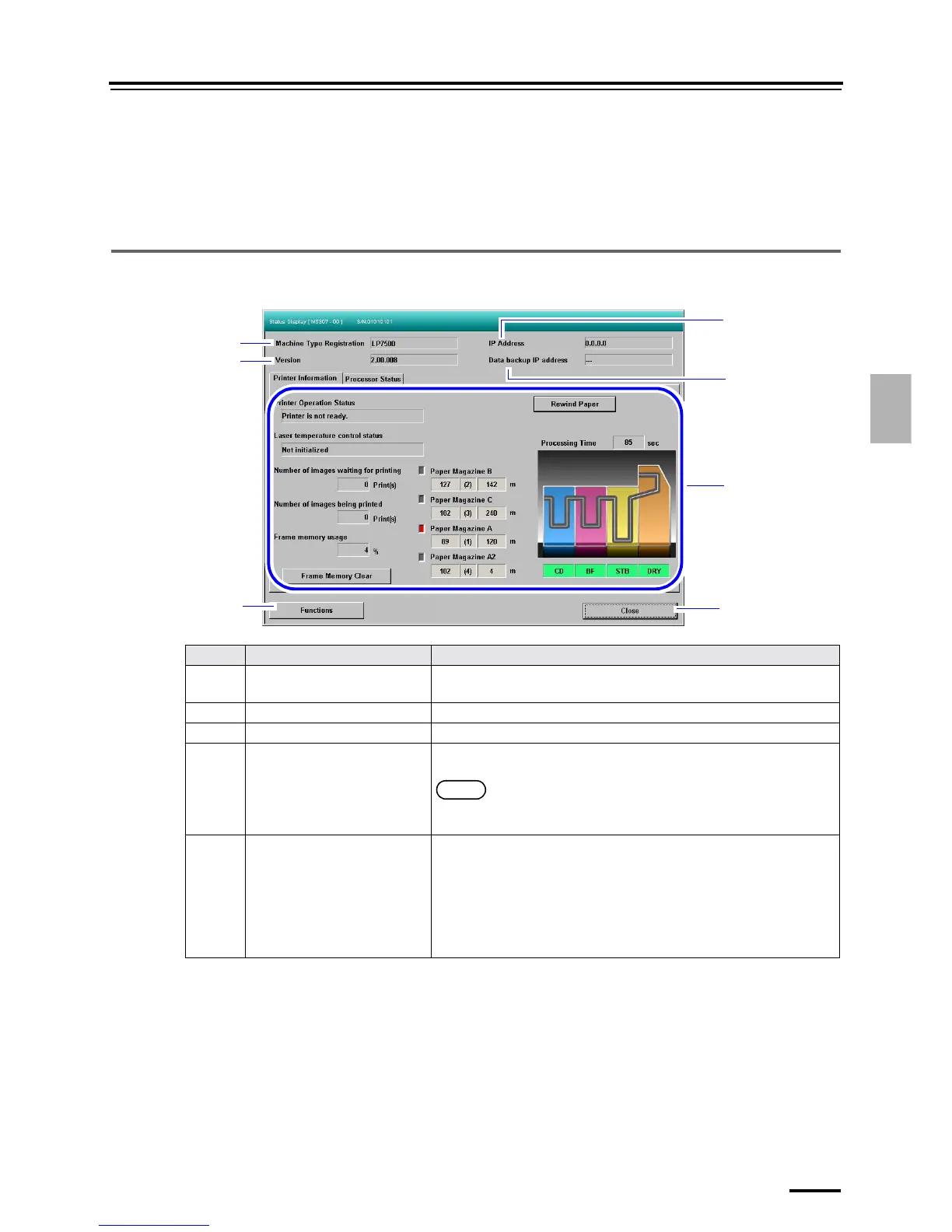
Detailed status of the printer and processor sections can be confirmed on this display.
Bringing up the display
On the Maintenance display, click Status Display.
4.3.1 Status Display
Example: Status Display display
No. Name Functions
1 Machine Type Registration Displays the Machine Type Registration name registered on the Output
Device Registration display.
2 Version Displays the version of the selected device.
3 IP Address Displays the IP Address of the selected device.
4 Data backup IP address Displays the IP Address of the PC on which the backup data of the device is
saved.
NOTE
• The backup data is automatically saved when the Close Down Checks
is performed.
5 Printer Information/Processor
Status
" Printer Information
Displays information of the printer section.
• For details, see
☞4.3.2 Printer Information.
" Processor Status
Displays information of the processor section.
• For details, see
☞4.3.3 Processor Status.
1
2
3
4
5
6
7
S5307-00-UM00F






 To Next Page