4.3 Confirming system status [Status Display]
4–10
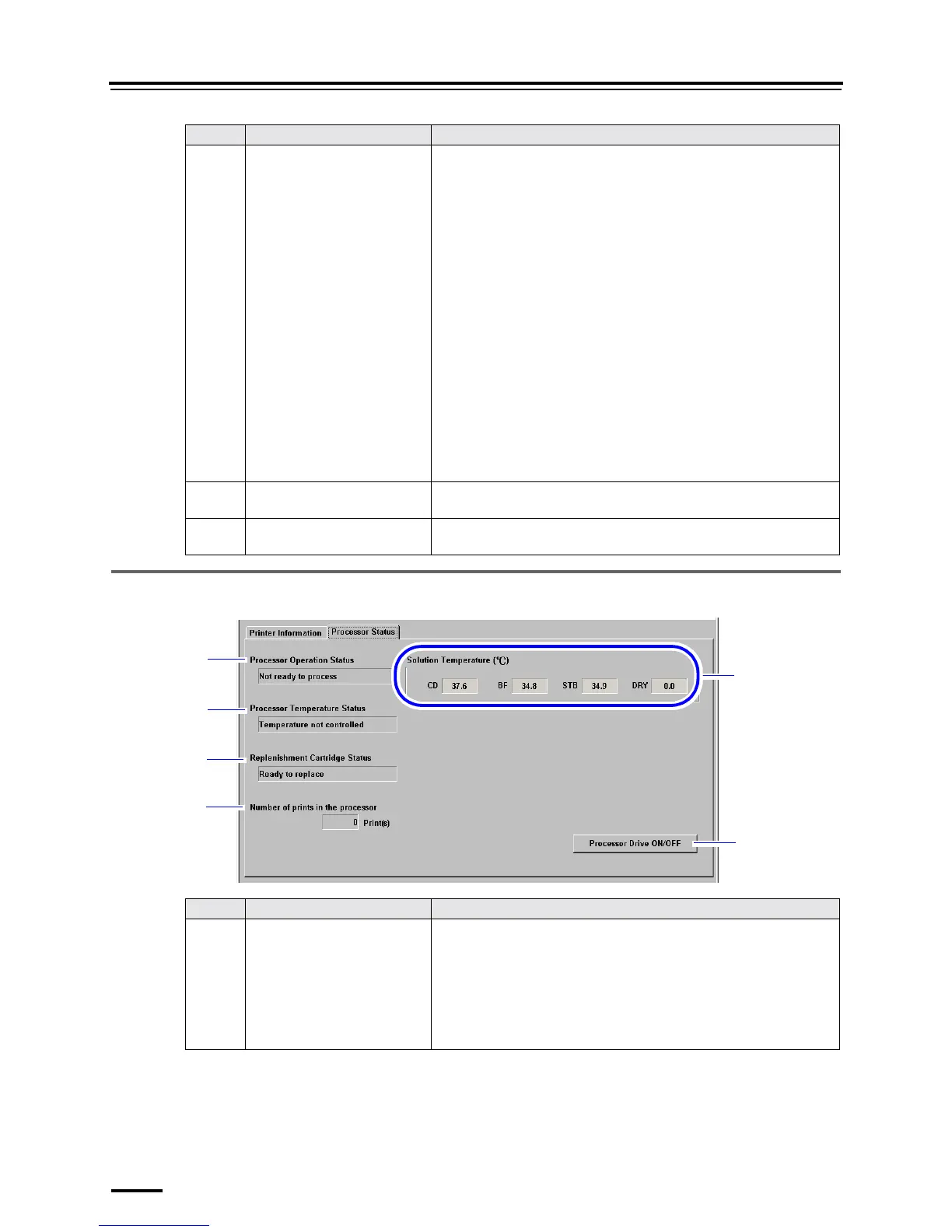
4.3.3 Processor Status
8 Paper position display in the
Processor
" Processing solutions
The background color of the processing solution name is different
depending on the condition of each processing solution.
• Background color: red
Cannot perform temperature adjustment of the processing
solution.
• Background color: pink
Performing temperature adjustment of the processing solution.
• Background color: yellow
Paper is passing through the processing solution tank.
• Background color: green
The temperature adjustment of the processing solution has
finished.
• Background color: gray
The system has not started up.
" Paper position display
Yellow circles show paper positions.
Positions of prints received with another operation PC are shown in
blue circles.
9 Processing Time Displays total processing time of P1, P2, PS and DRY by a second.
10 Rewind Paper button Click this to rewind paper.
Cannot perform this while printing.
No. Name Functions
1 Processor Operation Status Displays the status of the processor.
• Not ready to process
Printing cannot be performed.
• Ready to process
Printing can be performed.
• Operating. . .
Printing is being performed.
No. Name Functions
1
2
3
4
5
6
S5307-00-UM01F





 To Next Page