3.2 Closing down the system
3–9
3. Turning power on/off
IMPORTANT
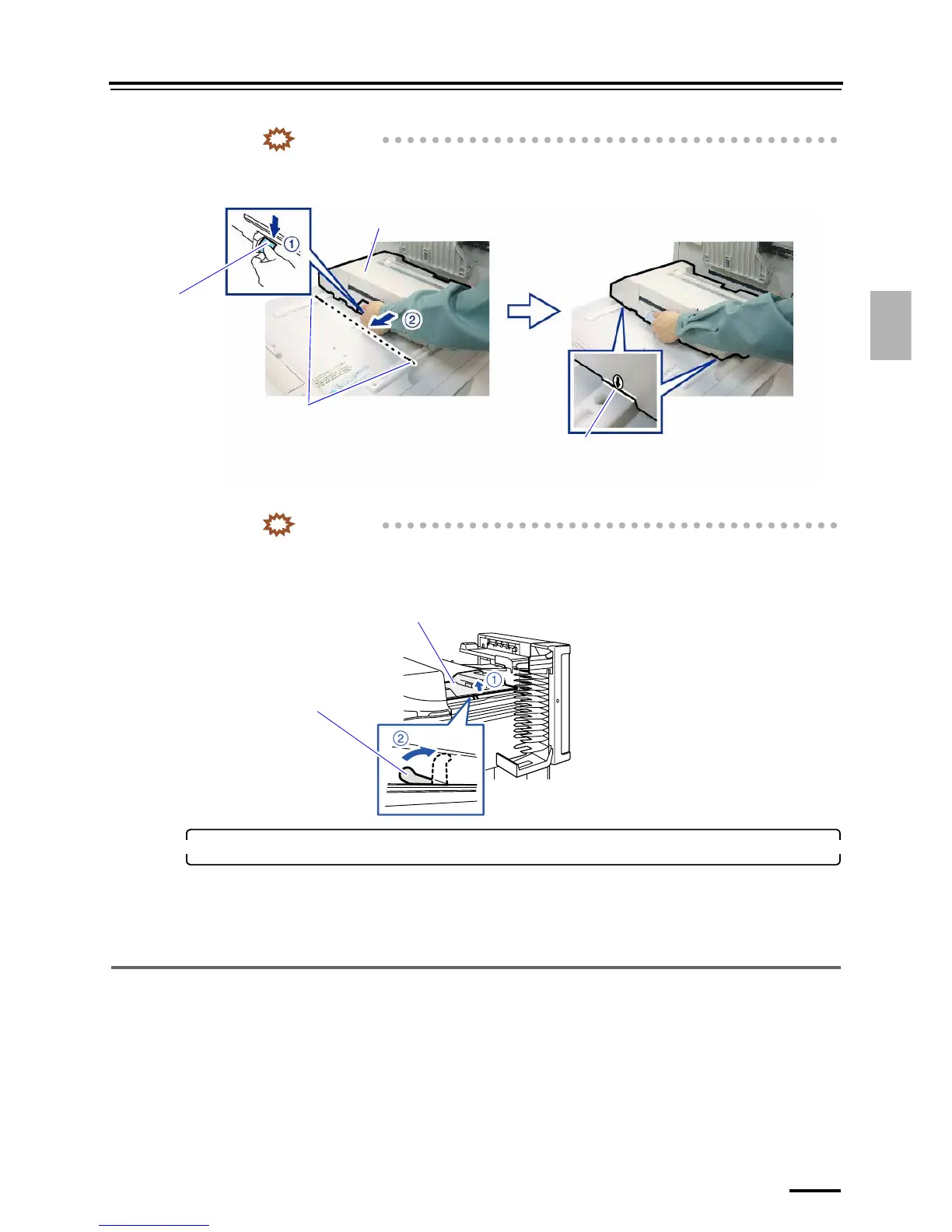
• When opening the processor top cover, confirm that the colorimeter unit is locked at the
central point of the rail. If the processor top cover is forcibly opened while the colorimeter unit
is at the left end of the rail without being locked, the unit falls down.
(2) Raise the stand and keep the processor top cover slightly open.
IMPORTANT
• If the processor top cover is closed, the solution drops accumulate on the back of the cover
and mix with the other solution. If a processing solution gets mixed with a solution of a
previous process, the contaminated solution cannot be used for processing. All the
contaminated solutions must be replaced.
5. Turn off the operation PC power supply.
Turn off the power of the operation PC as needed.
• For details about how to turn off the power supply of the operation PC, see the Controller Operator's
Manual.
This completes closing down the system with the program timer.
3.2.2 Closing down the system without using the program timer
You can close down the system without the program timer. The solution temperature adjustment is not started until you start
the system.
• If you will not use the system over the next five days, refer to
☞3.2.3 Closing down the system when you do not use it
over the next five days.
Colorimeter unit
Lever
Cutouts
Align the arrows to the central cutouts of the rails.
G088871
Processor top cover
Stand
G088938





 To Next Page