4
TEST OPERATION
4-4
(4) Perform test operation at the keypad panel.
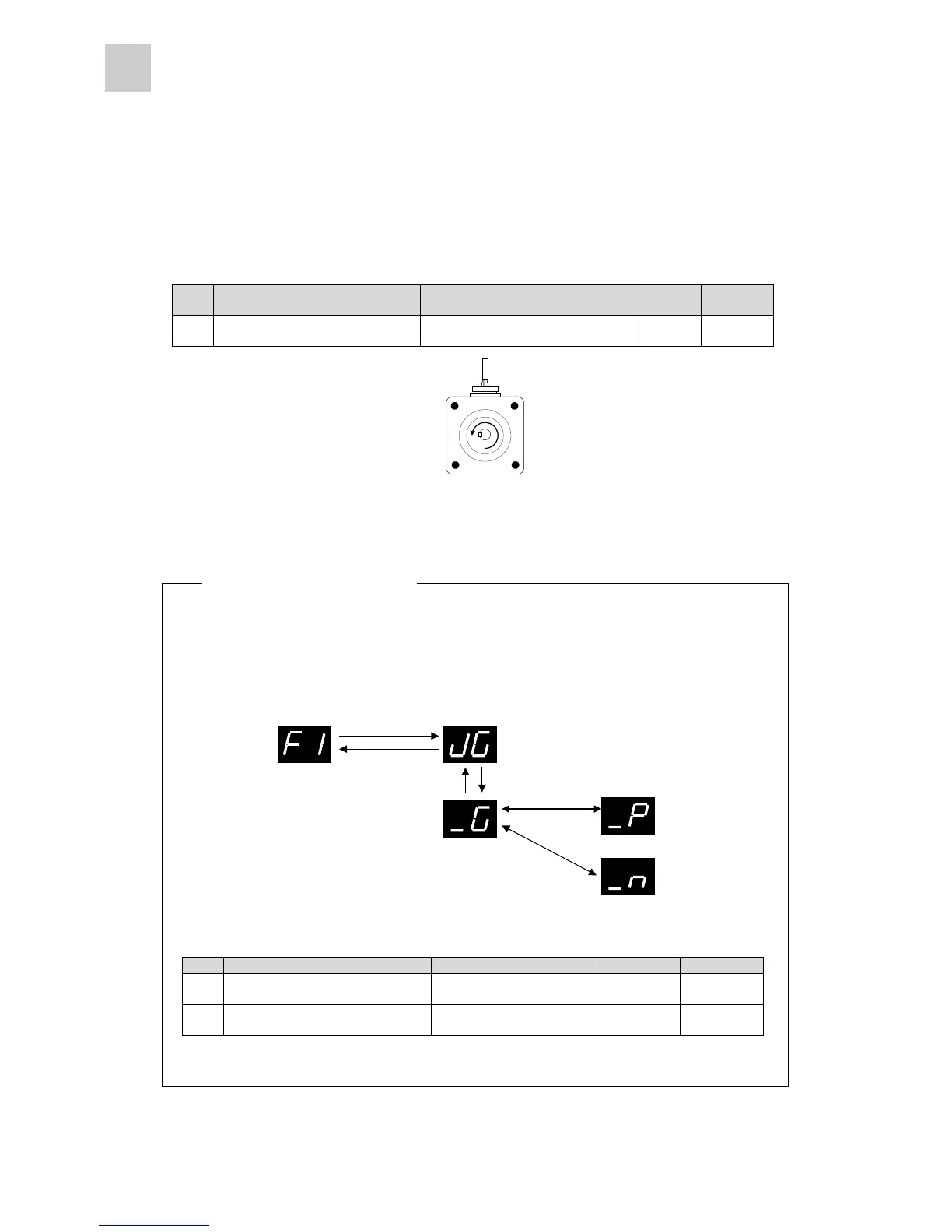
Use the keypad panel to turn the servomotor. Check that the servomotor turns in the correct direction.
Basic setting parameter #04
No. Name Setting range
Initial
value
Change
04 Direction of rotation switch
0: Forward rotation (CCW)
1: Reverse rotation (CW)
0 Power
If no fault is found in the first stage, go to the second stage.
System setting parameters #29 and #30
No. Name Setting range Initial value Change
29
Speed setting
(for test operation)
1 to 5000 [r/min]
(in 1 increments)
100 Always
30
Acceleration / deceleration time
(for test operation)
0.000 to 9.999 sec.
(in 0.001 increments)
0.100 Always
ENT (1 sec. or more)
ESC
∧
∨
ENTESC
Off-line
Rotation in
forward direction
Rotation in
reverse direction
* The servomotor rotates while the ∧ or ∨ key is held down.
Test operation at keypad panel
Use the MODE key to start the test operation mode.
The servomotor rotates while the key on the keypad panel is held down. The servomotor rotates at
the speed specified at parameter #29 with the acceleration and deceleration time specified at
parameter #30.
Forward rotation (CCW)



 To Next Page