KEYPAD PANEL
8
8-15
8-6) Test running mode
In the test running mode, keying on the keypad panel can rotate the servomotor or reset various settings
of the servo amplifier.
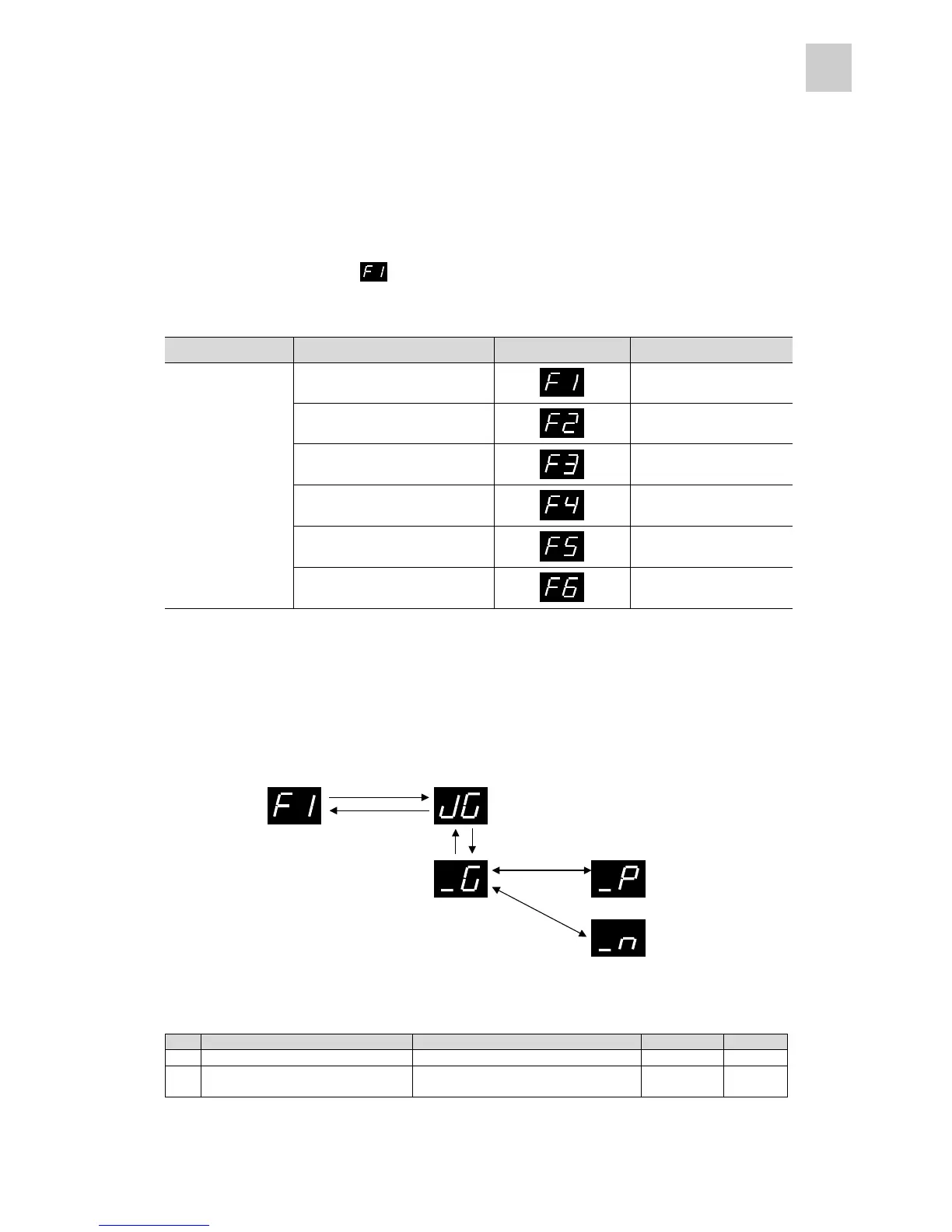
Press the MODE key to display [ ] and hold down the ENT key for at least 1 second to execute test
running.
Mode Sub-mode Sub-mode indication Relevant parameters
1. Manual operation Parameters #29 and #30
2. Alarm reset -
3. Alarm history initialization -
4. Parameter initialization Parameter #27
5. Phase-Z position adjustment Parameter #18
Test running mode
6. Auto tuning gain setting
Parameter #7
(1) Manual operation
The servomotor rotates while a key on the keypad panel is pressed. The servomotor speed is as per the
setting of parameter #29 and the acceleration/deceleration time is as per the setting of parameter #30.
* The servomotor rotates while the ∧ or ∨ key is held down.
System setting parameters #29 and #30
No. Name Setting range Initial value Change
29 Speed setting (for test operation) 1 to 5000 [r/min] (in 1 increments) 100 Always
30
Acceleration / deceleration time
(for test operation)
0.000 to 9.999 sec.
(in 0.001 increments)
0.100 Always
ENT (1 sec or more)
ESC
∧
∨
ENTESC
Offline
Rotation in positive direction
Rotation in negative direction



 To Next Page