100
Viewing Pictures on a Computer
Connecting the Camera
1
Find a memory card containing pictures you want to copy to the computer and insert the card into
the camera (P 13).
R Windows users may require the Windows CD when starting the software for the rst time.
Q Loss of power during transfer could result in loss of data or damage to the memory card. Insert a fresh or
fully-charged battery before connecting the camera.
2
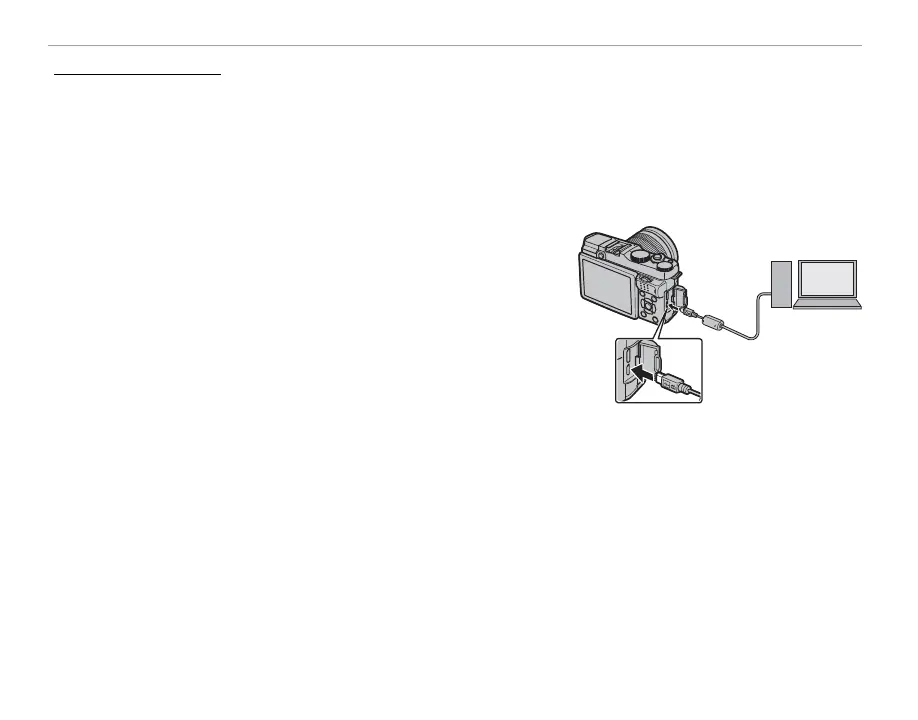
Turn the camera o and connect a USB cable (available sepa-
rately from third-party suppliers) as shown, making sure the
connectors are fully inserted. Connect the camera directly to
the computer; do not use a USB hub or keyboard.
Q The USB cable must be no more than 1.5 m (4.9 ft.) long and be suitable for data transfer.
3
Turn the camera on.
4
Upload pictures in MyFinePix Studio and
follow the on-screen instructions to copy pictures to the
computer. To exit without copying pictures, click Cancel.
For more information on using the supplied software, start the application and select the appropriate
option from the Help menu.



 To Next Page