9
Before You Begin
Lenses
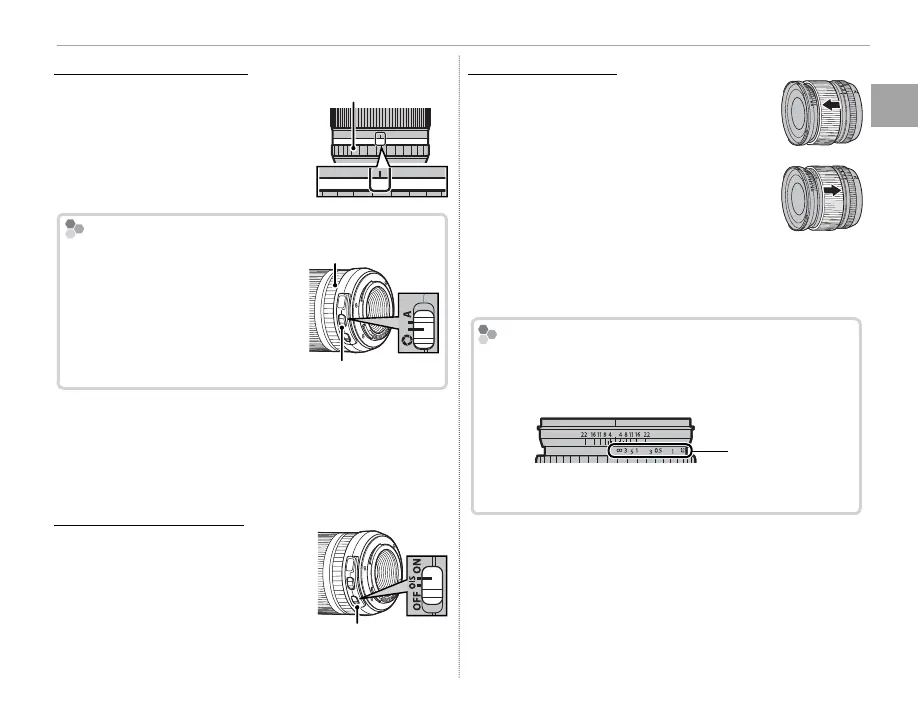
Lenses with Aperture Rings
Lenses with Aperture Rings
At settings other than A, you
can adjust aperture by rotating
the lens aperture ring (expo-
sure modes A and M).
Aperture ring
A161185.64
The Aperture Mode Switch
If the lens has an aperture mode
switch, aperture can be adjusted
manually by sliding the switch
to Z and rotating the aperture
ring.
Aperture ring
Aperture mode switch
Q When the aperture ring is set to A, rotate the sub-
command dial to adjust aperture.
R For information on the roles of the main and sub-
command dials, see page 125.
Lenses with O.I.S. Switches
Lenses with O.I.S. Switches
To activate image stabilization,
slide the switch to ON.
O.I.S. switch
Manual Focus Lenses
Slide the focus ring to the front for
autofocus.
For manual focus, slide the focus ring
to the back and rotate it while check-
ing the results in the camera display.
The focus distance and depth-of- eld
indicators can be used to assist manual
focus. Note that manual focus may not
be available in all shooting modes.
The Depth-of-Field Indicator
The Depth-of-Field Indicator
The depth-of- eld indicator shows the approximate
depth of eld (the distance in front of and behind the
focus point that appears to be in focus).
Distance
indicator
Q The camera does not display the focus distance when
the lens is in manual focus mode.



 To Next Page