33
The Q (Quick Menu) Button
The Q (Quick Menu) Button
The Q (Quick Menu) Button
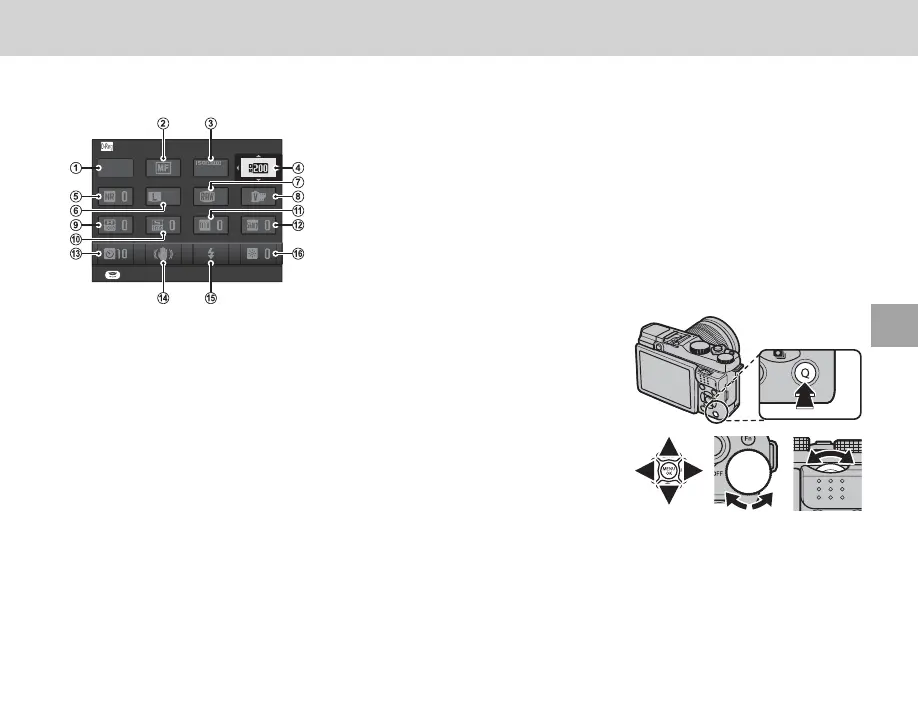
Press Q for quick access to the following items. For more information on the options available, see the
pages listed below.
DYNAMIC RANGE
SET
3:2
F
400
P
A
A SHOOTING MODE ................................... 34
B
F FOCUS MODE .......................................... 50
C
N ISO ........................................................... 48
D
U DYNAMIC RANGE .................................... 72
E
h NOISE REDUCTION ................................. 73
F
O IMAGE SIZE ............................................. 71
G
T IMAGE QUALITY ...................................... 72
H
P FILM SIMULATION.................................. 62
I
r HIGHLIGHT TONE ................................... 72
J
s SHADOW TONE ....................................... 73
K
f COLOR ..................................................... 72
L
q SHARPNESS ............................................ 72
M
B SELF-TIMER ............................................ 29
N
L IS MODE .................................................. 74
O
p FLASH MODE .......................................... 27
P
J LCD BRIGHTNESS ................................... 85
1
Press Q to display the quick menu during shooting.
2
Use the selector to highlight items and rotate the main/sub-com-
mand dial to change.
3
Press Q to exit when settings are complete.



 To Next Page