2
Parts of the Camera
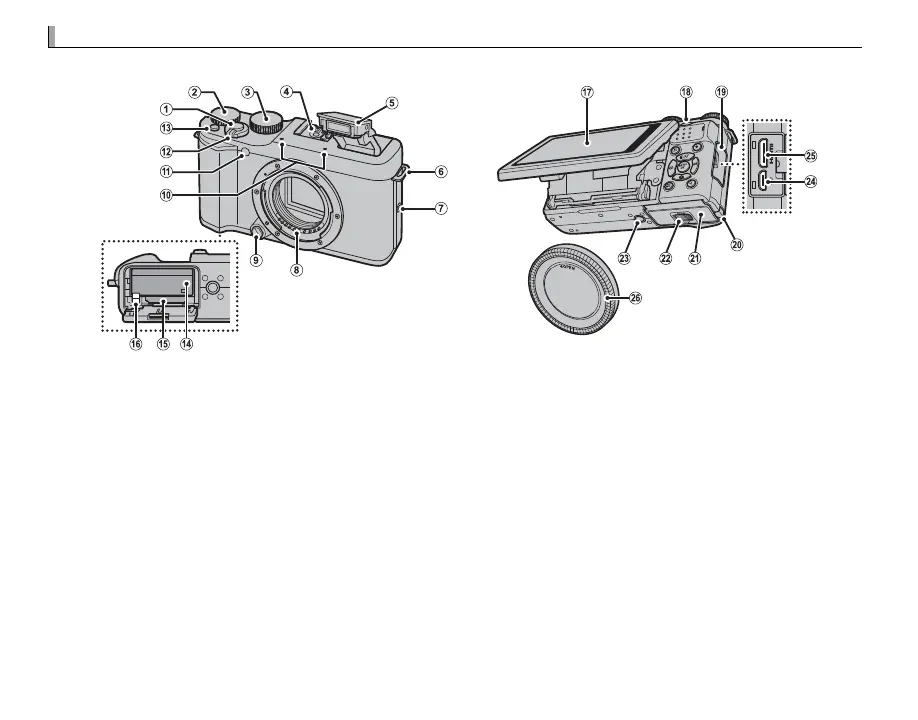
For more information, refer to the page listed to the right of each item.
A
Shutter button ................................................ 22
B
Main command ..........................................5, 125
C
Mode dial ........................................................ 34
D
Hot shoe ...................................................27, 112
E
Flash ............................................................... 27
F
Strap eyelet ..................................................... 10
G
Speaker ........................................................... 32
H
Lens signal contacts
I
Lens release button ......................................... 11
J
Microphone ..................................................... 31
K
AF-assist illuminator ....................................... 76
Self-timer lamp ............................................... 29
L
ON/OFF switch ............................................... 17
M
Fn (function) button ...................................... 65
Fn button options display button (press and hold)
*
Wi-Fi button (playback mode) ........................ 94
N
Battery chamber ............................................. 13
O
Memory card slot ............................................ 14
P
Battery latch ................................................... 13
Q
LCD monitor ...................................................... 5
R
Sub-command dial ....................................5, 125
S
Connector cover .............................100, 102, 109
T
Cable channel cover for DC coupler
U
Battery-chamber cover ................................... 13
V
Battery-chamber cover latch ........................... 13
W
Tripod mount
X
Micro USB/ .............................................100, 102
remote release connector ...........................42, 44
Y
HDMI mini connector .................................... 109
Z
Body cap ......................................................... 11
* Press and hold to access F Fn BUTTON SETTING menu.



 To Next Page