3
Before You Begin
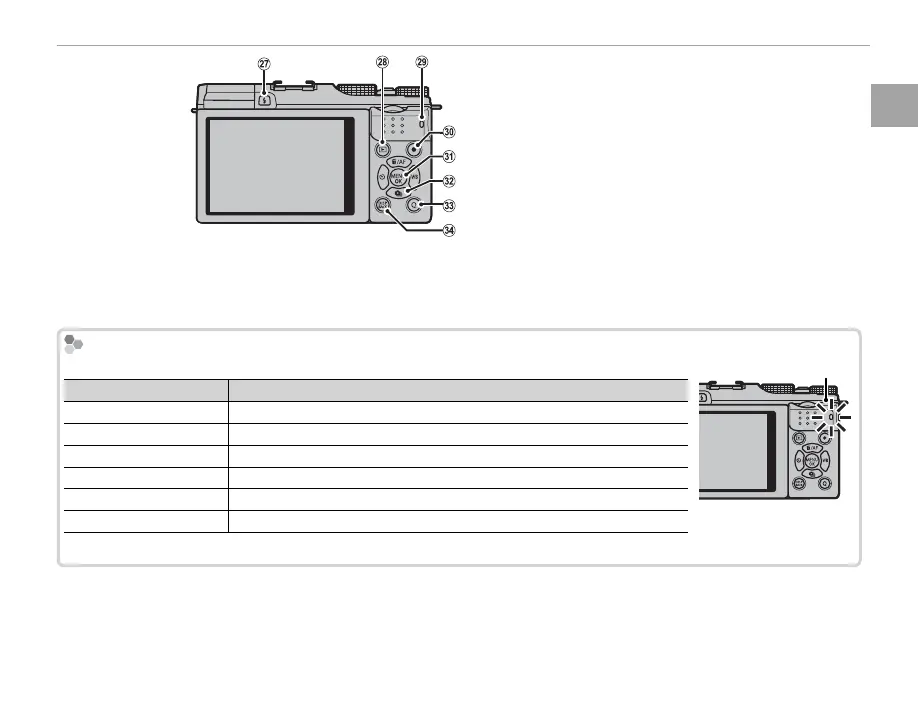
Parts of the Camera
a
N ( ash pop-up) button ................................. 27
b
a (playback) button ..................................... 23
c
Indicator lamp (see below)
d
t(movie recording) button ........................... 31
e
MENU/OK button ............................................. 4
X (control lock) button (press and hold) ........ 4
f
Selector ............................................................. 4
g
Q (quick menu) button .................................... 33
Monitor sunlight mode button
(press and hold) ................................................ 4
RAW conversion button (playback mode) ....... 64
h
DISP (display)/BACK button ........................... 19
o (silent mode) button (press and hold) ....... 4
The Indicator Lamp
The indicator lamp shows camera status as follows:
Indicator lamp
Camera status
Glows green Focus locked.
Blinks green Blur, focus, or exposure warning. Picture can be taken.
Blinks green and orange Recording pictures. Additional pictures can be taken.
Glows orange Recording pictures. No additional pictures can be taken at this time.
Blinks orange Flash charging; ash will not re when picture is taken.
Blinks red Lens or memory error.
Indicator lamp
R Warnings may also appear in the display (P 121).



 To Next Page