82
Using the Menus: Playback Mode
K
PRINT ORDER (DPOF)
Select pictures for printing on DPOF- and PictBridge-compatible devices (P 105).
J
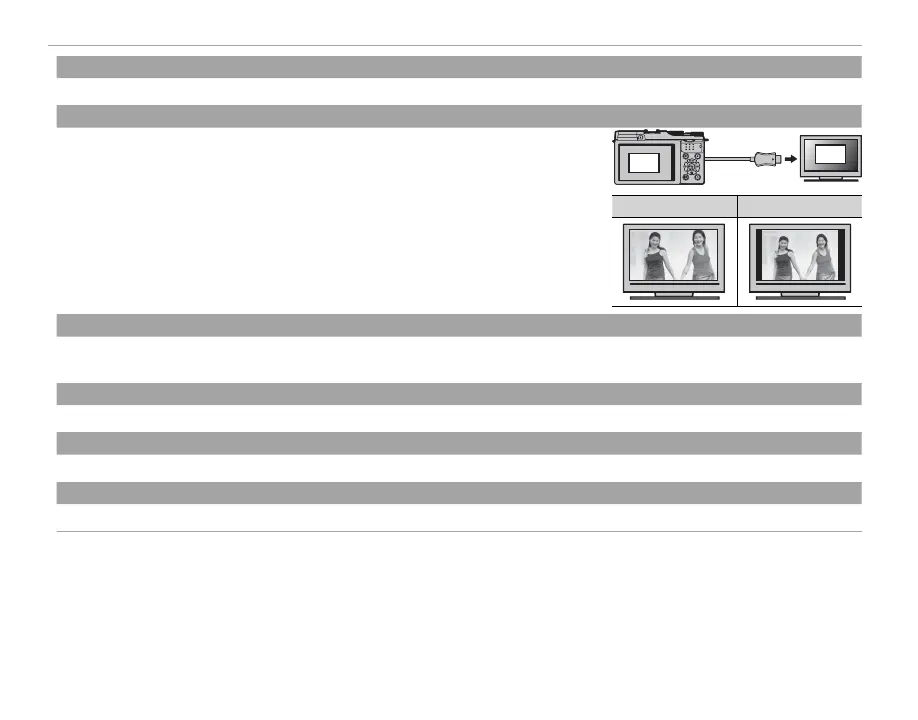
DISP ASPECT
Choose how High De nition (HD) devices display pictures with an aspect ratio of 3 : 2
(this option is available only when an HDMI cable is connected). Select 16 : 9 to display
the image so that it lls the screen with its top and bottom cropped out, 3 : 2 to display
the entire image with black bands at either side.
3:2
16:9
16 : 9
3 : 2
r
WIRELESS TRANSFER
Connect via a wireless network to upload pictures to smartphones or tablets or to remotely browse the pictures on the camera
and select images for download (P 92).
s
PC AUTO SAVE
Upload pictures to a computer over a wireless network (P 96).
V
instax PRINTER PRINT
Print pictures on optional FUJIFILM instax SHARE printers (P 107).
j
RAW CONVERSION
Create JPEG copies of RAW pictures (P 64).



 To Next Page