28
Using the Flash
Q Depending on the distance to the subject, some lenses may cast shadows in photos taken with the ash.
R Lowering the ash turns the ash o (P) and prevents it ring even when the subject is poorly lit; use of a
tripod is recommended. Lower the ash where ash photography is prohibited or to capture natural lighting
under dim light. We also recommend that you lower the ash when the camera is o .
R If p is displayed when the shutter button is pressed halfway, the ash will re when the photo is taken.
R Except in commander mode, the ash may re several times with each shot. Do not move the camera until
shooting is complete.
Flash Sync Speed
The ash will synchronize with the shutter at shutter speeds of
/
s or slower.
Optional Flash Units
The camera can also be used with optional FUJIFILM shoe-mounted ash units. Do not use third-party ash
units that apply over 300 V to the camera hot shoe.
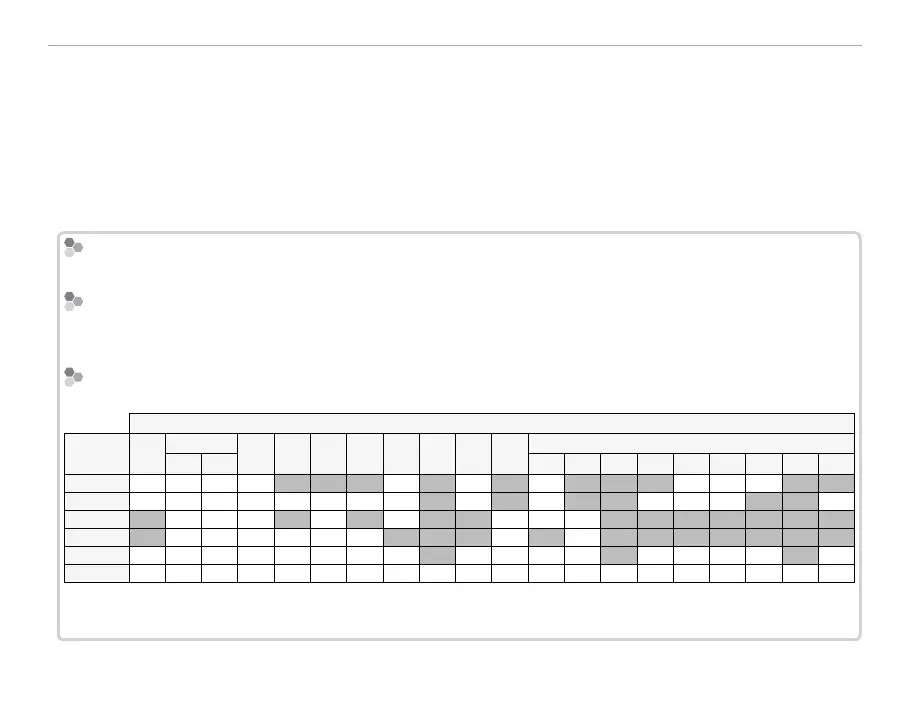
Flash Mode and Shooting Mode
Flash Mode and Shooting Mode
The ash modes available vary with the shooting mode:
Shooting mode
Flash
mode
S
Adv.
P
S
A
M
h
(
Z
)
M
N
O
SP
Y
j
h
H
p
Q
R
s
U
V
W
AUTO/
K
✔
✔
✔
✔
✔
✔
✔
✔
✔
✔
N
/
L
✔
✔
✔
✔
✔
✔
✔
✔
✔
✔
✔
✔
✔
✔
O
/
M
✔
✔
✔
✔
✔
✔
✔
✔
l
/
d
✔
✔
✔
✔
✔
✔
✔
✔
D
✔
✔
✔
✔
✔
✔
✔
✔
✔
✔
✔
✔
✔
✔
✔
✔
✔
P
✔
✔
✔
✔
✔
✔
✔
✔
✔
*
✔
✔
✔
✔
✔
*
✔
✔
✔
✔
✔
*
✔
* Flash mode selected automatically.
R The ash turns o (P) automatically in silent mode (P 84) and burst mode (P 59).



 To Next Page