107
Menus
The Setup Menu
b
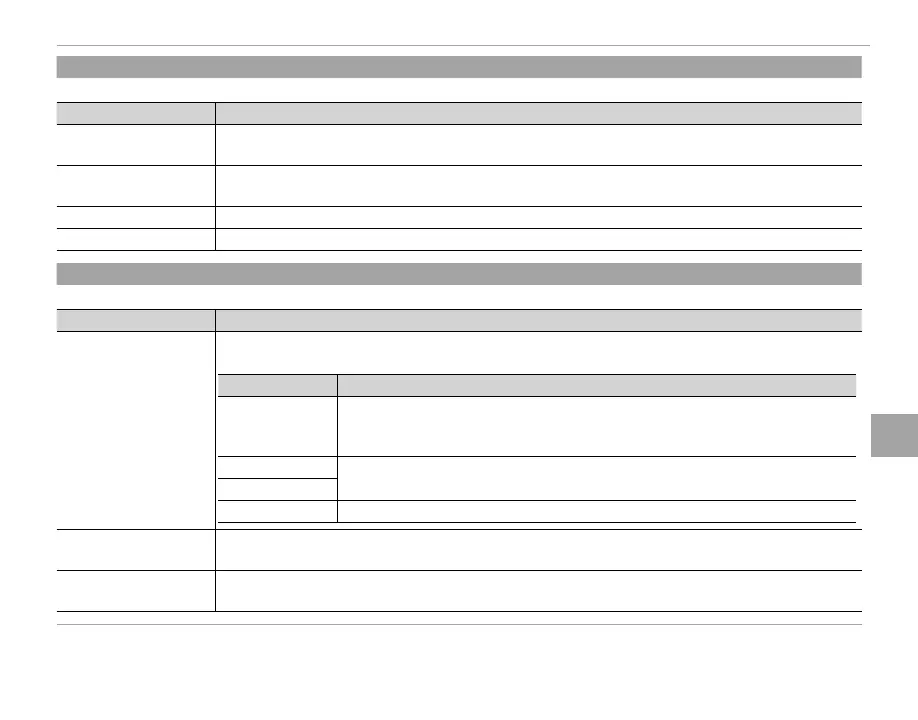
SOUND SET-UP
Adjust sound settings.
Option
Description
OPERATION VOL.
Adjust the volume of the sounds produced when camera controls are operated. Choose e OFF
(mute) to disable control sounds.
SHUTTER VOLUME
Adjust the volume of the sounds produced when the shutter is released. Choose e OFF (mute) to
disable the shutter sound.
SHUTTER SOUND Choose the sound made by the shutter.
PLAYBACK VOLUME Adjust the volume for movie playback.
A
SCREEN SET-UP
Adjust display settings.
Option
Description
IMAGE DISP.
Choose how long images are displayed after shooting. Colors may di er slightly from those in the nal
image and “noise” mottling may be visible at high sensitivities.
Option
Description
CONTINUOUS
Pictures are displayed until the MENU/OK button is pressed or the shutter button
is pressed halfway. To zoom in on the active focus point, press the center of the
command dial; press again to cancel zoom.
1.5 SEC
Pictures are displayed for 1.5 seconds (1.5 SEC) or 0.5 seconds (0.5 SEC) or until
the shutter button is pressed halfway.
0.5 SEC
OFF Pictures are not displayed after shooting.
EVF AUTOROTATE DISPLAYS
Choose whether the indicators in the view nder rotate to match camera orientation (P 25). Regardless
of the option selected, the indicators in the monitor do not rotate.
PREVIEW EXP. IN MANUAL
MODE
Select ON to enable exposure preview in manual exposure mode. Select OFF when using the ash or
on other occasions on which exposure may change when the picture is taken.



 To Next Page