29
Basic Photography and Playback
Basic Photography and Playback
Basic Photography and Playback
Taking Photographs
This section describes how to take pictures using program AE (mode P). See pages 48 – 50 for informa-
tion on S, A, and M modes and pages 51 and 52 for information on the options available in auto mode.
1
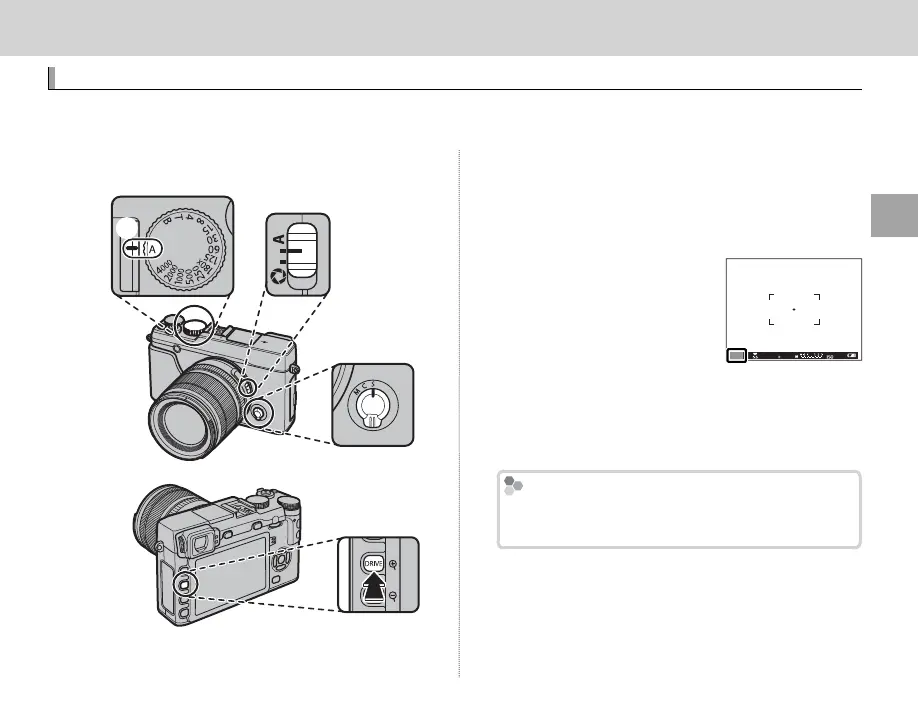
Adjust settings for program AE.
C
④
B
A
A
Shutter speed (P 47): Select A (auto)
B
Aperture (P 47): Select A (auto)
C
Focus mode (P 68): Select S (single AF)
D
DRIVE mode (P 60): Select B (still image)
Con rm that P appears in
the display.
Q If AUTO is displayed in red,
press a function button (by
default, Fn2/AUTO) to exit
auto mode (P 51).
R Image stabilization (P 12)
is recommended.
P
4000
5.6
400
The Q Button
The Q button can be used to view and adjust
camera settings (P 41).



 To Next Page