41
The Q (Quick Menu) Button
The Q (Quick Menu) Button
The Q (Quick Menu) Button
Using the Q Button
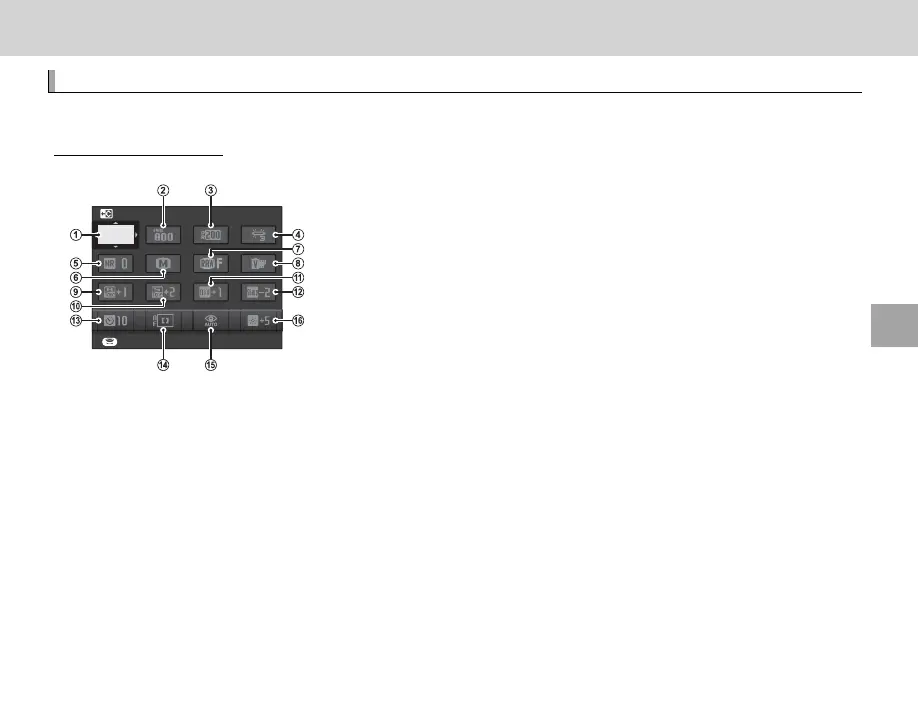
Press Q for quick access to selected options.
The Quick Menu Display
At default settings, the quick menu contains the following items.
SET
SELECT CUSTOM SETTING
BASE
A
u SELECT CUSTOM SETTING ...................... 84
B
N ISO ........................................................... 75
C
U DYNAMIC RANGE ................................... 93
D
D WHITE BALANCE .................................... 82
E
h NOISE REDUCTION ................................. 94
F
O IMAGE SIZE ............................................. 93
G
T IMAGE QUALITY ..................................... 93
H
P FILM SIMULATION ................................. 59
I
r HIGHLIGHT TONE ................................... 94
J
s SHADOW TONE ....................................... 94
K
f COLOR ..................................................... 94
L
q SHARPNESS ............................................ 94
M
B SELF-TIMER ............................................ 79
N
F AF MODE ................................................. 71
O
p FLASH MODE .......................................... 36
P
J EVF/LCD BRIGHTNESS.......................... 108
R hCUSTOM and kCOLOR TEMPERATURE white balance options can not be
accessed using the Q button. Use a function button or the shooting menu.
The quick menu shows the options currently selected for items
B
—
P
, which can be changed as
described on page 43. The u SELECT CUSTOM SETTING item (item
A
)
shows the current custom
settings bank:
• q: No custom settings bank selected.
• t — u: Select a bank to view the settings saved using the K EDIT/SAVE CUSTOM SETTING
option in the shooting menu (P 94).



 To Next Page