Working with the notebook
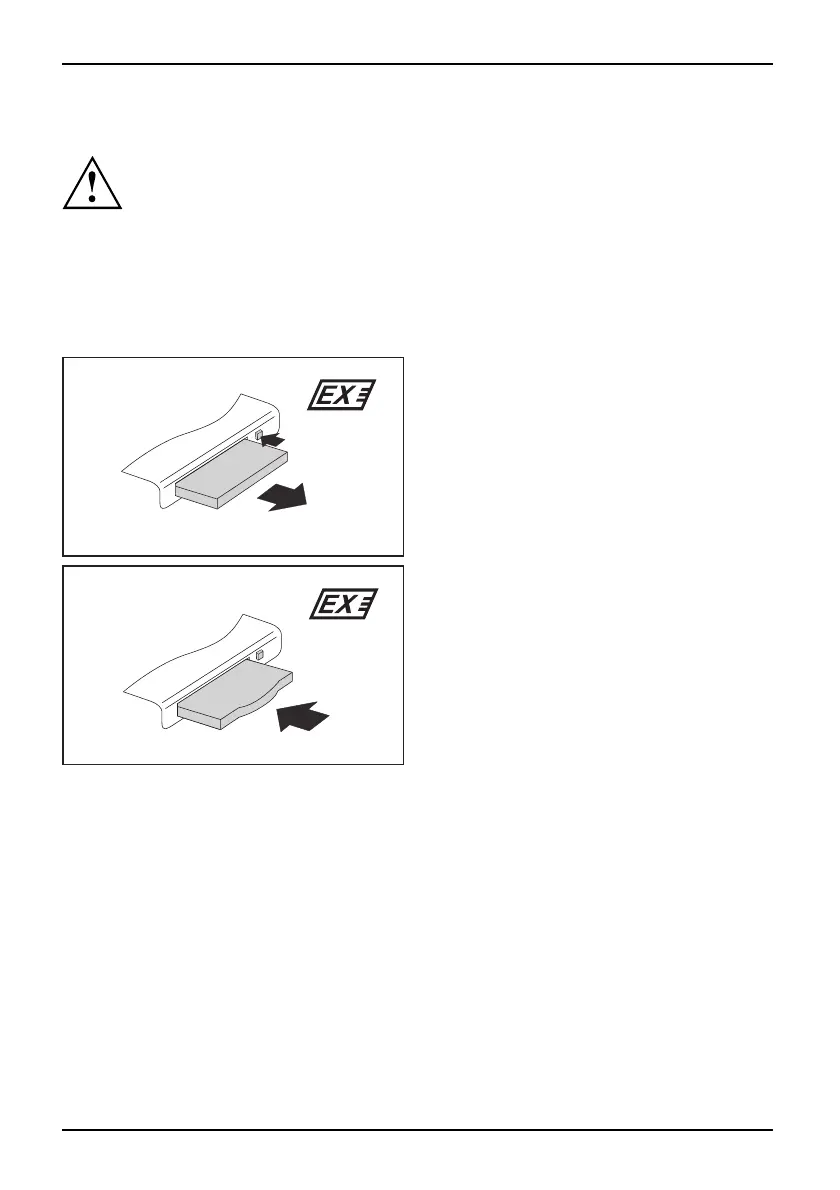
ExpressCard removing
ExpressCard
In order to protect y our data, always follow the correct procedure
for removing the card outlined below.
You can stop the ExpressCard using the corresponding symbol in the task bar:
► Left-click on the icon.
► Select the ExpressCard you want to stop an d remove.
► Press the Enter key.
Wait for the dialogue box which tells you that it is now safe to remove the ExpressCard.
2
1 (2 x)
2
► Press the eject button (1) twice, until
the ExpressCard projects slightly
from the notebook.
► PulltheExpressCardoutoftheslot(2).
► Insert the placeholder for the ExpressCard
into the slot g uide.
► Carefully slide the placeholder for the
ExpressCard as far as it will go into the
slot. Do not use excessive force.
36 A26391-K90-Z200-1-7619, edition 1






 To Next Page