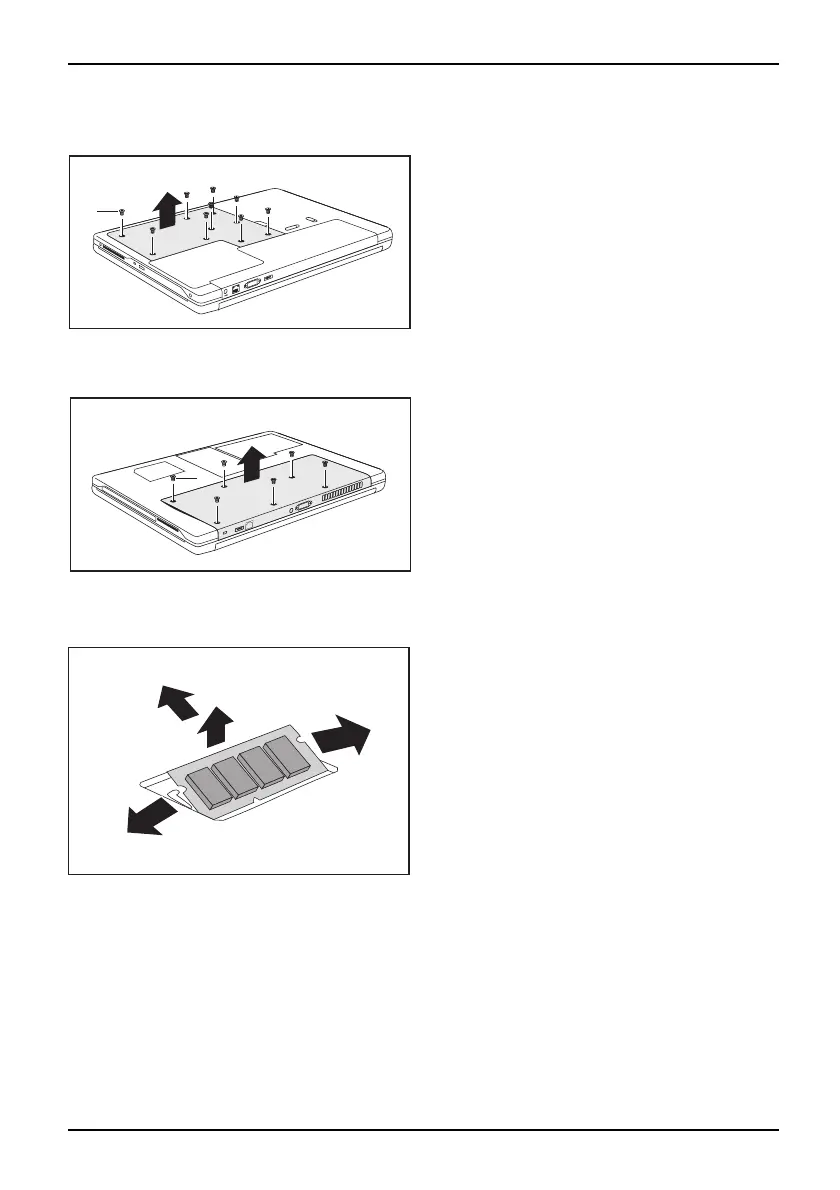
Removing and installing components
during servicing
Devices with a joint compartment for memory and hard disk
2
1
► Remove the screws (1).
► Lift the c over off the no tebook in the
direction of the arrow (2).
Devices with separate co
mpartments for memory and hard disk
2
1
► Remove the screws (1).
► Lift the cover off the no
tebook in the
direction of the arrow
(2).
Removing memory modules
3
2
1
1
► Carefully push the two mounting
clips outwards (1).
MemoryexpansionMemorymodule
The memory module snaps upwards (2).
► Pull the memory module out of its slot
in the direction of the ar row (3).
A26391-K90-Z200-1-7619, edition 1 65






 To Next Page