8.2 Troubleshooting
fi-5000N Operator’s Guide 89
Troubleshooting
8
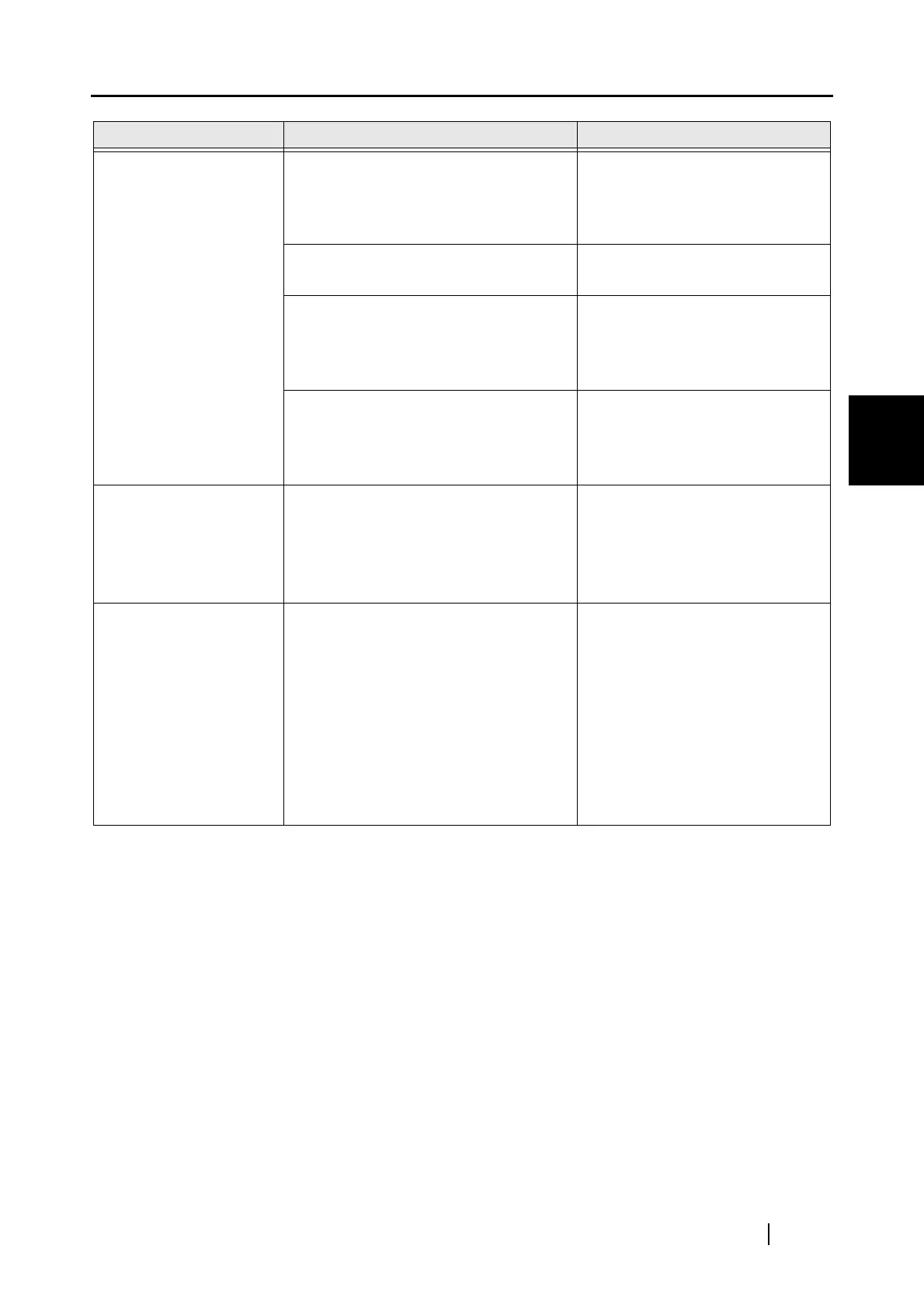
Scanning does not start
when the [Scan] or
[Send to] button is
pressed.
Is the scanner showing an error code?
(Does "U" or "E" appear on the Func-
tion Number display of the scanner?)
Note down the displayed mes-
sage, and take the appropriate
action subject to the displayed
message.
Does any error message appear on the
fi-5000N?
Take the appropriate action sub-
ject to the displayed message.
Turn off the fi-5000N and reconnect the
USB cable. Does the problem persist
even after you turn on the power
again?
Check whether there is a problem
with the USB cable or the scan-
ner.
Turn off the fi-5000N and reconnect the
network cable. Does the problem per-
sist even after you turn on the power
again?.
Check whether there is a problem
with the network cable or the net-
work (such as hub, router).
Fi-5000N does not
appear in the [Select
Scanner] tab of the fi-
5000N Software.
(Unable to communi-
cate over the network)
1. Is the network cable connected?
2. Is the Hub turned on?
3. Is the fi-5000N's IP address set cor-
rectly?
4. Is the fi-5000N turned on?
Check whether there is a problem
with the network cable or the net-
work (such as hub, router).
A message informing
that scanner is not found
appears during scan-
ning.
Verify in the fi-5000N Software the fol-
lowing points:
1. Is the fi-5000N being used set as
"favorite"?
2. Is the scanner connected to the fi-
5000N?
3. Does the fi-5000N appear as "Inac-
tive" in the [Scanner Select] tab?
4. Did you set the fi-5000N network
connection using DCHP configura-
tion?
Start the fi-5000N Software, and
check whether there is a problem
with the network settings or
whether the fi-5000N is selected
correctly.
Symptom Check this item Remedy



 To Next Page