U41578-J-Z875-1-76 73
Appendix
.
When you confirm the new ID setting by pressing the Apply button, the system
will make the change but will not display it correctly until the Spheras agents
have been stopped and restarted. Initially a form will be displayed showing the
old ID no. 240; this is because the Cabinet ID Spheras agent only requests the
number at start up.
In order to display the correct number, go to the browser and proceed as follows.
Stop the Spheras agents and then restart them (see also page 11).
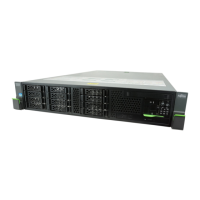
The new ID number “099” is now shown in the left-hand navigation field on the
Welcome page.
Click the plus (+) sign alongside the R icon.
The menu tree structure expands and displays the components of your
FibreCAT S80 system.







 To Next Page