System expansions
Adding memory
MemorymoduleMainmemoryRemovingmemorySystemexpansionSystemexpansi on
If you want to remove or add memory, proceed as follows:
Please observe the safety information in chapter "Important not es", P age 6.
Only use memory extensions for note books: 1 G Byte and 2 GByte modules
DDR2-667 SO DIMM or DDR2-800 SO DIMM.
Never use force when installing or removing a mem ory extension.
Make sure that foreign objects do not fall into the memory extension compartment.
Individual components (e.g. the processor heat sink) c an become ve ry hot
during operation. We therefore recommend that you wait one hour after
switching off the device before removing or installing the memory modules.
Otherwise, there is a risk of suffering burns!
As some components are exposed that are sensitive to sta tic electricity, please
take note of chap ter "
Information about boa rds", Page 21.
Removing memory modules
3
2
1
1
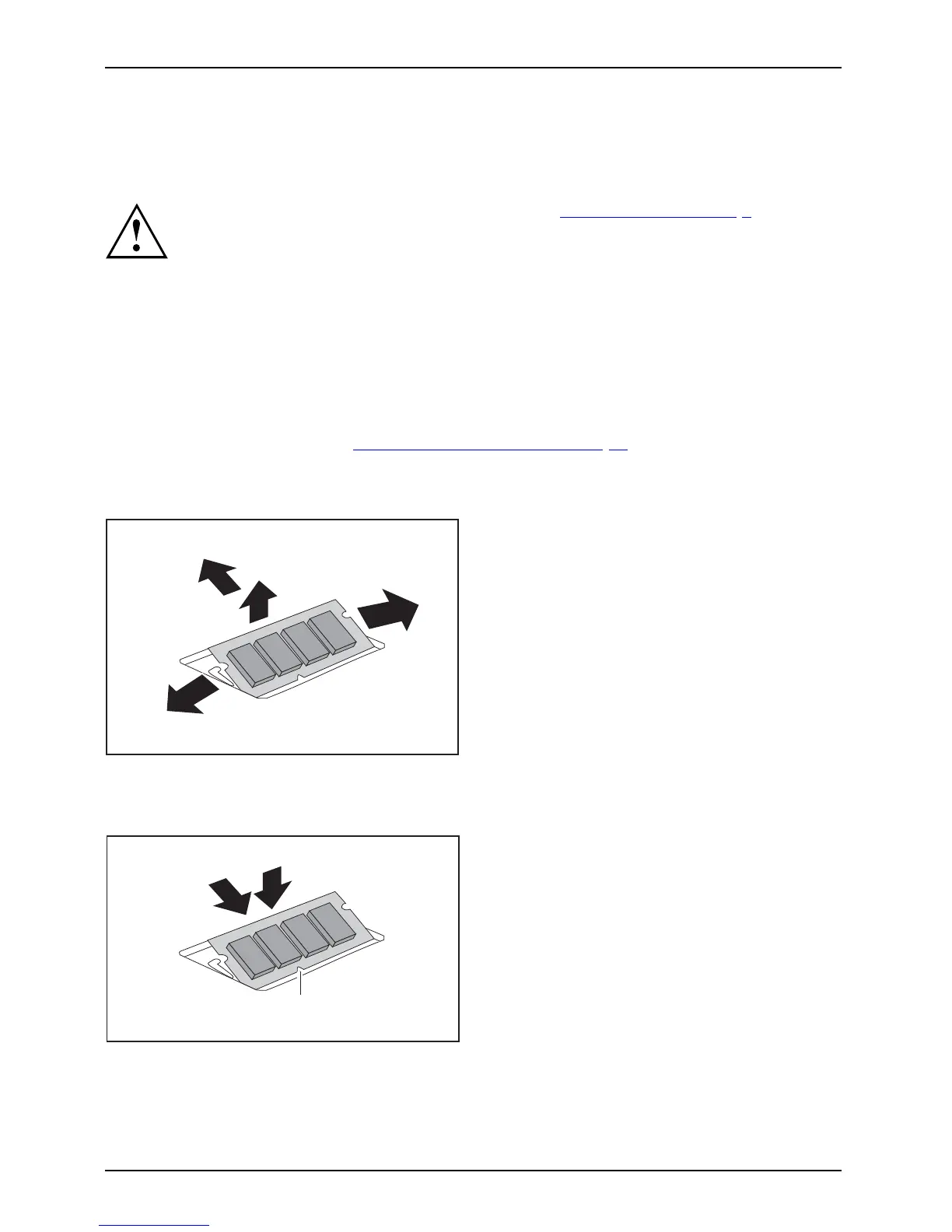
► Carefully push the two mounting
clips outwards (1).
MemoryexpansionMemorymodule
The m e m ory module snaps upwa rds (2).
► Pull the memory module out of its slot
in the direction of the arrow (3).
Installing a memory module
2
a
1
► Insert the memory module with the contacts
and the recess (a) facing the slot (1).
Memorye
xpansion
Memorym
odule
► Carefully push the memory module
downwards until you feel it click
into place (2).
24 Fujitsu Technology Solutions



 To Next Page