System expansions
Removing the SmartCard reader
SmartCardr eader
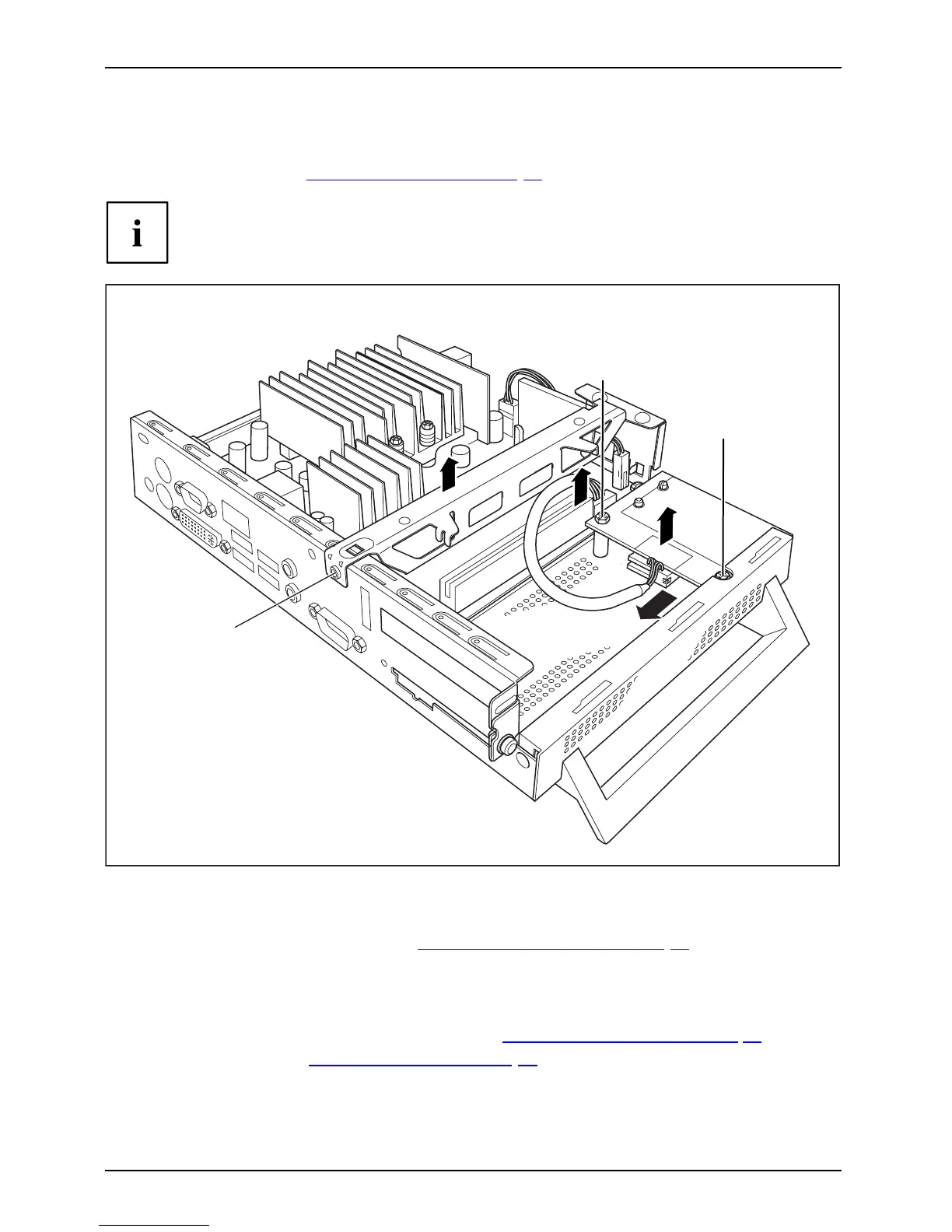
► Open the casing (see "Opening the casing", Page 22 ).
If a PCI board is installed, you must remove the cross piece and PCI board:
3
4
5
5
6
2
1
► Undo the screws (1) and cables on the cross piece w hich are in the way.
► Remove the cross piece (2).
► Remove the P CI board, (see chapter "
Removing the PCI boa rd", Page 27).
► Disconnect the cable from the SmartCard reader (3) and from the mainboard (4).
► Undo the screw s (5).
► Lift the SmartCard reader from the secu ring bolt (6).
► Reinstall the cross piece and the PCI board (see "
Installing the PCI board", Page 25).
► Close the casing (see "
Closing the casing", Page 23).
30 Fujitsu Technology Solutions



 To Next Page