System expan sio ns
Retrofitting the DVI-D monitor port (optional)
If your device is not facto ry-fi tted with a DVI-D monitor p ort, y ou can retrofit th is as an option.
You can install either a PCI board or a DVI-D monitor port in the slot.
The DVI monitor port which is available for retrofitting is a DVI-Digital (DVI-D) type
port. Therefore, only digitally accessible monitors can be connected.
► Op en the casing (see "
Opening the casing", Page 22).
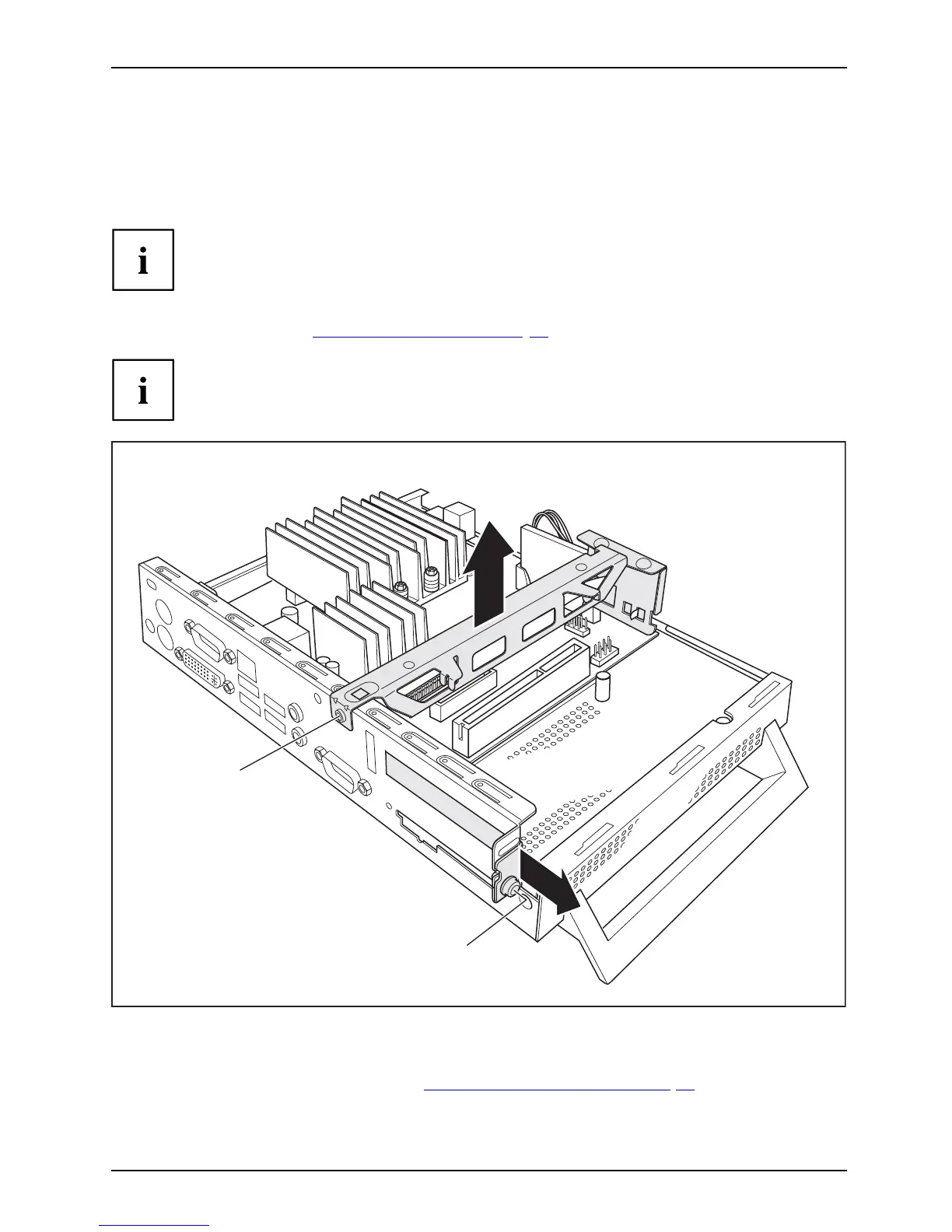
If a PCI board is installed, you must remove the cross piece and PCI board:
1
3
2
4
► Undo the screws (1) and cables on the cross piece which are in the way.
► Remove the cross piece (2).
► Remove the PCI board, (see chapter "
Removing the PCI boa rd", Page 27).
► If no PCI board is installed: Undo the screw of the slot cover (3) and remove the slot cover (4).
Fujitsu Technology Solutions 31



 To Next Page