Getting Started
Chapter 4 Installation of the Emulation System
MCU-AN-391005-E-V17 - 12 - © Fujitsu Microelectronics Europe GmbH
4.3.3 Connecting and Cabling the Adapter Board to the Evaluation Board
Depending on the evaluation board, a probe cable is required or not. The following sections
describe the connection of the adapter board to the evaluation board SK-91460-Main or to
the evaluation board SK-91F467D-208PFV with the probe cable PB-91467D-208PFV or PB-
91467D-LS-208PFV
4.3.3.1 Connecting the Adapter Board to the SK-91460-MAIN
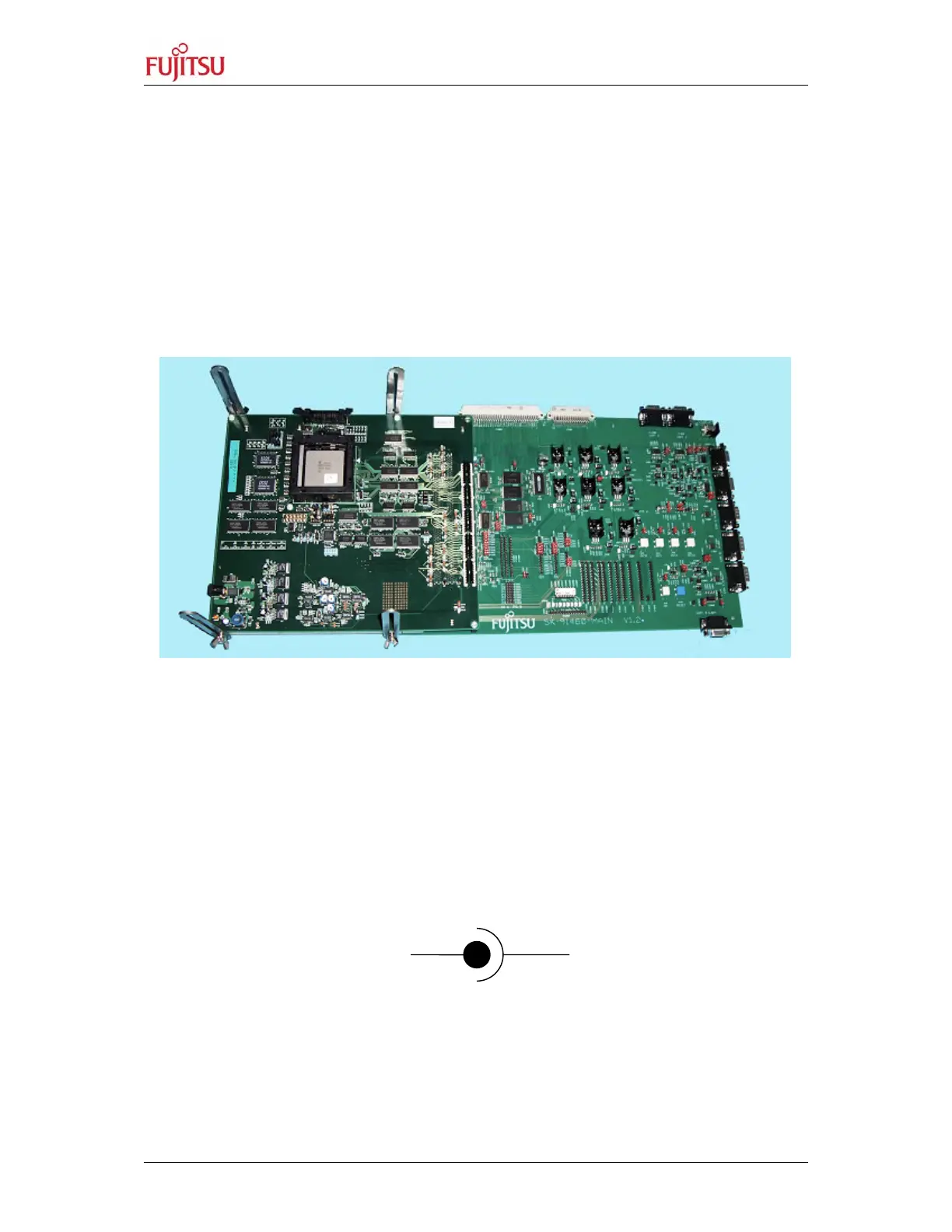
1. Connect both boards. Be aware, that the boards are tight connected.
Figure 4 shows the connected boards.
Figure 4: Connected Adapter Board and Evaluation Board
After connecting both boards together it is necessary to connect the DSU-FR Cable
MB2198-10 and the power supplies.
2. Connect the DSU-FR Cable MB2198-10 to the evaluation board.
3. Connect the 16 V DC power supply to the port ‘DC in’ and to 230 V. Please, be
aware, that ‘SW2 Power’ is off.
4. Provide the 9 V DC power supply and connect it to 230 V. The following figure shows
the correct polarisation. Do not power up the evaluation board by connecting the
power supply yet.
Figure 5: The Correct Polarisation of the 9 V DC Power Supply.
9 VGND


 To Next Page